Chapter 1. Introduction
1.1. How to Use This Manual
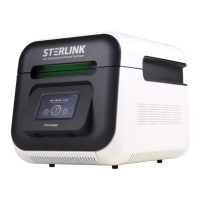
A user of the STERLINK mini Sterilization System must read the ‘Safety Information’, ‘Preparation
of Medical Devices,’ and ‘Operation’ sections before using it. ‘Chapter 1 Introduction’ describes the
components of this user manual. ‘Chapter 2 Safety Information’ provides information on safety and
stability when using the sterilizer. ‘Chapter 3 Overview of the Sterilizer’ summarizes the information
on the sterilizer and its components. ‘Chapter 4 Preparation of Medical Devices’ describes the method
of preparing and packing medical devices. ‘Chapter 5 Operation’ describes how to use the sterilizer
properly, and how to ensure optimum sterilization performance.
If you are responsible for controlling and supervising the STERLINK mini Sterilization System, you
must read the entire user manual. It is recommended that you carefully read the sections after Chapter
5. ‘Chapter 6 Access Privileges and Tasks Performed with Administrative Privileges’ describes the
tasks and options available only to administrators with access privileges. ‘Chapter 7 Reports and Files’
describes how to manage the sterilization information provided by the sterilizer. ‘Chapter 8
Maintenance’ and ‘Chapter 9 Troubleshooting’, and ‘Attachments’ are included for your reference. Be
sure to keep this manual in a location where you can quickly and easily find the information you need
just in case a problem arises.
1.2. Contact Us
If you have any questions about the operation of the STERLINK mini Sterilization System or would
like to know whether certain types of medical devices are sterilized safely, please contact our customer
service center at +82-1544-0508 in Korea. Internationally, contact your local Plasmapp customer
support representative. You may also visit our website at http://plasmapp.com.


 To Next Page