3-15
3 First Steps
3.3.3 Mounting Spacer Ring and Tip-Tilt Unit
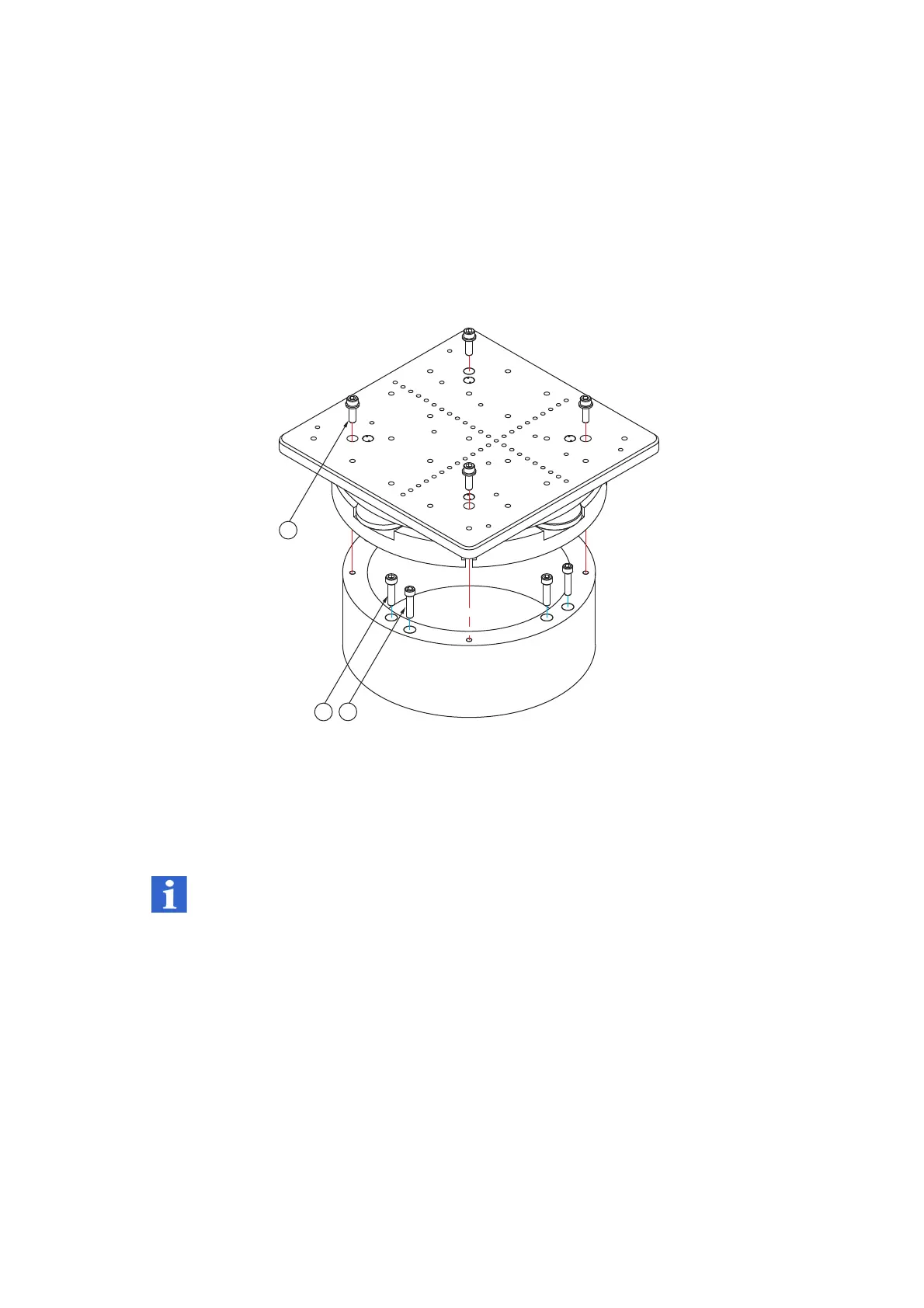
To assemble the spacer ring with the tip-tilt unit on the base plate, proceed as
follows:
Spacer ring on
base plate
1. Screw the spacer ring onto the base plate using the four screws [C] or [B].
Hand-tighten the screws.
Tip-tilt unit on
spacer ring
2. Screw the tip-tilt unit onto the spacer ring using the four screws [A] and
the washers.
Figure 3.10: Assembling spacer ring and tip-tilt unit
INFORMATION
You will find further information on assembling the XY positioning stage in the
operating instructions for accessories.
3.3.4 Mounting the Test Sample onto the Tip-Tilt Unit
To mount the test sample onto the tip-tilt unit, proceed as follows:
1. Use the threaded holes to mount a sample holder. The drill holes for
dowel pins can have dowel pins inserted in them which are then used to
position or center it.
2. Rotate the adjusting wheels to align the sample surface perpendicularly to
the object beam.
A
4 M6 x 16 Allen screws
B
4 1/4"-20UNCx1” cylinder screws
C
2 M6 x 25 Allen screws



 To Next Page