34
3.3.3 Setting RFID Power
It is recommended to use the default value of the RFID power on the printer. However, the value
can be changed for specific case or requirements.
1. Install the media and ribbon, turn on the printer.
2. After “READY” is displayed on the screen, press the [PAUSE/Self Test] button, and then press
and hold [FEED/Calibration] button to enter the setting menu, find “RFID POWER”.
3. Press the [FEED/Calibration] button to select “RFID POWER”, the current power value will be
displayed on the LCD screen.
4. Press the [PAUSE/Self Test] button to decrease the value and the [CANCEL/ Reset] button to
increase the value. After finding the appropriate value for power, press the [FEED/Calibration]
button to save the new value.
3.3.4 Setting RFID Offset
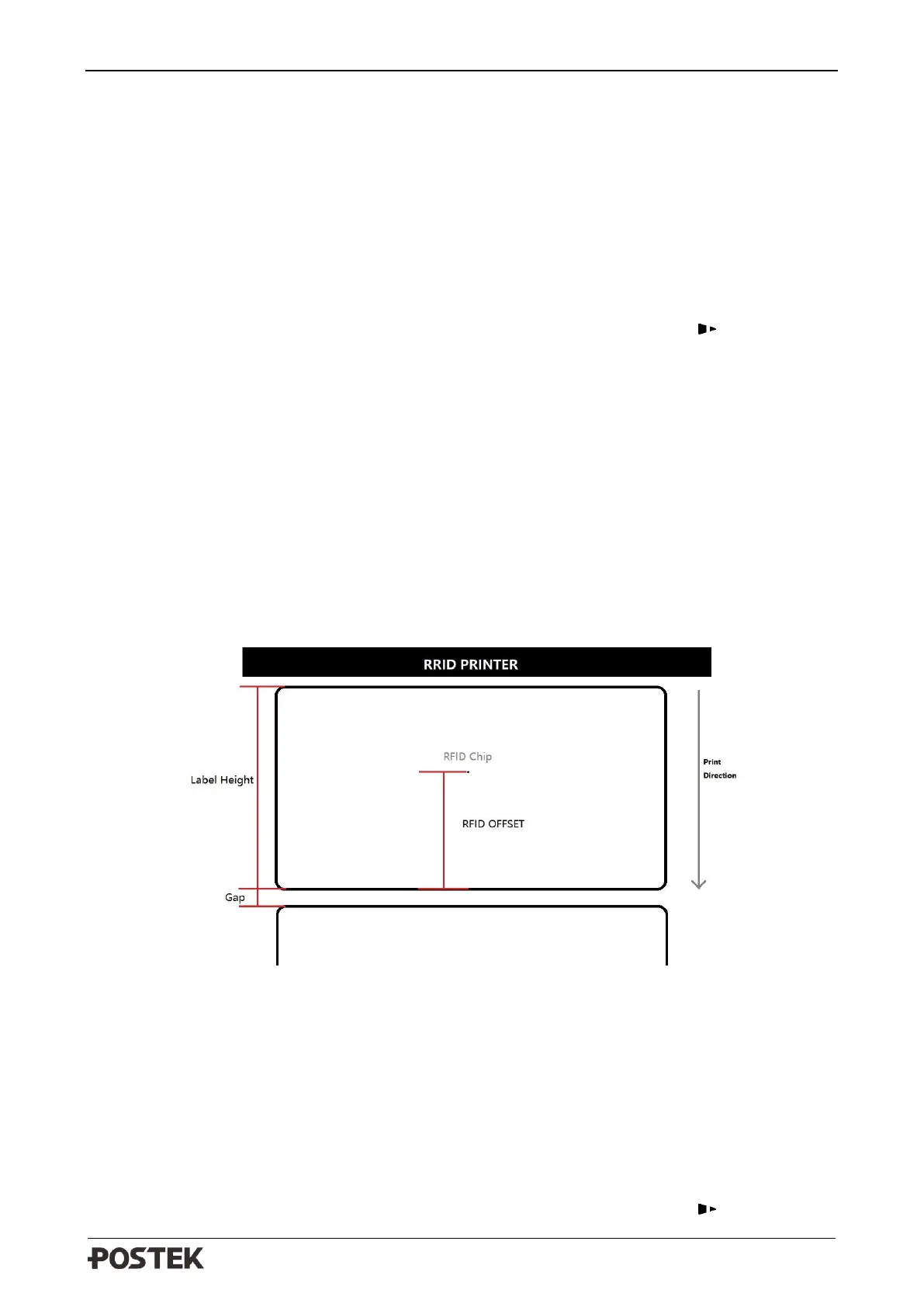
To ensure proper read and write function, the printer will automatically set an offset value when
performing RFID calibration to adjust for different position of antenna within different kinds of
RFID media. The RFID offset value can be adjusted manually to optimize printer’s RFID read and
write performance, usually the optimal RFID Offset value shall be identical with the distance
between the center of the RFID chip and the leading edge of the label, please refer to Figure 3-4 to
measure the RFID Offset value:
Figure 3-4 RFID Offset
To adjust the RFID offset value:
1. Install the media and ribbon, turn on the printer.
2. After “READY” is displayed on the screen, press the [PAUSE/Self Test] button, and then press
and hold [FEED/Calibration] button to enter the setting menu, find “RFID OFFSET”.
3. Press the [FEED/Calibration] button to select “RFID OFFSET”, the current offset value will be
displayed on the LCD screen.
4. Press the [PAUSE/Self Test] button to decrease the value and the [CANCEL/ Reset] button to



 To Next Page