Software update
13
Powersoft X Series amplier platforms embed a com-
plete digital audio signal management system based on
ARM Cortex A-8 processor and TI C6000 DSP platform.
This impressive on-board computing capacity is driven by a
dedicated software environment.
Updated releases of the X Series software are available
on the Armonía forum (http://www.powersoft-audio.com/
en/armonia-forum).
The package contains the software update le whose
name is in the form:
update-version#-model.bin
(e.g. update-v1.5.0.6-x4.bin); in order to update the software
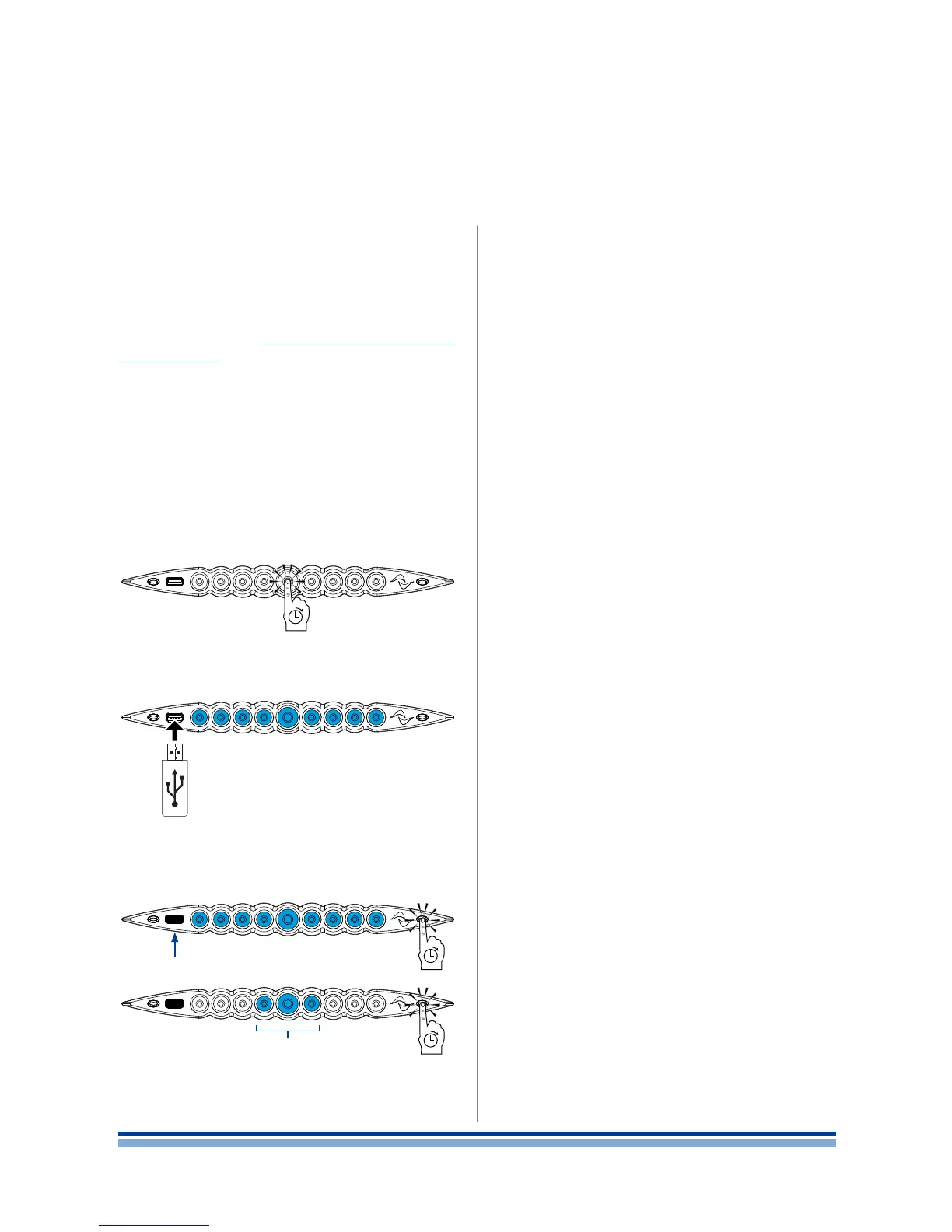
of your X Series amplier platform you must store the soft-
ware update le into a USB key and follow these instructions:
1. Switch the amplier on and wait for the completion of
the boot sequence.
2. Plug the USB key with the software update le to the
USB port in the front panel of the amplier.
3. Keep pressed the rightmost pushbutton (Armonía call-
back) until the second beep is emitted and the LEDs
start blinking.
4. Whait until the amplier restart and all front LEDs turn
solid blue.
14 | X Series | User guide
Blinking
USB Key in
...














 To Next Page