Software update | 17
14 : 4.Dante™ networking
The Dante™ versions of the X Series amplier platforms
support Dante™ redundant networking via the two ether-
CON ports on the rear panel:
f Primary/ETH1 is the Primary network port;
f Secondary/ETH2 is the Secondary network port.
Dante™ connectivity is always supported on the
Primary/ETH1 Gigabit Ethernet port; the Secondary/ETH2
Gigabit Ethernet port offers continuity of operation when a
parallel redundant network is established.
NOTE: if the PC implements two Ethernet ports,
the Dante Controller starting from version 3.5 can connect
both the Primary and the Secondary Networks.
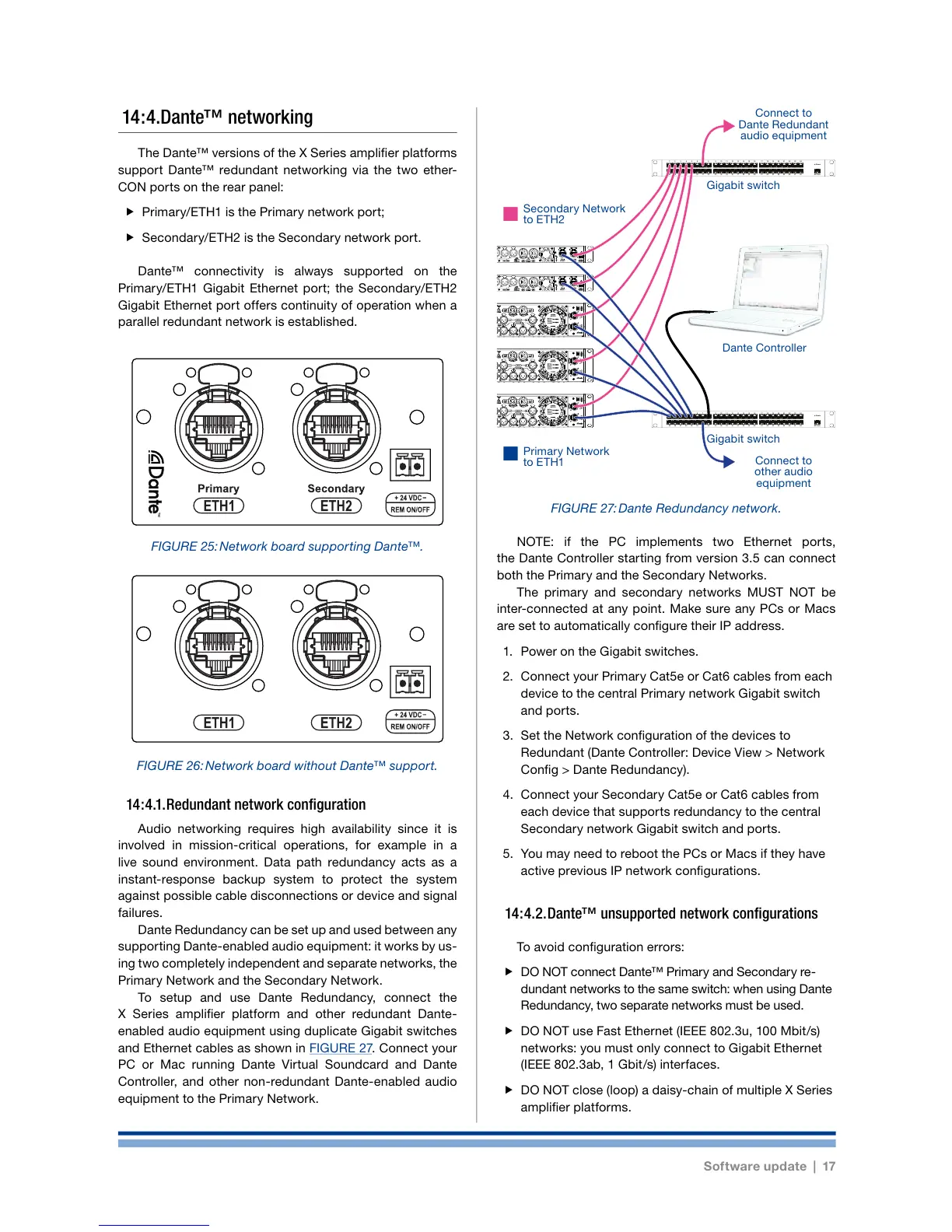
The primary and secondary networks MUST NOT be
inter-connected at any point. Make sure any PCs or Macs
are set to automatically congure their IP address.
1. Power on the Gigabit switches.
2. Connect your Primary Cat5e or Cat6 cables from each
device to the central Primary network Gigabit switch
and ports.
3. Set the Network conguration of the devices to
Redundant (Dante Controller: Device View > Network
Cong > Dante Redundancy).
4. Connect your Secondary Cat5e or Cat6 cables from
each device that supports redundancy to the central
Secondary network Gigabit switch and ports.
5. You may need to reboot the PCs or Macs if they have
active previous IP network congurations.
14 : 4.2. Dante™ unsupported network configurations
To avoid conguration errors:
f DO NOT connect Dante™ Primary and Secondary re-
dundant networks to the same switch: when using Dante
Redundancy, two separate networks must be used.
f DO NOT use Fast Ethernet (IEEE 802.3u, 100 Mbit/s)
networks: you must only connect to Gigabit Ethernet
(IEEE 802.3ab, 1 Gbit/s) interfaces.
f DO NOT close (loop) a daisy-chain of multiple X Series
amplier platforms.
14 : 4.1. Redundant network configuration
Audio networking requires high availability since it is
involved in mission-critical operations, for example in a
live sound environment. Data path redundancy acts as a
instant-response backup system to protect the system
against possible cable disconnections or device and signal
failures.
Dante Redundancy can be set up and used between any
supporting Dante-enabled audio equipment: it works by us-
ing two completely independent and separate networks, the
Primary Network and the Secondary Network.
To setup and use Dante Redundancy, connect the
X Series amplier platform and other redundant Dante-
enabled audio equipment using duplicate Gigabit switches
and Ethernet cables as shown in FIGURE 27. Connect your
PC or Mac running Dante Virtual Soundcard and Dante
Controller, and other non-redundant Dante-enabled audio
equipment to the Primary Network.
FIGURE 25: Network board supporting Dante™.
FIGURE 26: Network board without Dante™ support.
12345678
25 26 27 28 29 30 31 32
9 10 11 12 13 14 15 16
33 34 35 36 37 38 39 40
17 18 19 20 21 22 23 24
41 42 43 44 45 46 47 48 UP Link
Power
12345678
25 26 27 28 29 30 31 32
9 10 11 12 13 14 15 16
33 34 35 36 37 38 39 40
17 18 19 20 21 22 23 24
41 42 43 44 45 46 47 48 UP Link
Power
FIGURE 27: Dante Redundancy network.
Gigabit switch
Gigabit switch
Connect to
other audio
equipment
Connect to
Dante Redundant
audio equipment
Secondary Network
to ETH2
Primary Network
to ETH1
Dante Controller














 To Next Page