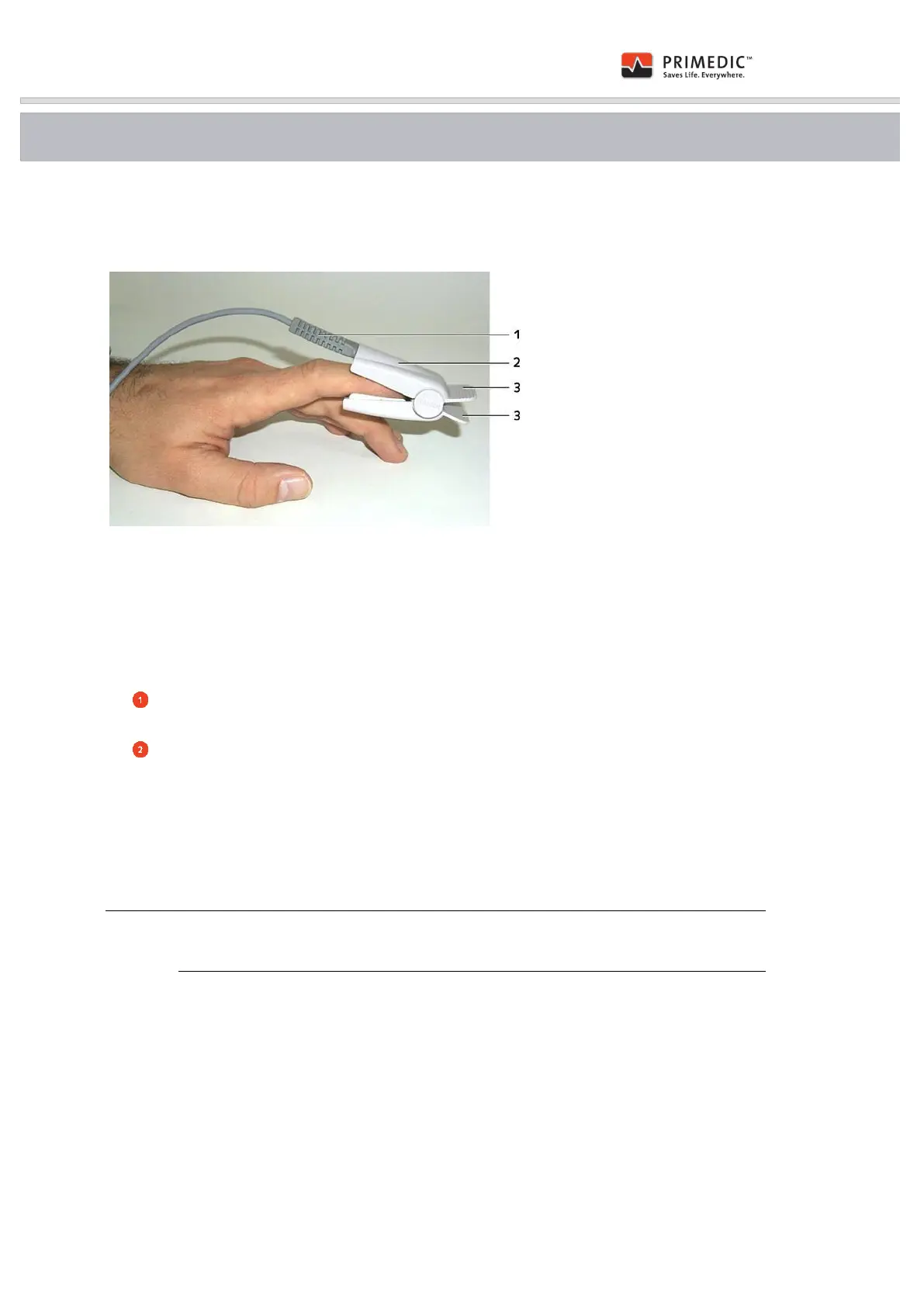
Fig. 27: Attaching the SpO
2
sensor
(1) Bend protection sleeve
(2) SpO
2
sensor
(3) Surfaces for opening the sensor
Procedure:
Insert the plug of the SpO
2
sensor into the device so that the arrow on the plug is in
line with the arrow on the device jack. Ensure that the connector is fully inserted.
Press the two surfaces (3) on the SpO
2
sensor together and slide the opened sensor
over any of the patient's fingers with the cable / jack side of the sensor on the fingernail
side of the finger.
The sensor can remain in one measuring point for a maximum of 4 hours, provided that the
skin characteristics and the correct seating of the sensor are checked regularly. As on some
patients, the sensor may cause skin irritation at the measuring point after a while, it may be
necessary to move the sensor more frequently.
To disconnect from the device, first lift the sleeve with the arrow slightly and then
pull the connector out of the jack.


 To Next Page