VIBTOOL 02.2009
18
2. Shock pulse & Vibration acceleration:
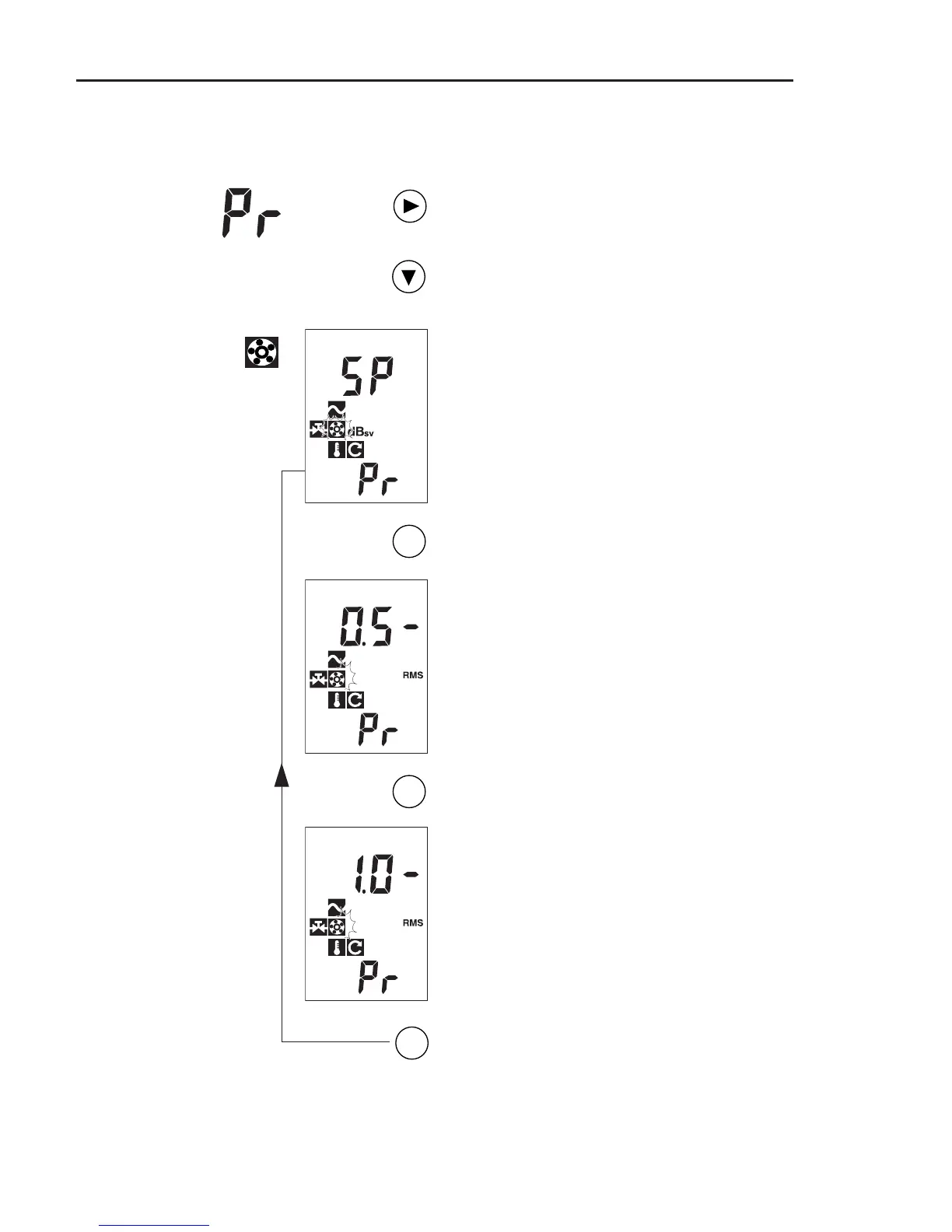
Switch on VIBTOOL and press NEXT until
‘Pr’ appears in the lower display field.
Keep the DOWN key pressed until the
following display appears:
Shock pulse is selected when the ‘Bear-
ing’ symbol flashes and ‘SP’ (= ’Shock
Pulse’) appears on the display.
To select the vibration acceleration mea-
surement, press ENTER:
Vibration acceleration 0.5kHz to 10kHz
is selected: the ‘Bearing’ symbol flashes
and the lower frequency (0.5) appears on
the display.
To change the lower frequency to 1kHz,
press ENTER:
Vibration acceleration 1kHz to 10kHz is
now selected: 1.0 - (kHz).
To return to the shock pulse measure-
ment again, press ENTER.
ENT
ENT
ENT
Operation



 To Next Page