www.qutools.com quTAG MC Manual 29
Please note that these settings are saved in the device and therefore persistent between software
restart. Only a restart of the device will reset all settings to their default values.
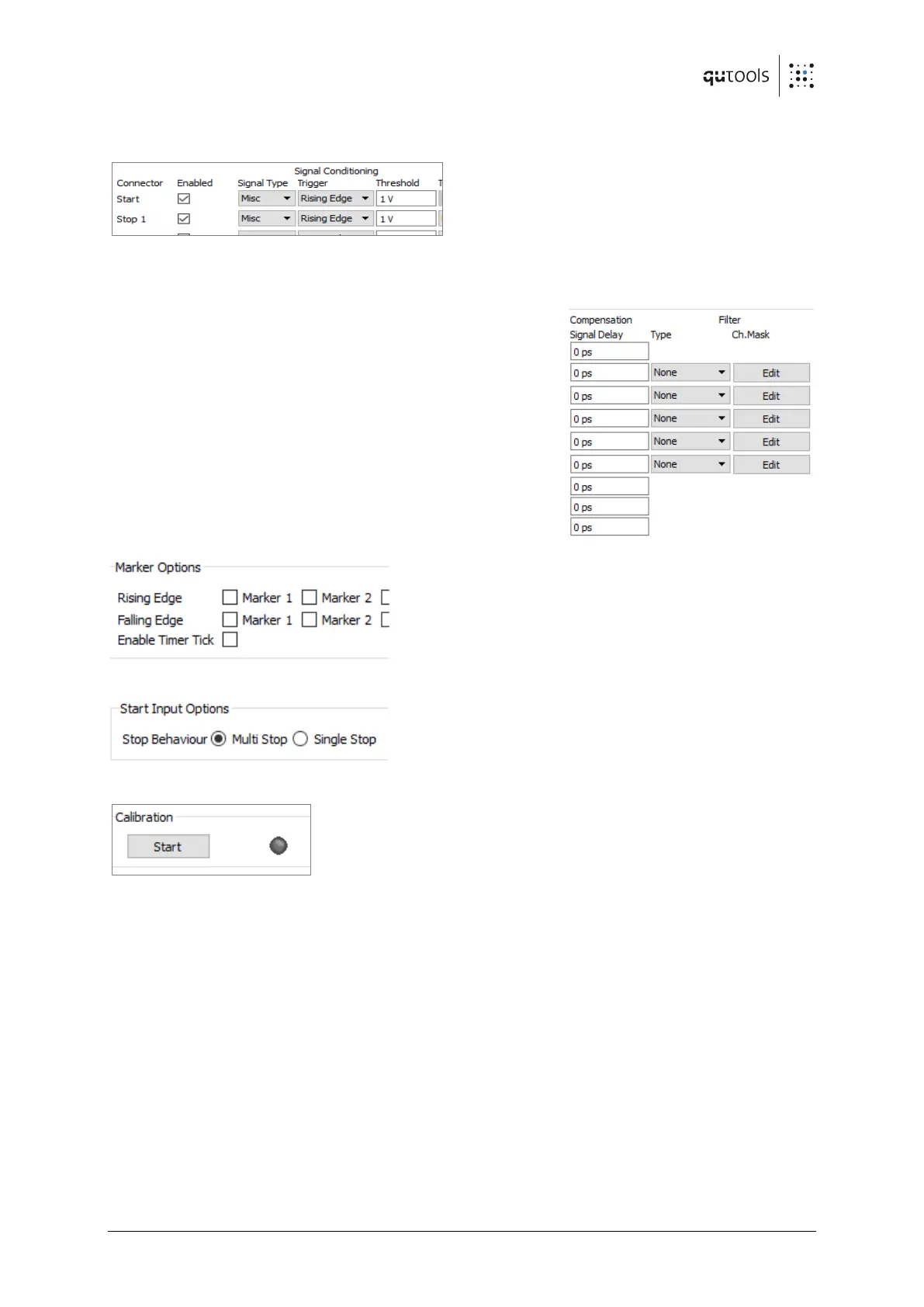
The checkboxes next to "Enabled" can disable
individual inputs. If a channel is disabled, no
events will be detected on this channel and the
events will not be processed.
The trigger level and rising/falling edge detection of each input can be configured with the inputs
under "Signal Conditioning". Presets for the common LVTTL and NIM signal standards can be
chosen under "Signal Type".
The "Signal Delay" setting can be used to compensate
runtime differences between -100 ns and 100 ns for each
input.
In the filter section, different filters can be defined for
channels 1-5. Events that are filtered will not be transferred
to the PC but they will continue to contribute to count rates
and correlations. "None" means that all events are processed
and filtering is not active. There are three types of filter
currently available (see section 7.7 ). The channel mask is a
parameter of some filter types that can be edited by pressing
"Edit".
The marker channels can be enabled globally and
individually. The device internally generates a timer tick
every millisecond for timing purposes. Markers and
timer ticks can't be observed in the GUI itself but only in
stored data. They show up as channels 100-103
(markers) and 104 (timer tick).
In the next section, some options related to the start
channel can be configured. When using the Single Stop
mode, only the first event after one start channel event
of each stop channel will be transferred to the PC, all
others will be suppressed. The multi stop mode will process all events.
In order to achieve constant measurement resolution, an internal
calibration process has to be performed from time to time. It may
need to be redone when the temperature of the device or the
environment have changed. The process doesn't require user
support and is run each time Daisy is started. It can be retriggered by clicking "Start" in the
calibration part.


 To Next Page