30 quTAG MC Manual www.qutools.com
7.7 Filters
The following filters are applicable on input stop channels 1-5. A filter can be applied by choosing
the filter type for the desired channel. After that, a channel mask for Coinc and Sync filters has to
be applied on the related channels. The channels can be applied by pressing "Edit" and activating
the desired checkboxes, see figure on page 31.
This filter mutes the channel. This means that all events at this channel are
processed internally and can be used for coincidence counting or other filters, but
will not be transmitted to the PC.
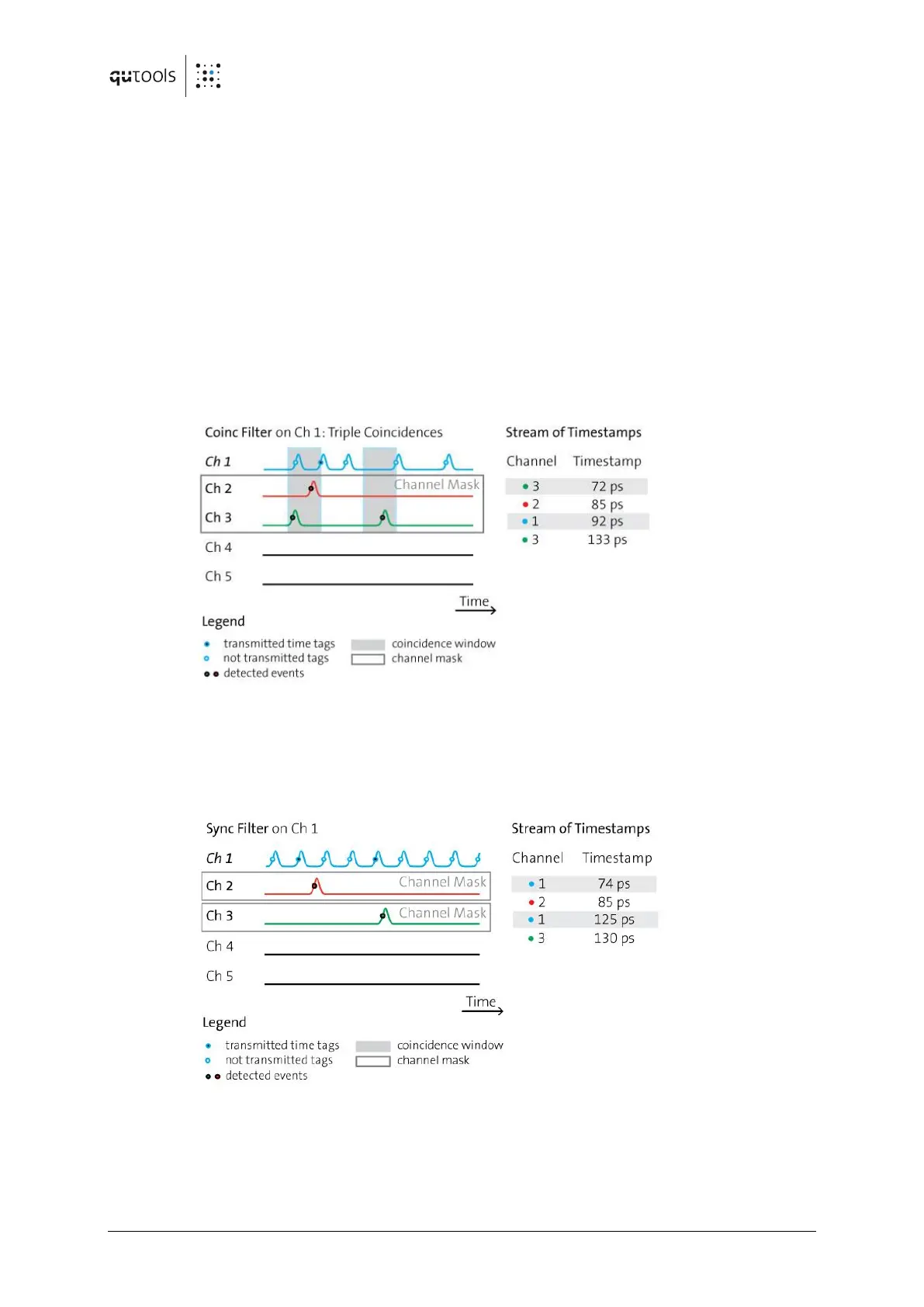
The coincidence filter will only transmit the time tag to the PC if earlier events have
been detected on each channel of the channel mask within the coincidence window
(as defined in the "coincidence" tab).
The filter can also be applied symmetrically, e.g. to two channels, each one with the
channel masks reversed. Hence, a huge variety of filtering options is available.
The Sync filter will only transmit a time tag when a later event is detected at one of
the channels of the "channel mask".
This filter is useful e.g., for a laser trigger signal when there is not a lot of detection
signals. Trigger events not followed by a detection event are useless and will be
suppressed.


 To Next Page