23
WAg Selenia
Additional anode/filter combinations for specific machines are also included (see Appendix B)
Making a Measurement with multiple sensors connected
The Accu-Gold Digitizer Module (AGDM) allows you to connect up to five sensors and simultaneously
collect data from all of the connected sensors. (The Rapid-Gold Digitizer Module (RGDM) and Accu-Dose
Digitizer Module (ADDM) have a subset of these ports – see table on page 6.) The five sensor ports are:
AGMS – Accu-Gold multi-sensor
ICH – Ion Chamber
DD – Dose Diode
mAs – Invasive and non-invasive mA/mAs sensors
AUX – Auxiliary connector for the light sensor, DAPCKP+ (uses Accu-Gold Excel software only),
and future sensors (Aux sensors are not available for use with the Nugget)
To make a measurement using more than one sensor:
1. Click Disconnect in the Accu-Gold software Measurement view to stop the software from taking
measurements.
2. Plug any additional sensors into the available ports.
3. Position the new sensors into the X-ray beam.
4. Press Connect to bring the sensor on line and stabilize. Select a trigger source and expose to X-
rays.
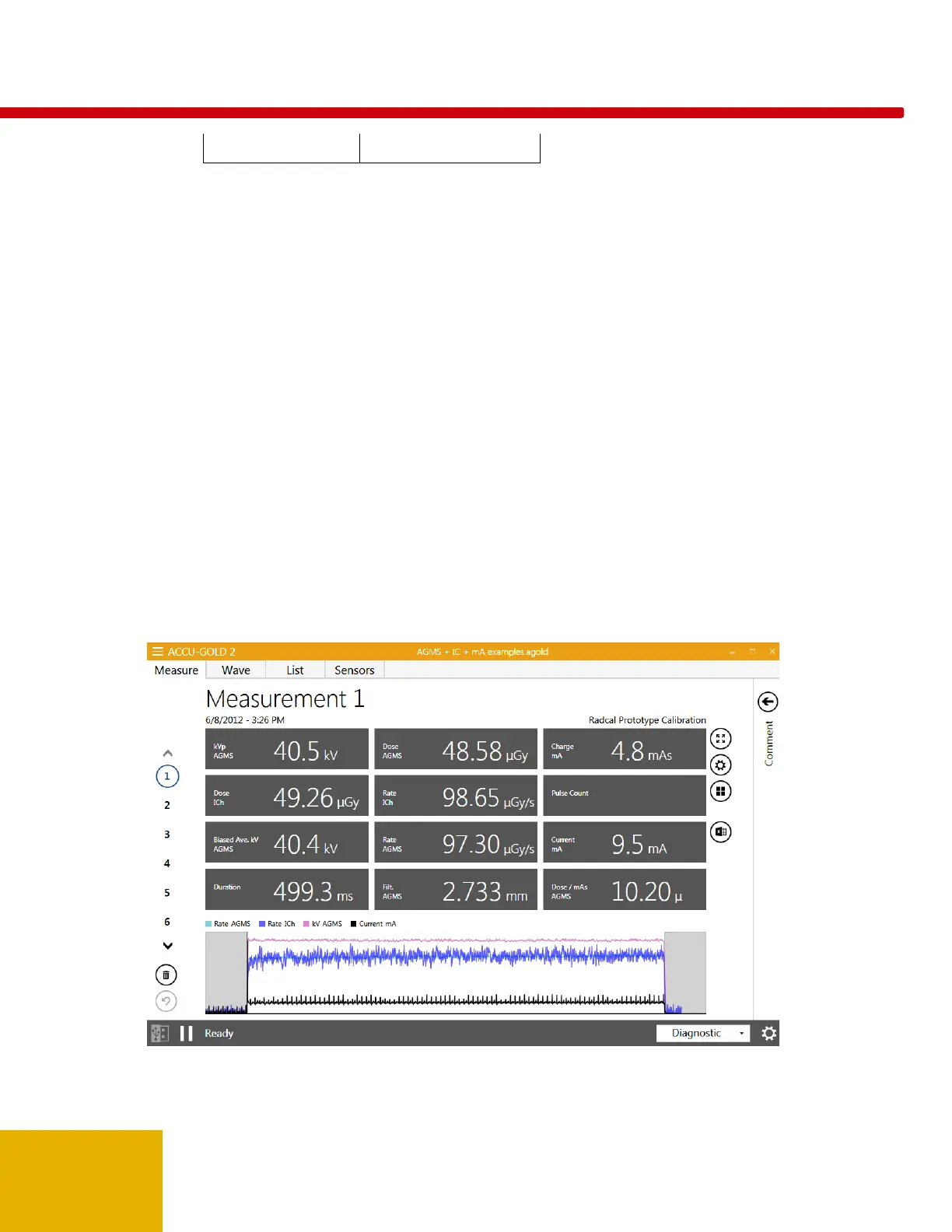
In this example, an Ion chamber sensor is connected along with the multi-sensor and a mAs meter.



 To Next Page
 Loading...