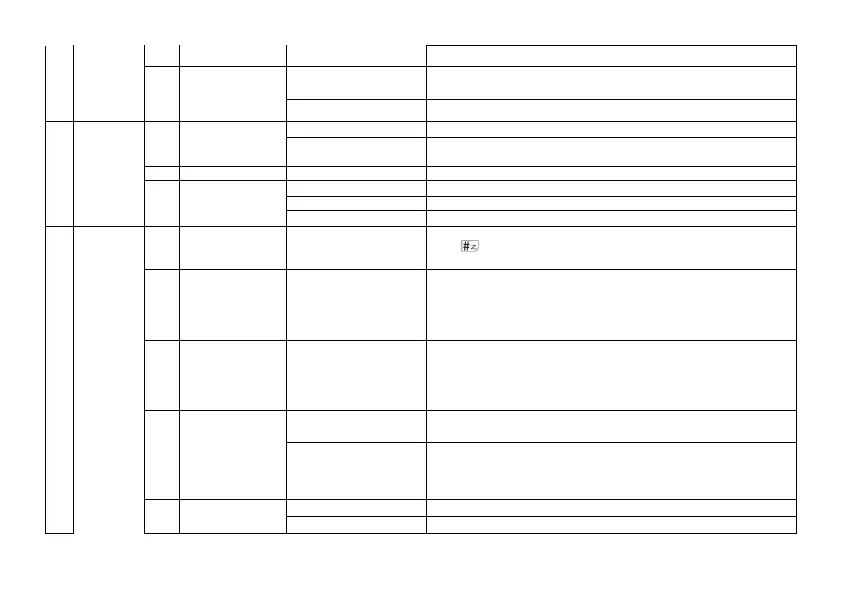
VOX VOX on/off
26 Reset
VFO
Reset the radio's VFO menu to factory defaults (no reset for bank,
scan settings)
ALL Resets the radio to factory defaults, with some exceptions.
4 GNSS
1 GPS On/Off
OFF Turn off the position system, long press the MENU key is ineffective
ON
Turn on the position system, press and hold the MENU key to enter GPS
mode
2 Time Zone -12 to 0 to + 12 Set the time zone of the region
3 GPS Mode
GPS
BDS
GPS+BDS
5
Program
Channel
1 CH.NAME Channel 1
View channel name, allows to rename the current channel. Press
the key to switch the input method, allowing the input of
letters, numbers and symbols.
2 RX Frequency
View the current channel Receiver frequency, allow to change the
current frequency. Input the RX frequency by keypad, click the
Menu key to save
。
* Channels 1-30 are GMRS fixed frequencies, frequency change
is prohibited.
3 TX Frequency
View the current channel Transmitter frequency, allow to change
the current frequency. Input the TX frequency by keypad, click
the Menu key to save
*Channels 1-30 are GMRS fixed frequencies, frequency change is
prohibited.
4 Trans Power
High
Selects between HIGH transmitter power when in VFO/Frequency
mode.
Low
Selects between LOW transmitter power when in VFO/Frequency
mode.
WARNING: Channels 8-14 are low power transmissions and power switching
is prohibited
5 Bandwidth
Wide Wideband (25 kHz bandwidth)
Narrow narrowband (12.5 kHz bandwidth)



 To Next Page