ESP-SMTe Controller
12
D
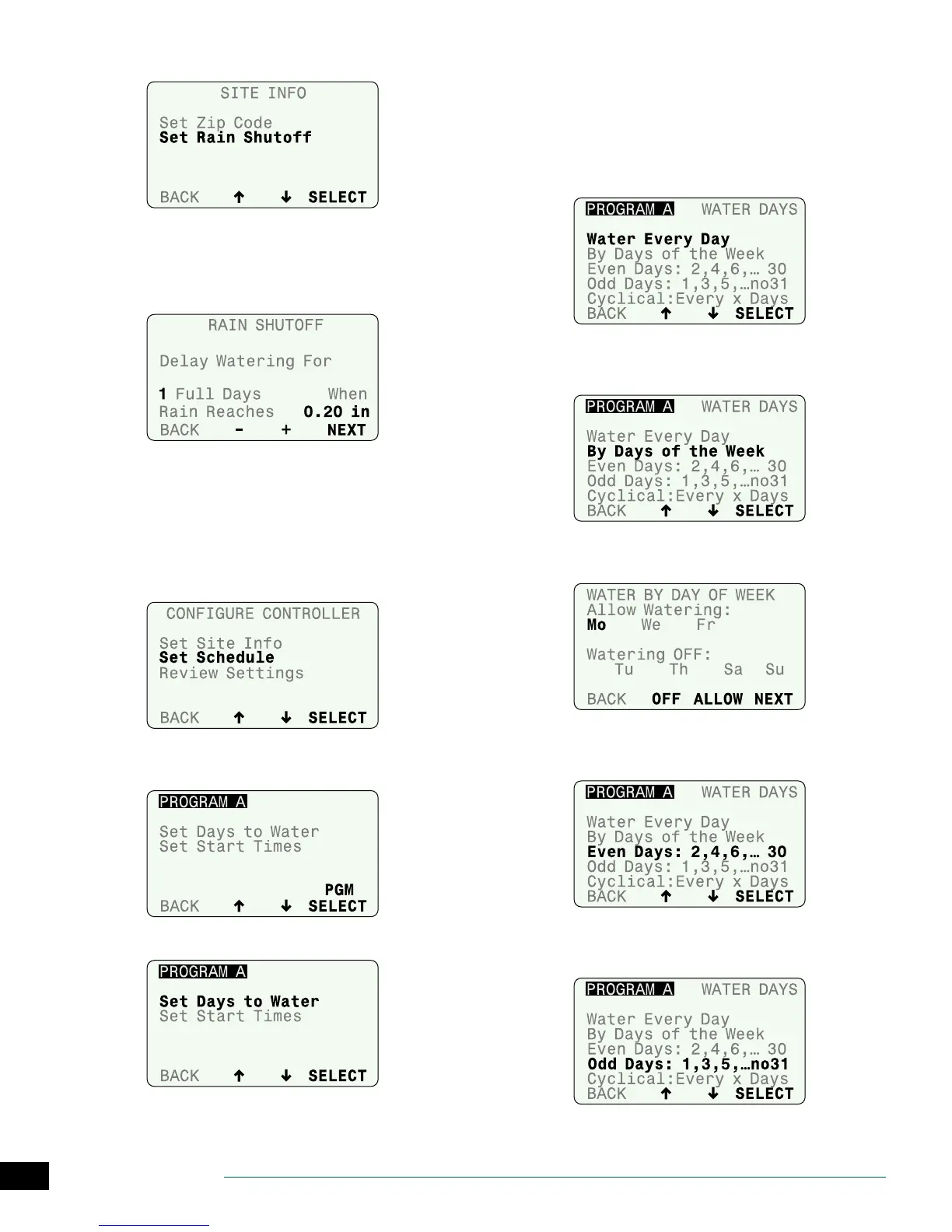
Select Set Rain Shuto.
E
Enter the number of Days to delay watering when a
set amount of rain is detected; then press NEXT.
F
Set the amount of rain that will start the delay; then
press NEXT.
G
Press BACK to return to the Congure Controller
menu.
Set Schedule
For each Program (A and B), select the Days to Water and
the Start Times that irrigation will begin.
A
Select Set Schedule.
B
Press UP or DOWN until PROGRAM is blinking; then
press PGM SELECT to choose A or B.
C
Select Set Days to Water.
D
Select a watering day option.
NOTE: After selecting a watering day option, the
screen will automatically advance to Step 5, Block
One Day a Week.
Water Every Day:
No restrictions on days to water.
Days of the Week:
Set a custom weekly schedule.
• Press OFF or ALLOW to water on the selected day; then
press NEXT.
Even Days:
Water only on even calendar days.
Odd Days:
Water only on odd calendar days (except 31st).


 To Next Page