ESP-SMTe Controller
14
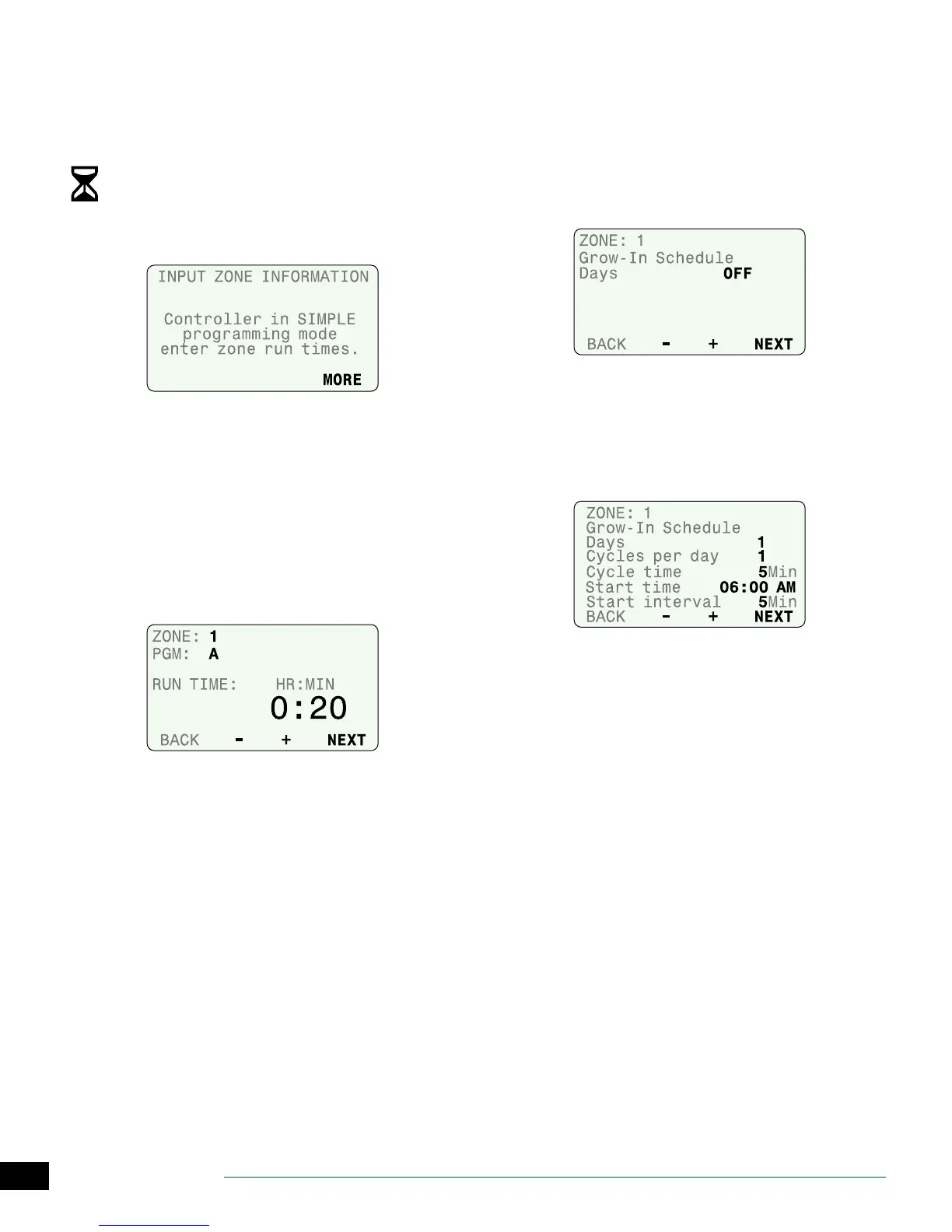
Input Zone Information
Enter run times for every zone and set up a watering
schedule for new plants.
NOTE: For Advanced ET mode, see page 21.
Turn the dial to Input Zone Information.
• The current programming mode is displayed. Press
MORE to continue.
Set Zone Run Times
Enter desired Run Times for each zone and program.
NOTE: Run Times should be entered based on the
hottest time of year for your location. The SMTe will
make adjustments to the Run Times in Simple Smart
mode based on local weather conditions.
A
Select the desired zone.
B
Select Program A or Program B.
C
Set the Run Time; then press NEXT.
Set Grow-In Schedule
New plants have dierent watering needs than plants that
are already established. New plants are watered every day
during a set Grow-In Schedule period, then are watered
according to regular schedules when the period ends.
A
Press
+
when OFF is blinking to enable the Grow-In
Schedule for the selected zone; press NEXT to return to
the Set Run Times screen.
B
Set the number of days the Grow-In period will last.
C
Set the number of Cycles per day (up to 8).
D
Set the Cycle time (duration of each Cycle).
E
Set the Start Time (time the rst Cycle begins).
F
Set the Start interval time (minutes between Cycles).


 To Next Page