TND
™
Tablet User Manual 19
Destinations
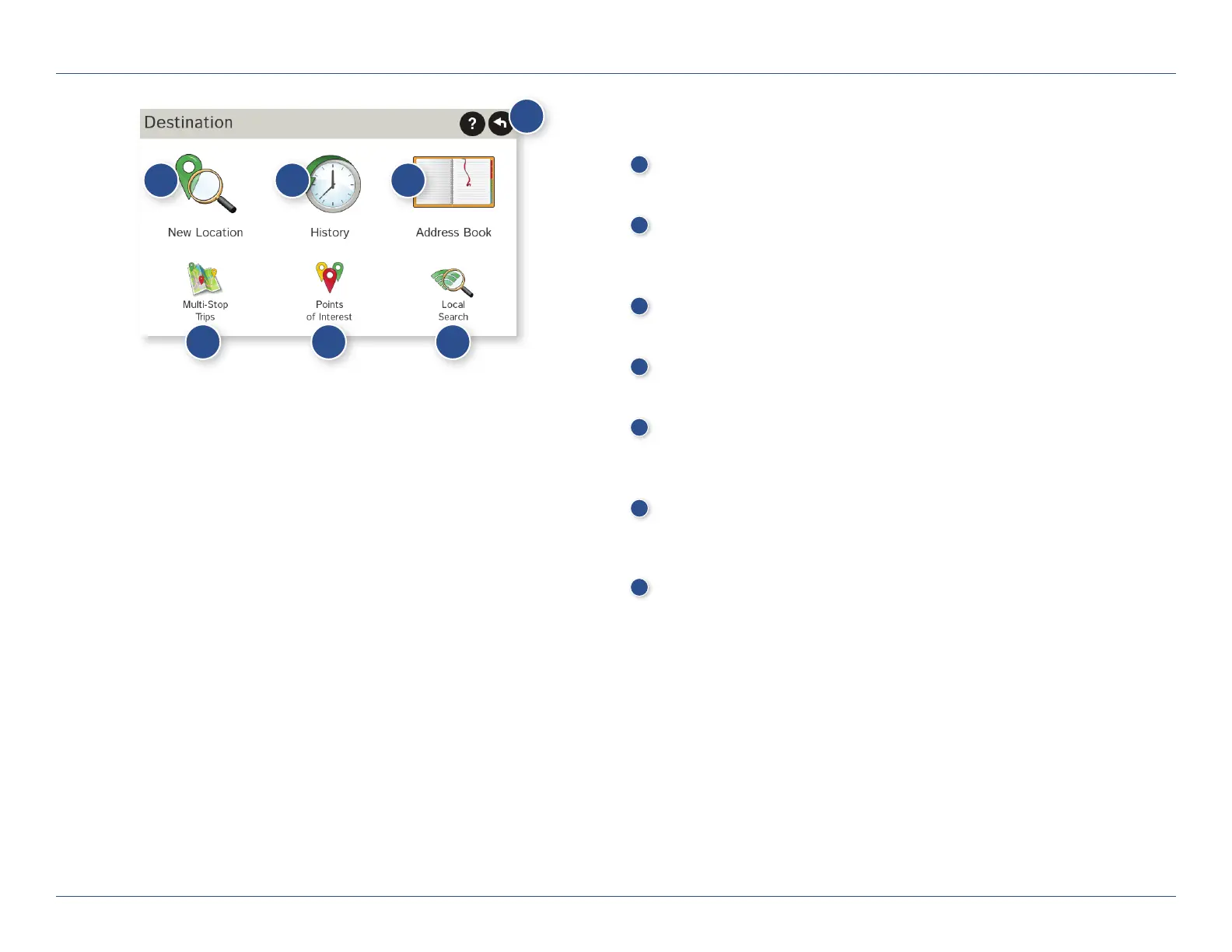
To access this window from the Main Menu, tap Choose Destination.
1
Back
Tap to return to the Main Menu.
2
New Location
Tap to route to a new location by address, city center, intersection,
or latitude/longitude. (See page 21.)
3
History
Tap to route to a recently entered location.
4
Address Book
Tap to view a list of saved locations. (See page 25.)
5
Multi-Stop Trips
Tap to view a list of saved multi-stop trips or to create a new one.
(See page 27.)
6
Points of Interest/POIs
Tap to search for a point of interest (POI) such as a gas station,
restaurant, etc. (See page 32.)
Local Search
Tap to search for local businesses, restaurants, and more
by name or keyword. (Note: Wi-Fi connection required.)
(See page 36.)
3C. Destinations
1
2 3 4
5 6
7
7
For Sales Information Please Contact
RoadTrucker Inc
(www.RoadTrucker.com)
8312 Sidbury Rd.
Wilmington, NC 28411
(800) 507-0482 / (910) 686-4281













 To Next Page