TND
™
Tablet User Manual 50
3E. Tools & Features
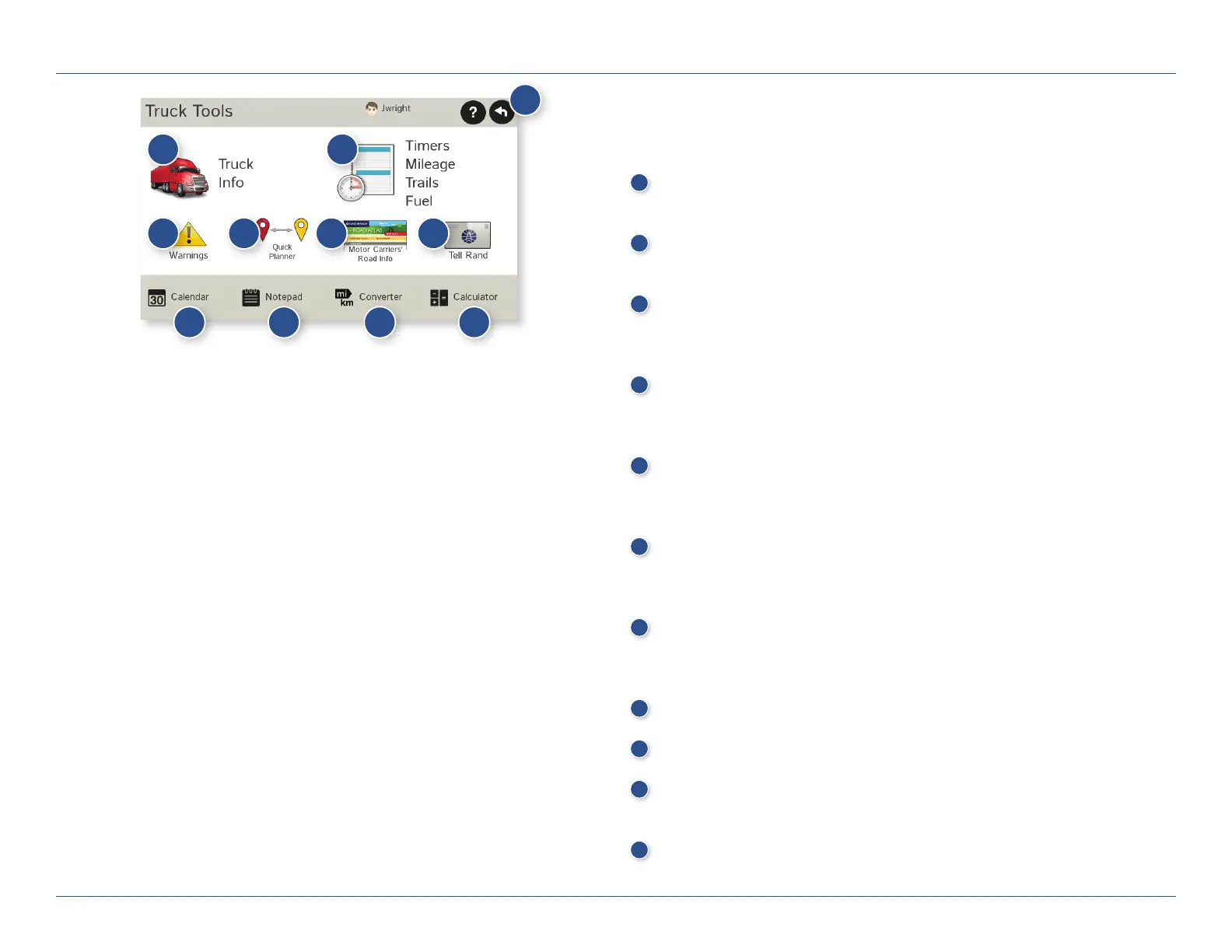
Truck Tools
Note: Some features are not available in Car Mode.
1
Back
Return to the Main Menu.
2
Truck Info
Enter truck information (weight, length, etc.). (See page 13.)
3
Timers, Mileage, Trails, and Fuel
View driving, on-duty, and maintenance timers; state logs; trails;
and fuel purchase information. (See pages 51-54.)
4
Warnings
Set warning distances for driving time, duty hours, and upcoming
weigh stations. (See page 14.)
5
Quick Planner
Between any two cities or towns, quickly calculate the distance,
driving time, and cost. (See page 55.)
6
Rand Motor Carrier’s Road Info
View Rand McNally Truck Emergency contact information and
truck regulations. (See page 56.)
7
Tell Rand
Compose a message to send to Rand McNally when you
connect to the Dock. (See page 58.)
8
Calendar (See page 57.)
9
Notepad (See page 57.)
10
Converter (See page 57.)
Quickly convert distance, weight, and temperature.
11
Calculator (See page 57.)
1
2 3
4 5 6 7
8 9 10 11
For Sales Information Please Contact
RoadTrucker Inc
(www.RoadTrucker.com)
8312 Sidbury Rd.
Wilmington, NC 28411
(800) 507-0482 / (910) 686-4281













 To Next Page