TND
™
Tablet User Manual 54
3E. Tools & Features
Fuel Logs
1. Tap Truck Tools.
2. Tap Timers, Mileage, Trails, Fuel.
3. Tap the Fuel tab to view a list of fuel logs by quarter.
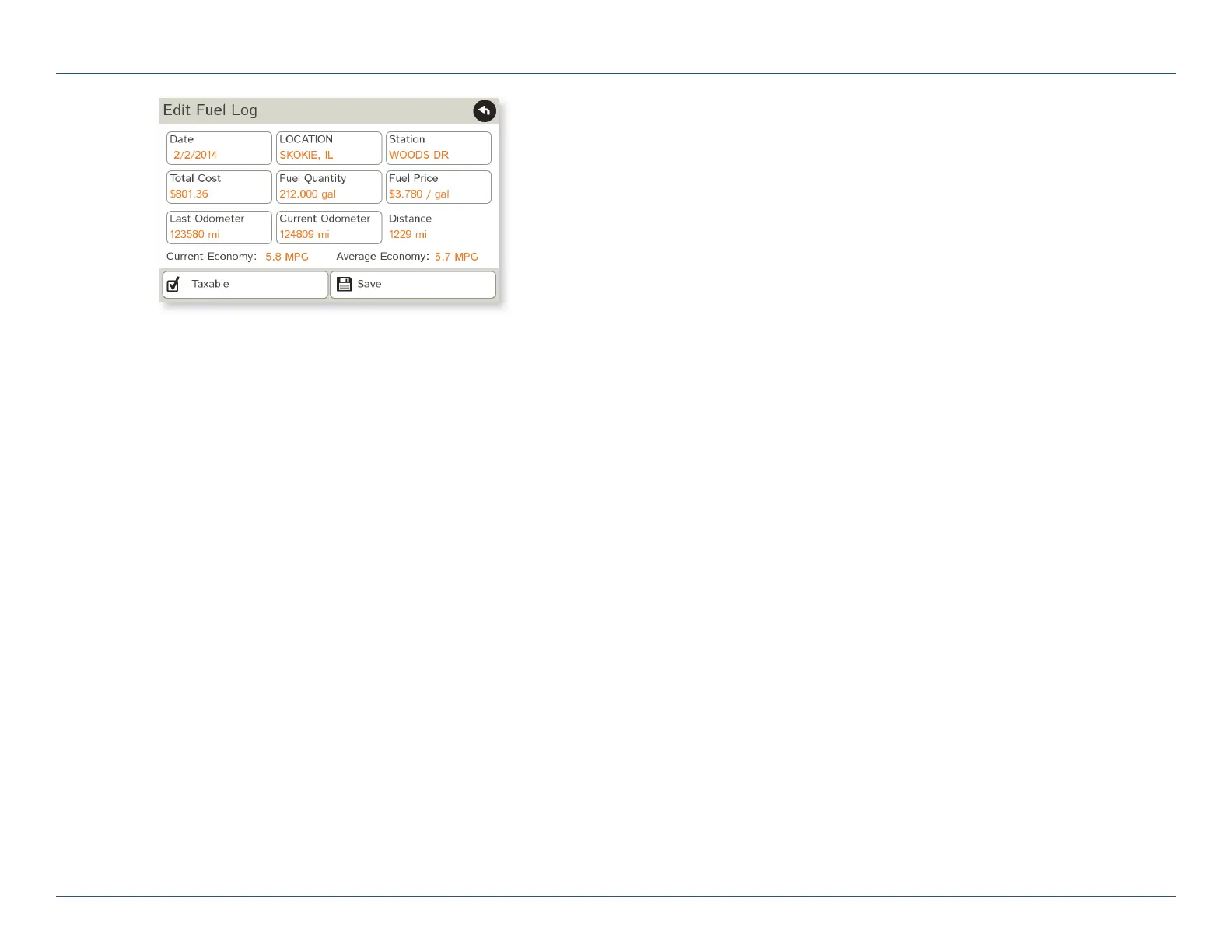
4. Tap Add Fuel to record the date, location and cost of fuel purchase.
5. Tap on any field to edit.
6. Check Taxable to include the purchase in the fuel log.
7. Tap Save (Note: Fuel economy is calculated automatically.)
8. Once fuel purchases have been entered, tap on a quarter to view
the details.
9. You can View by State or View by Month.
10. Tap the state or month to view fuel purchases.
11. Tap View All to see all fuel purchases.
For Sales Information Please Contact
RoadTrucker Inc
(www.RoadTrucker.com)
8312 Sidbury Rd.
Wilmington, NC 28411
(800) 507-0482 / (910) 686-4281













 To Next Page