TND
™
Tablet User Manual 9
2. Getting Started > Main Menu
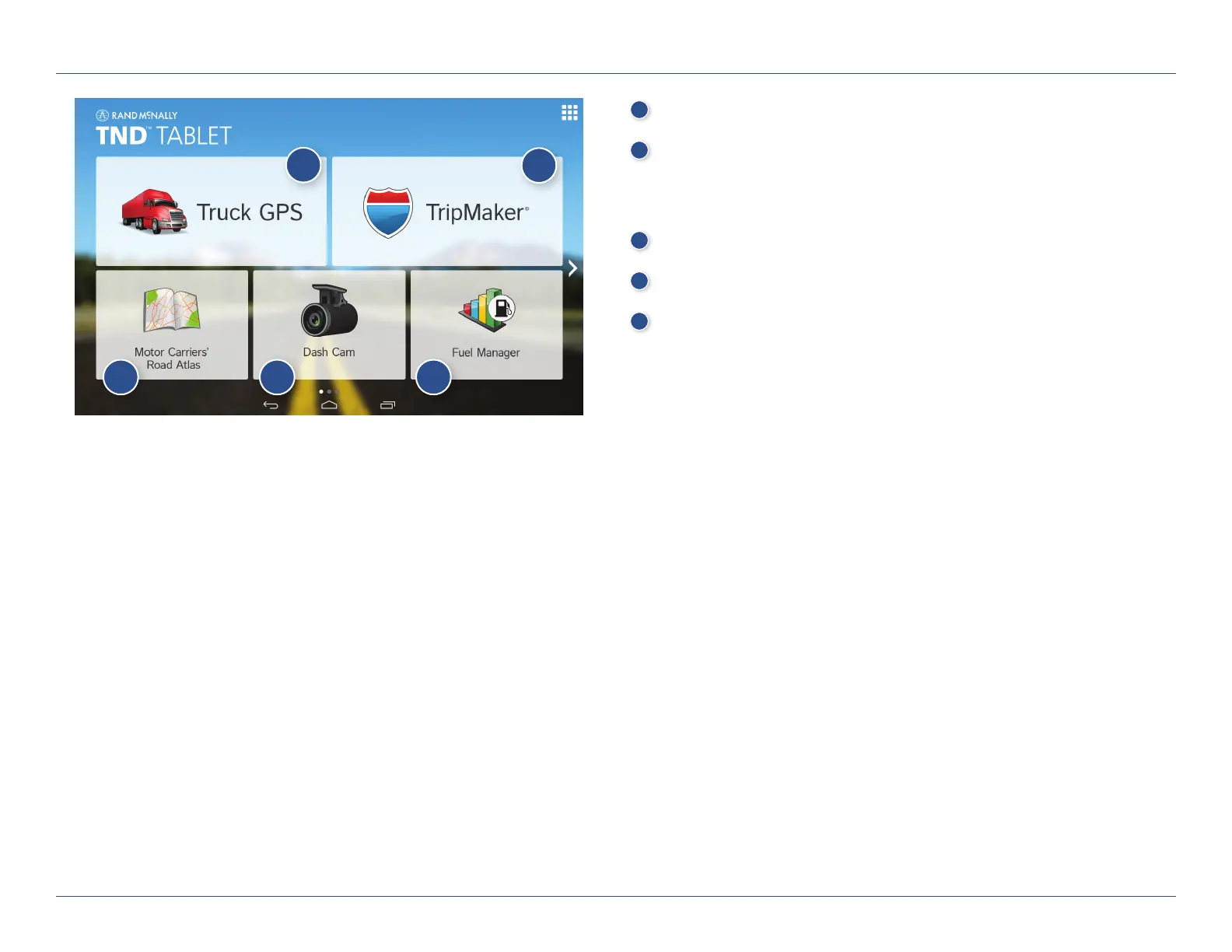
1
IntelliRoute
®
TND
™
Main Menu (See page 11.)
2
TripMaker
®
Use the online planning tool to plan a trip with multiple via points
and transfer it to the navigation app as a multi-stop trip. (See help
available online.)
3
Motor Carriers’ Road Atlas (See page 60.)
4
Dash Cam (See page 61.)
5
Fuel Manager (For assistance with Fuel Manager and all other apps,
see help within each app.)
The bottom three buttons on the home screen can be changed according
to your preferences. (To replace with other apps, open the app tray by
tapping the upper right corner of the screen. Select Rand McNally
Launcher and Truck Widget settings. Tap a box and select a shortcut, or
tap applications to view more. Tap Save.)
1
2
3 4 5
For Sales Information Please Contact
RoadTrucker Inc
(www.RoadTrucker.com)
8312 Sidbury Rd.
Wilmington, NC 28411
(800) 507-0482 / (910) 686-4281













 To Next Page