TND
™
Tablet User Manual 30
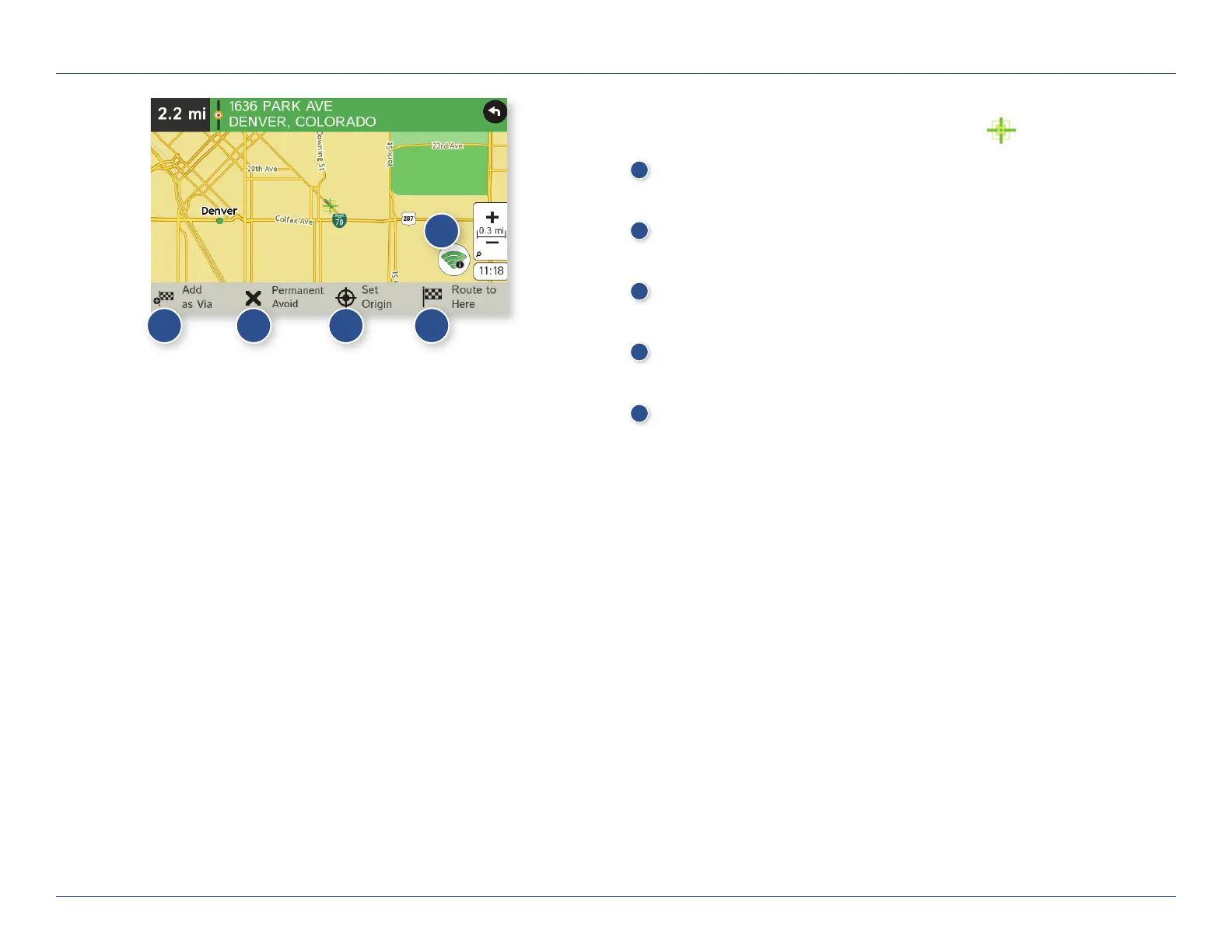
Tap on the Map
When you tap on the map screen, the crosshairs display.
1
Add as Via
Add a via—an interim stop between the origin and the destination.
2
Avoid
Tap to avoid the route, road, or area, or to detour. (See page 31.)
3
Set Origin
Set the location as the starting point of the route.
4
Route to Here
Tap Begin New Route to navigate to the location.
5
Wi-Fi
View live information at this location with a Wi-Fi connection.
3C. Destinations > Tap Map
1
2
3 4
5
For Sales Information Please Contact
RoadTrucker Inc
(www.RoadTrucker.com)
8312 Sidbury Rd.
Wilmington, NC 28411
(800) 507-0482 / (910) 686-4281













 To Next Page