TND
™
Tablet User Manual 25
Address Book
Add Locations to the Address Book from the Confirmation Window
(See page 37.):
1. Ta p Save to Address Book.
2. Tap Yes to accept the default name or tap No to display a keyboard.
3. Type the name of the location and tap Enter to save the location
in the Address Book. The Confirmation Window re-displays.
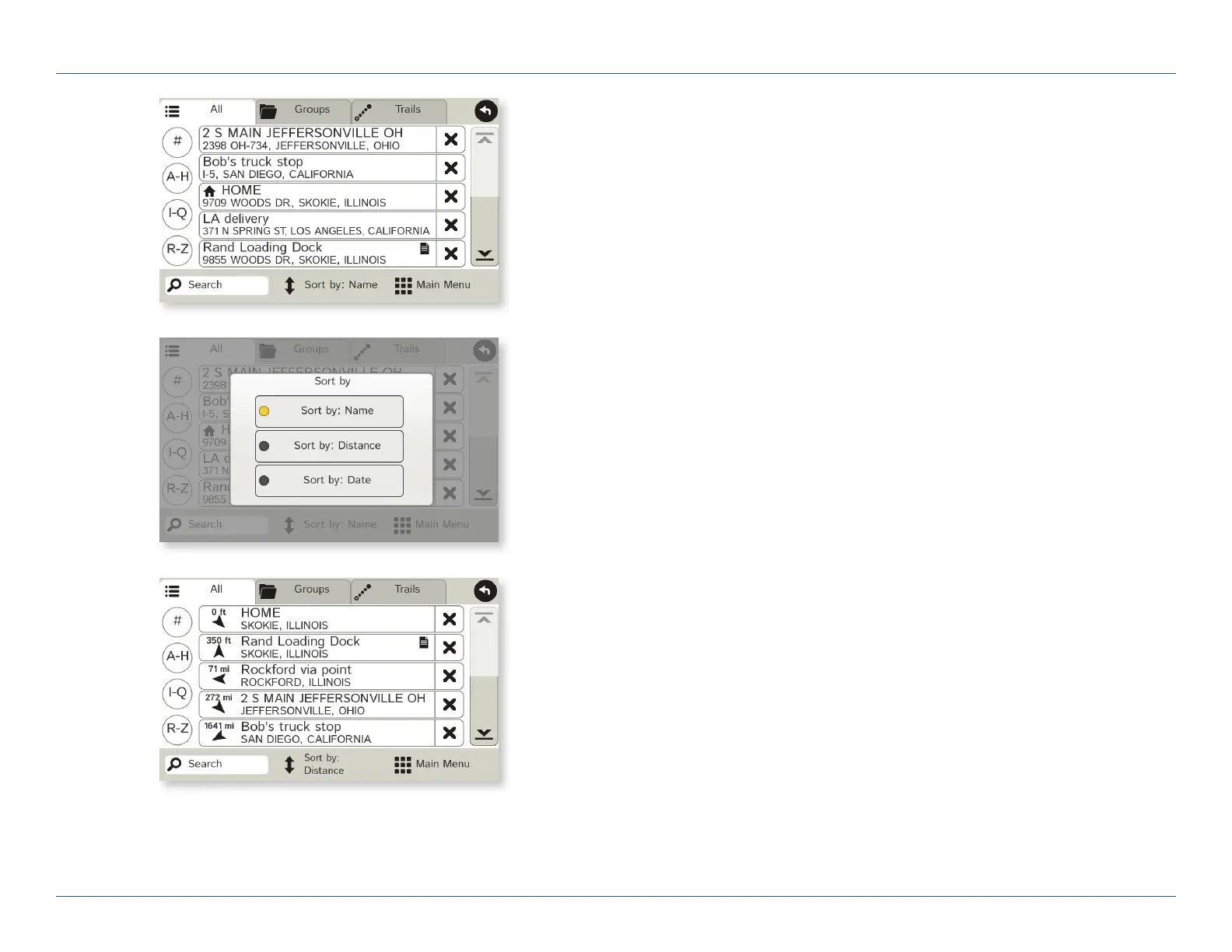
Entries
• Tap Choose Destination > Address Book.
Entries are alphabetically sorted by Name.
• To sort by Distance or Date, tap Sort By.
• Use the up and down arrows to scroll through the list or use the
alphabet buttons on the left.
• Tap the Search field to search the Address Book by keyword.
• The notepad icon indicates a note has been added for this location.
Route to an Address Book Location
1. Tap Choose Destination > Address Book.
• Tap on the All Addresses tab or
• Tap on the Groups tab.
2. Tap on an address to select it.
The Confirmation Window displays. (See page 37.)
3. Tap Begin New Route to navigate to the location.
3C. Destinations > Address Book
For Sales Information Please Contact RoadTrucker Inc
(www.RoadTrucker.com)
8312 Sidbury Rd.; Wilmington, NC 28411 - (800) 507-0482 / (910) 686-4281













 To Next Page