TND
™
Tablet User Manual 58
3F. Tell Rand
Tell Rand
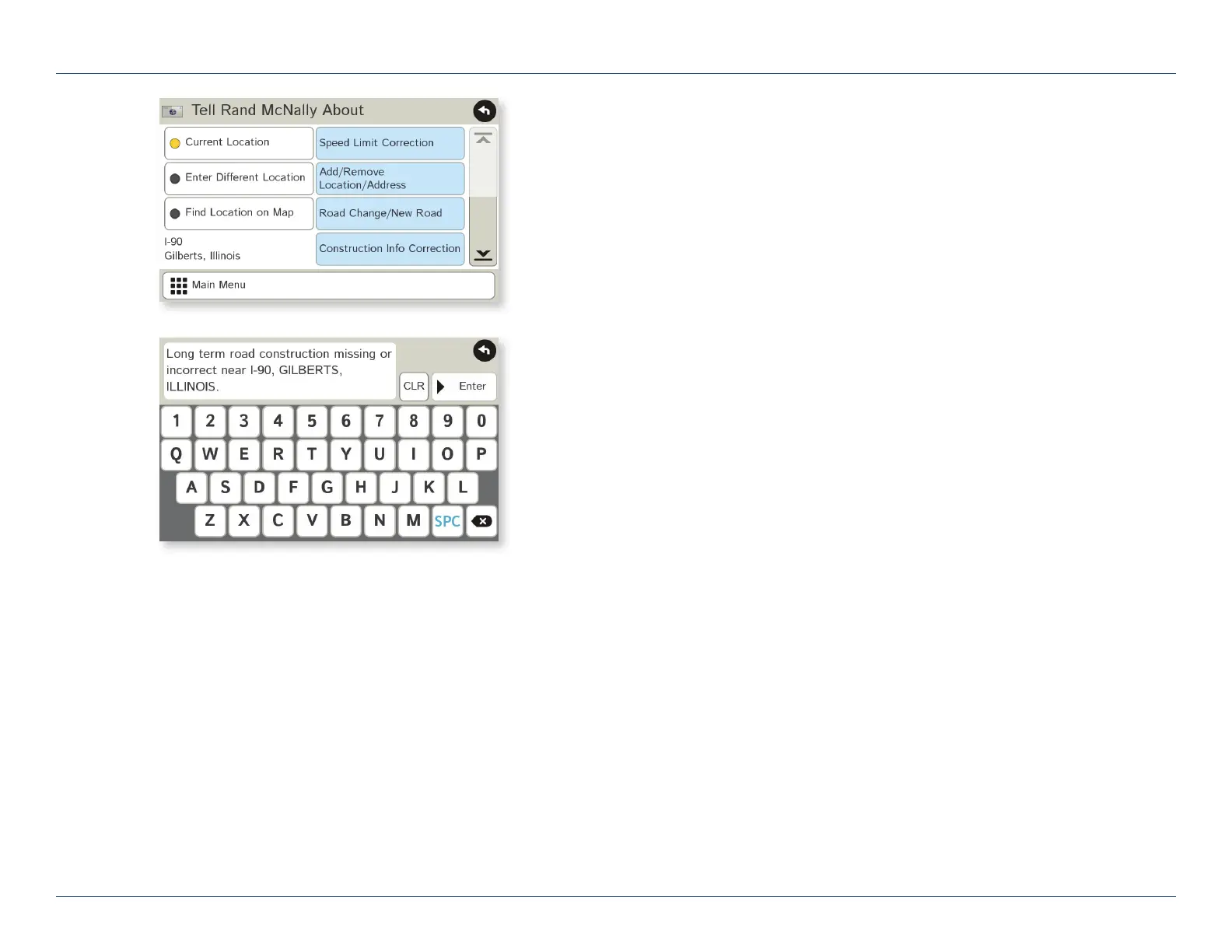
Enter messages for Rand McNally regarding construction, truck restrictions,
addresses, your device, and more.
1. Tap Truck Tools.
2. Tap Tell Rand. On the left side, tap Current Location.
Enter Different Location or Find Location on Map.
Note: You can open a Tell Rand speed limit message by tapping
the speed limit or mile marker on the map screen.
3. If you selected Enter Different Location, enter it as an address.
If you selected Find Location on Map, tap on the map to set the
crosshairs at that location, then tap Back.
4. On the right side, tap the type of message you want to send.
5. Type your message.
6. Tap Enter to save the message.
7. To discard the message and return to the previous window,
tap Back.
8. To send the message, be sure your device is connected to
the Internet.
For Sales Information Please Contact
RoadTrucker Inc
(www.RoadTrucker.com)
8312 Sidbury Rd.
Wilmington, NC 28411
(800) 507-0482 / (910) 686-4281













 To Next Page