TND
™
Tablet User Manual 27
Create a Multi-Stop Trip
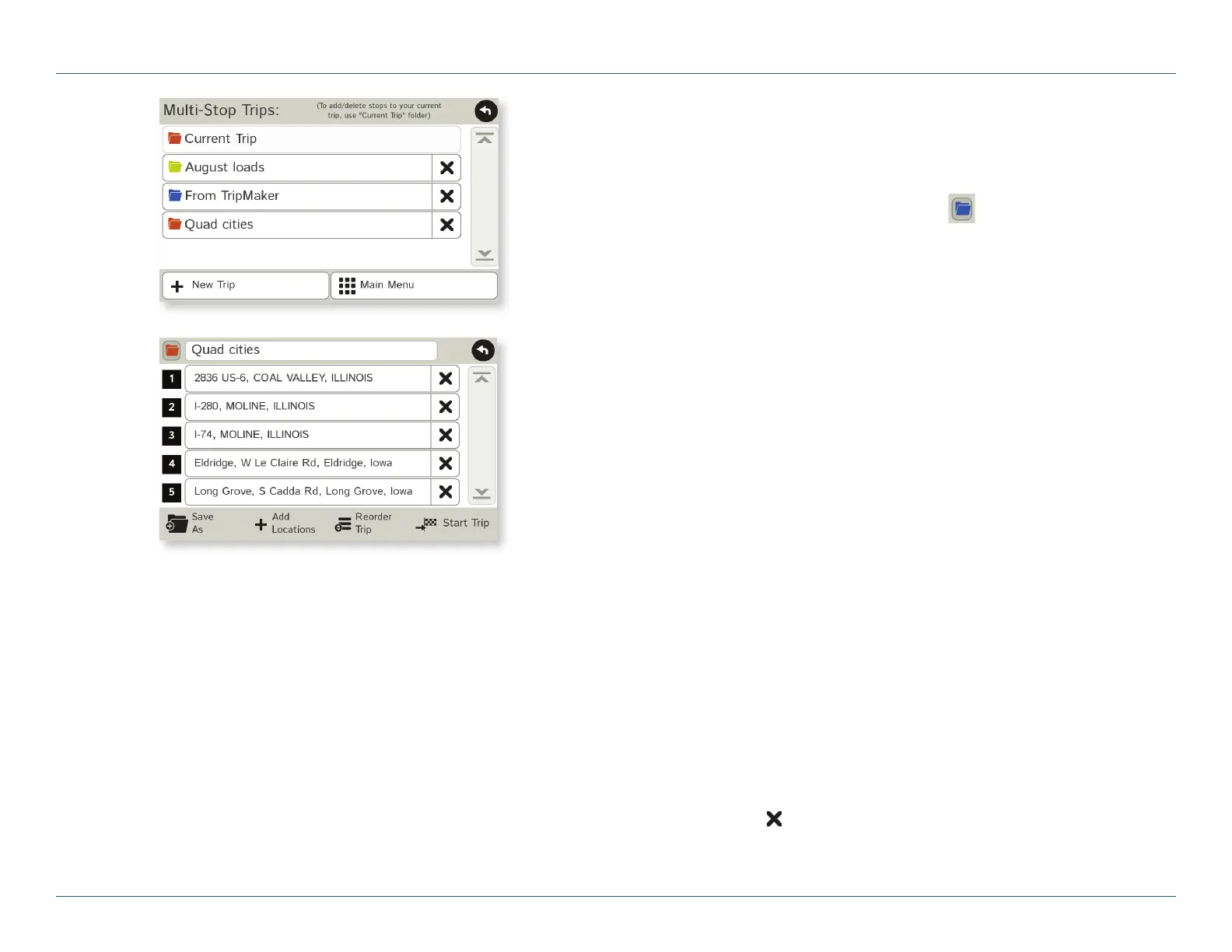
1. Tap Choose Destination > Multi-Stop Trips.
2. Tap New Trip.
3. Type the trip name.
4. To select a different color folder, tap .
5. Tap on a color, then tap Close.
6. When finished, tap Enter.
Note: A multi-stop trip can include up to 50 stops.
Add a Stop
Note: You can add locations in the order you want to route to them
or reorder stops later (See page 28.)
From the Main Menu:
1. Tap Choose Destination > Multi-Stop Trips.
2. Tap on the route.
3. Tap Add Address.
4. To add an address, tap Enter New Address, History,
Address Book, or POI.
5. A Confirmation Window asks if you want to add another stop.
Tap:
• Yes to add another stop
• No if the route is complete.
6. Tap Back to save changes.
Remove a Stop
1. Tap Choose Destination > Multi-Stop Trips.
2. Tap on the route.
3. Tap on the
next to the stop to be removed.
4. Tap Yes.
3C. Destinations > Multi-Stop Trips
For Sales Information Please Contact
RoadTrucker Inc
(www.RoadTrucker.com)
8312 Sidbury Rd.
Wilmington, NC 28411
(800) 507-0482 / (910) 686-4281













 To Next Page