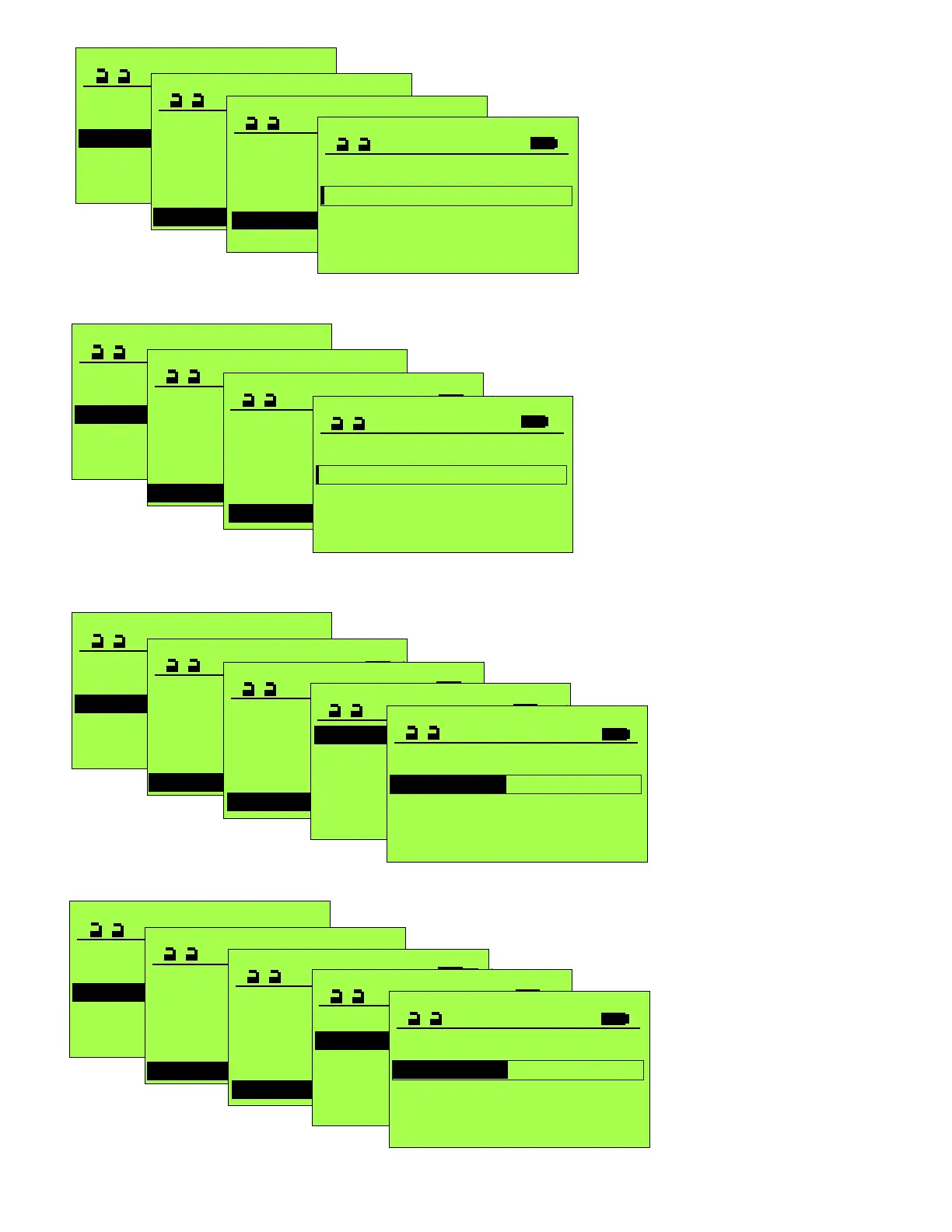
Operation mode >
SERVICE STG
Maintenance >
Functions >
Configure System
Learning System >
Parameter >
PARAMETER
CAN-BUS >
Input/Output >
Miscellaneous >
Entrance System >
Control Panel >
Locking >
MISCELLANEOUS
TOWA 1
Push to actuate open 0
Push to actuate close 0
Holding force 0
Lead time open 0
Lead time close 0
Lead time open
1
Pre-warning time after the open signal,
before the door actually moves, and
warning continues while the door is in
motion.
Note: 0 = No pre-warning and no warning
while in motion
1 = 0.2 seconds pre-warning + warning
40 = 8 seconds pre-warning + warning
(opening delayed 8 sec.)
The push to open function will interrupt the
pre-warning delay.
AUX00_OUT must be set to “9 Warning”.
Operation mode >
SERVICE STG
Maintenance >
Functions >
Configure System
Learning System >
Parameter >
PARAMETER
CAN-BUS >
Input/Output >
Miscellaneous >
Entrance System >
Control Panel >
Locking >
MISCELLANEOUS
TOWA 1
Push to actuate open 0
Push to actuate close 0
Holding force 0
Lead time open 0
Lead time close 0
Lead time close
1
Pre-warning after the open time expires,
before the door begins closing, and warning
continues during the door is in motion.
Note: 0 = No pre-warning and no warning
while in motion
1 = 0.2 seconds pre-warning + warning
40 = 8 seconds pre-warning + warning
(closing delayed 8 sec.)
The push to close function will interrupt the
pre-warning delay.
AUX00_OUT must be set to “9 Warning”
Operation mode >
SERVICE STG
Maintenance >
Functions >
Configure System
Learning System >
Parameter >
PARAMETER
CAN-BUS >
Input/Output >
Miscellaneous >
Entrance System >
Control Panel >
Locking >
MISCELLANEOUS
Alarm display >
Push to actuate open 0
Push to actuate close 0
Holding force 0
Lead time open 0
Lead time close 0
Alarm display
Time safety 18
Obstruction 1
Time activation 18
Time activation
18
Effective for inputs for Interior
Sensor, Exterior Sensor and
Special Activation (SSK).
Display for AKI/AKA/SSK or
SIO/SIS/ELS If the alarm output
is configured, it will be disabled
after the preset time.
Adjusts in 6 second increments.
0=Disabled
1=6 seconds before alarm
12=72 seconds before alarm
40=240 seconds before alarm
Operation mode >
SERVICE STG
Maintenance >
Functions >
Configure System
Learning System >
Parameter >
PARAMETER
CAN-BUS >
Input/Output >
Miscellaneous >
Entrance System >
Control Panel >
Locking >
MISCELLANEOUS
Alarm display >
Push to actuate open 0
Push to actuate close 0
Holding force 0
Lead time open 0
Lead time close 0
Alarm display
Obstruction 1
Time activation 18
Time safety 18
Time safety
18
Effective for inputs for Interior
Sensor, Exterior Sensor and
Special Activation (SSK).
Similar to Time release above.
Adjusts in 6 second increments.
0=Disabled
1=6seconds before alarm
12=72 seconds before alarm
40=240 seconds before alarm







 To Next Page