EasyManua.ls Logo

Record 5100 Series - Software Update Procedures; Flash Programmer Setup; Software Verification Process

Default Icon
21 pages
Print Icon
To Next Page IconTo Next Page
To Previous Page IconTo Previous Page
Loading...
AKKU PASS
FLASH PASS
EEPROM PASS
RTC PASS
CAN PASS
FPC902
Version 2.71
Nov 24 2013
10:48:48
FPC902
Service STG
Service STG Slave >
Flash-Programmer >
Setup >
FLASH PROGRAMMER
Automatic update >
Manual update >
Indicate files >
Check files >
CAN nodes are
searched ...
Updates are
searched ...
STA20_UL Vx.xx
replace by
STA20_UL Vx.xx
Yes No
Updates are
searched ...
BDE-D Vx.xx
replace by
BDE-D Vx.xx
Yes No
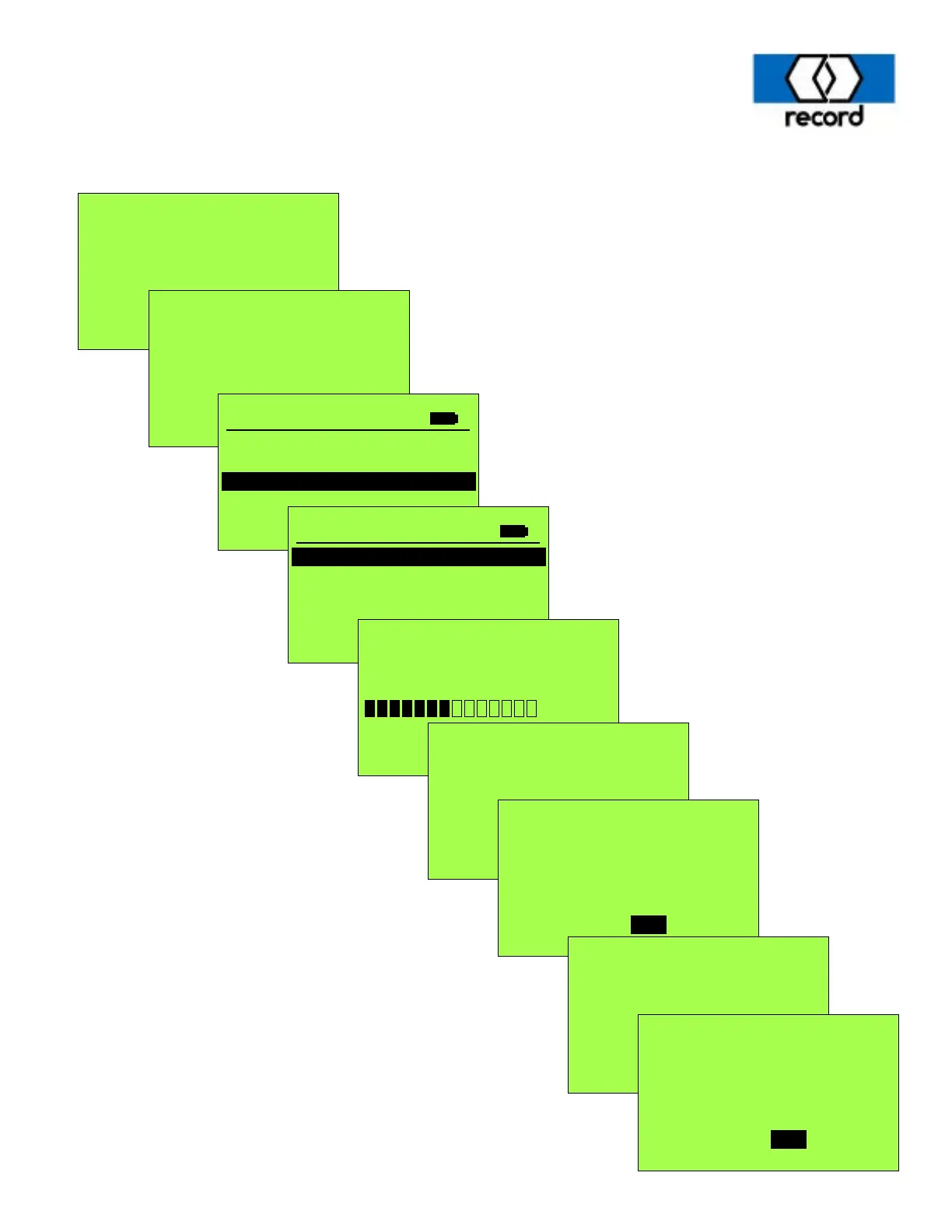
The following sequence of screens are to be followed when updating door and display software.
Use the Down arrow to
select “Flash-Programmer”
then press “OK”
Press “OK”
Use the Left
arrow to select
“Yes”, then
press “OK”
Use the Left
arrow to select
“Yes”, then
press “OK”
Service sensor >

Related product manuals