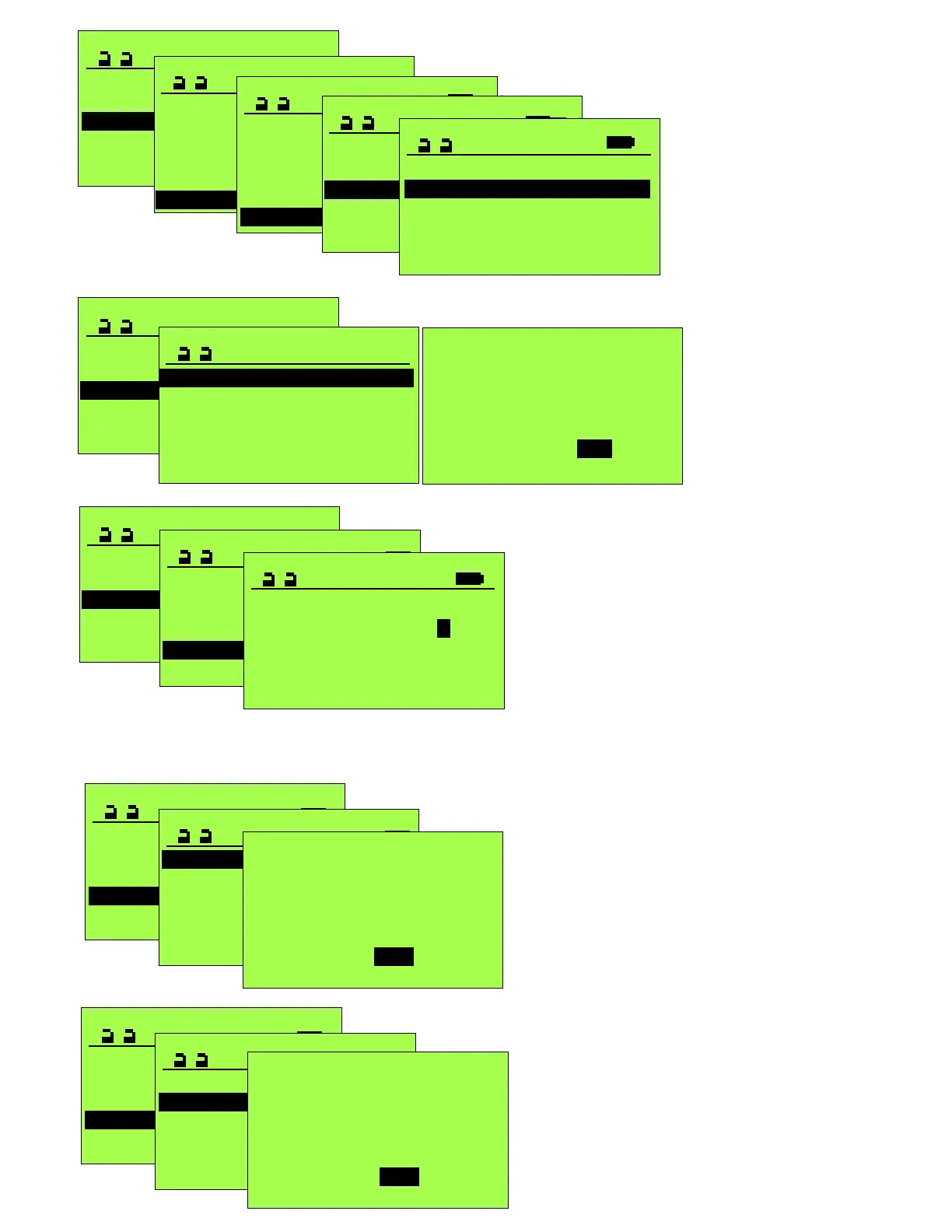
Operation mode >
SERVICE STG
Maintenance >
Functions >
Configure System
Learning System >
Parameter >
PARAMETER
CAN-BUS >
Input/Output >
Miscellaneous >
Entrance System >
Control Panel >
Locking >
MISCELLANEOUS
Alarm display >
Push to actuate open 0
Push to actuate close 0
Holding force 0
Lead time open 0
Lead time close 0
Alarm display
Time safety 18
Obstruction 1
Time activation 18
Obstruction
0 Disabled
1 Enabled
Disabled= Display module
will not show Obstruction
error.
Enabled= Display module
will show Obstruction error.
This parameter is used to replace the factory
telephone number with a custom telephone
number. This number will be momentarily
displayed when the unit is switched from
“OFF” mode, and will periodically flash when
an Alarm screen is displaying. Removal of a
custom number will reinstate the factory 800
number.
Operation mode >
SERVICE STG
Functions >
Diagnostics >
Learning System >
Parameter >
Maintenance >
Maintenance
Cycles1000 Target >
Weeks Actual >
Weeks Target >
Reset maintenance >
Setup maintenance >
Cycles1000 Actual >
Reset Maintenance
Are you sure?
Yes
No
The listed parameters in
the center screen are for
setting up a maintenance
program for the unit and
resetting it after target is
met.
Operation mode >
SERVICE STG
Functions >
Diagnostics >
Learning System >
Parameter >
Maintenance >
Maintenance
Cycles1000 Target >
Weeks Actual >
Weeks Target >
Phone 800 438 1937
Cycles1000 Actual >
PHONE
800 438 1937
PN
The following screen sequences are not used to modify parameters, but are used to reset
Operation mode >
SERVICE STG
Diagnostics >
Learning System >
Parameter >
Maintenance >
Functions >
FUNCTIONS
Factory settings >
Release AKI >
Learning ELS >
Learning parameter >
BAT emerg. reaction >
Default Settings >
various door functions as described.
Default settings
Are you sure?
Yes No
Resets Parameters to “Default
settings” and requires a new
Calibration run.
Operation mode >
SERVICE STG
Diagnostics >
Learning System >
Parameter >
Maintenance >
Functions >
FUNCTIONS
Factory settings >
Release AKI >
Learning ELS >
Learning parameter >
BAT emerg. reaction >
Default Settings >
Factory settings
Are you sure?
Yes No
Resets Parameters to “Factory
settings” without requiring a new
Calibration run.







 To Next Page