TRIP COMPUTER
2
Getting to know your vehicle - 147
Vehiclesnotfittedwithamultime
dia screen, display B
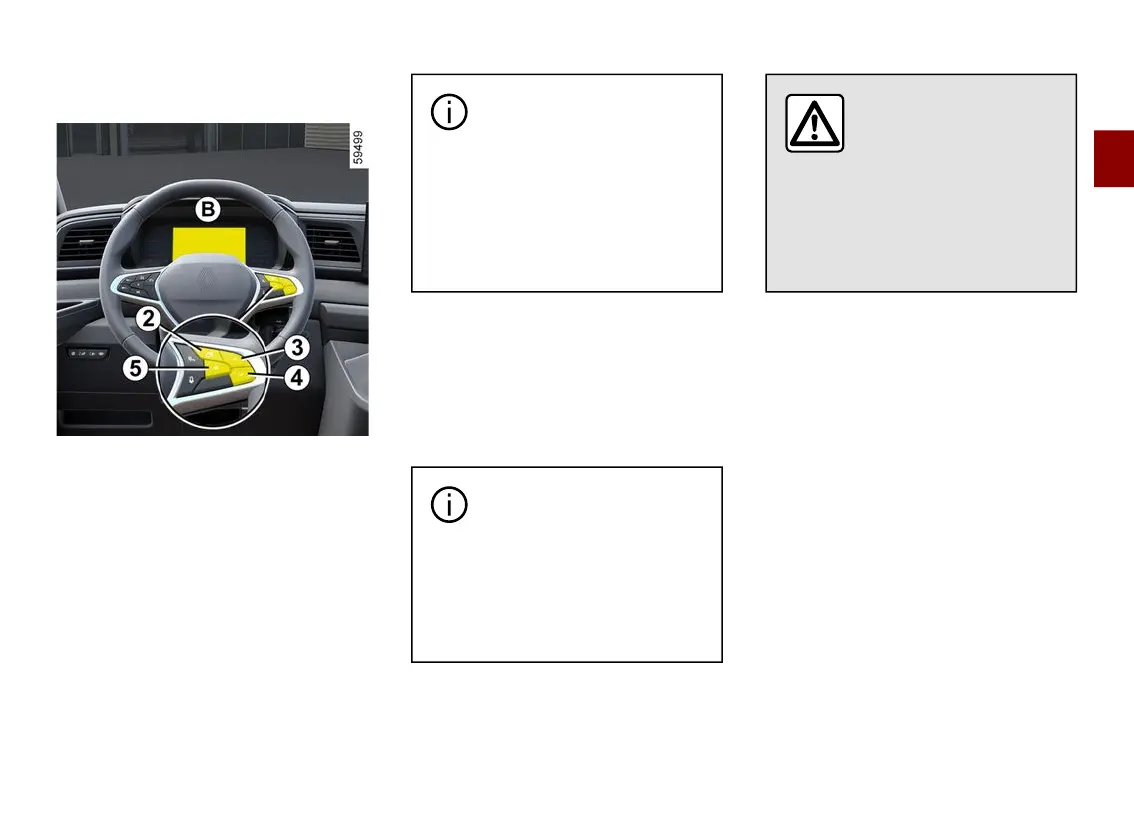
Press the switch
2
as many times as
required to reach the "Settings" world.
Repeatedly press control
3
or
4
to
reach the "Time setting" menu then
press switch
5
"OK".
Press and hold switch
5
"OK" until the
time flashes.
Set the hour using control
3
or
4
,
press switch
5
"OK" to confirm, then
set the minutes using control
3
or
4
and press switch
5
"OK" to confirm.
Depending on the vehicle,
If the electrical supply is cut
(batterydisconnected,bro
ken supply wire, etc.), the clock
will automatically go back to the
right time after a few minutes
oncethesystemiscapableofre
ceiving information GPS.
Exterior temperature indicator
Special feature:
Whentheexteriortemperatureisbe
tween ˗3°C and +3°C, the °Cchar
acters flash (signalling a risk of ice on
the road).
If the power supply is cut
(batterydisconnected,sup
ply wire cut, etc.), the clock
must be reset.
We recommend that you do not
adjustthesesettingswhiledri
ving.
Exterior temperature
indicator
Asiceformationisrelat
ed to climatic exposure,
localairhumidityandtempera
ture, the external temperature
alone is not sufficient to detect
ice.











 To Next Page