ADDITIONAL DRIVING AID FUNCTIONS
3
Driving - 225
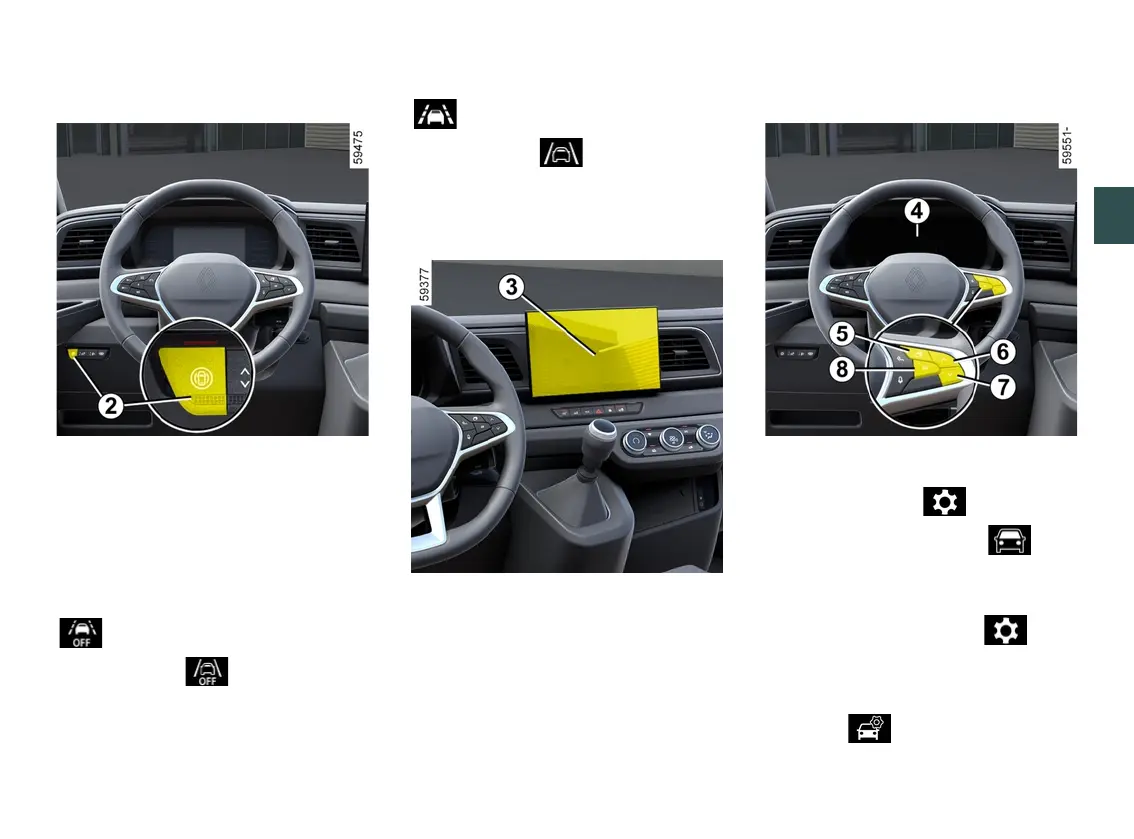
Activating,deactivatingthefunc
tion using the "My Safety" button
2
Thefunctioncanbedeactivatedorac
tivated using "Custom" mode in the
"My Safety" function 🡺216.
Ifthefunctionhaspreviouslybeende
activated using "Custom" mode:
– to deactivate the function, press
the button
2
twice. The warning light
on the button
2
goes out and the
warning light or, depending on
the vehicle, the warninglightap
pearsinyellowontheinstrumentpan
el;
– to reactivate the function, press
the button
2
once. The warning light
on the button
2
comes on and the
warning light or, depending on
the vehicle, the warninglightap
pears on the instrument panel;
Activating, deactivating the system
fromthemultimediascreen
3
To activate or deactivate the function,
refer to the multimedia instructions.
Select ON or OFF.
Activating/deactivating the system
from the trip computer
4
– With the vehicle stationary, press
theswitch
5
asmanytimesasre
quiredtoreachthe tabor,de
pending on the vehicle, the tab;
or
– press switch
5
and repeatedly press
control
6
or
7
to reach the tab;
– depending on the vehicle, press
switch
8
OK;
– repeatedly press control
6
or
7
to
reach the menu, then press
switch
8
OK;











 To Next Page