ADDITIONAL DRIVING AID FUNCTIONS
3
228 - Driving
– "Vibration": adjust the steering wheel
vibrationforthe"Lanedeparturepre
vention" function;
– depending on the vehicle, "Lane exit
anticipation" or "Warning": adjust the
line detection sensitivity level. To do
this, select:
– "Late": line detected when
crossed;
– "Standard": line detected when
approached;
– "Early": line detected when near.
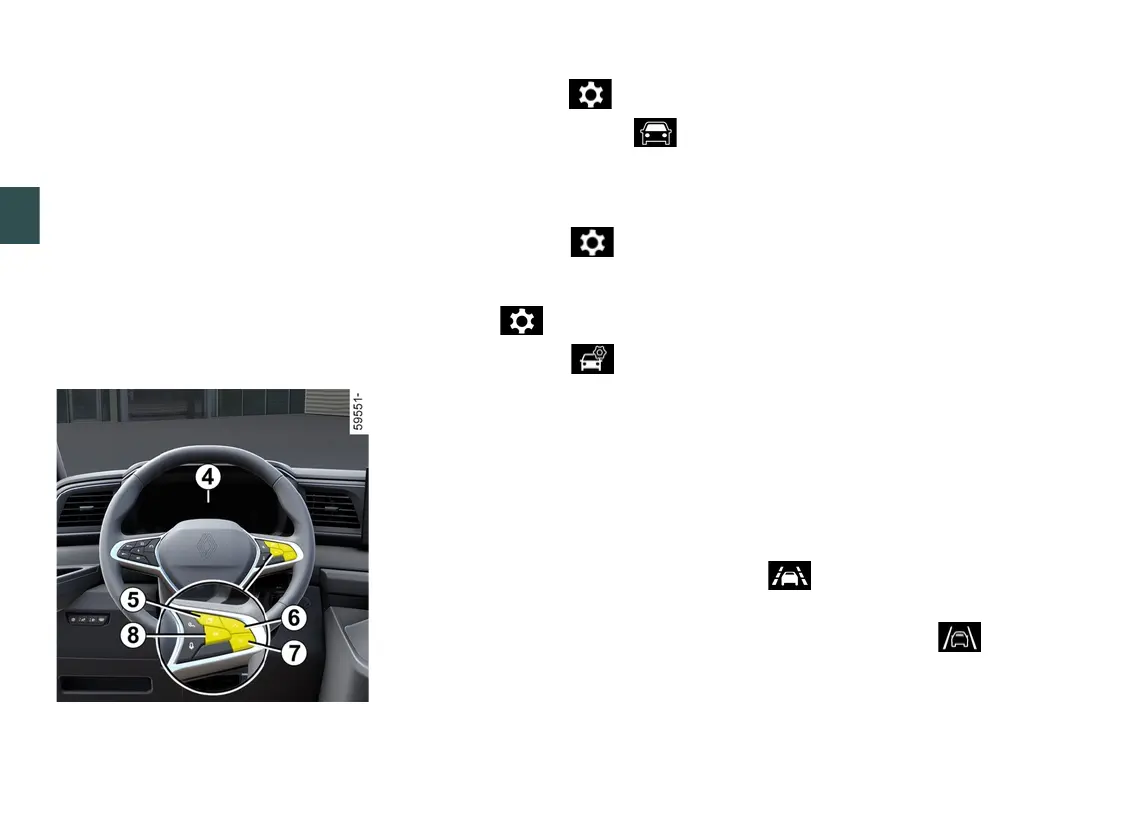
Adjusting settings from the trip
computer
4
– With the vehicle stationary, press
theswitch
5
asmanytimesasre
quiredtoreachthe tabor,de
pending on the vehicle, the tab;
or
– depending on the vehicle, press
switch
5
and repeatedly press control
6
or
7
to reach the menu. Press
switch
8
OK;
– repeatedly press control
6
or
7
to
reach the " " menu or, depending
on the vehicle, the " " menu.
Press switch
8
OK;
– repeatedlypresscontrol
6
or
7
to
reach the "DRIVING ASSIST" menu.
Pressswitch
8
OK.
To adjust the sensitivity:
– repeatedly press control
6
or
7
to
reach the "Lane keep assist sensitivity"
menu. Press switch
8
OK;
– presscontrol
6
or
7
repeatedly to
adjustthesetting.Pressswitch
8
OK.
To adjust the vibration intensity:
– repeatedly press control
6
or
7
to
reach the "Lane keep assist vibration"
menu. Press switch
8
OK;
– presscontrol
6
or
7
repeatedly to
adjustthesetting.Pressswitch
8
OK.
Function temporarily unavailable/
disabled
The system is no longer available or
disabled when:
– very fast lane departure;
– driving continuously on a line;
– approximately four seconds after
changing lanes;
– tight bends;
– impaired visibility;
– oneofthedirectionindicatorsisacti
vated;
– activating the hazard warning lights;
– engaging reverse gear;
– strong acceleration;
– the lane width changes;
– operation of the Electronic Stability
Control system;
– operation of the anti-lock braking
system;
– theactiveemergencybrakingsys
tem is triggered;
When the function is unavailable, the
warning light or, depending on
the vehicle, the left-hand and right-
hand lines
7
and the warning
light turn grey on the instrument panel.
When the front camera is obscured,
the"Frontcameranovisibility"mes
sage appears on the instrument panel.
Clean the area where the sensors are
located.











 To Next Page