ADDITIONAL DRIVING AID FUNCTIONS
3
Driving - 243
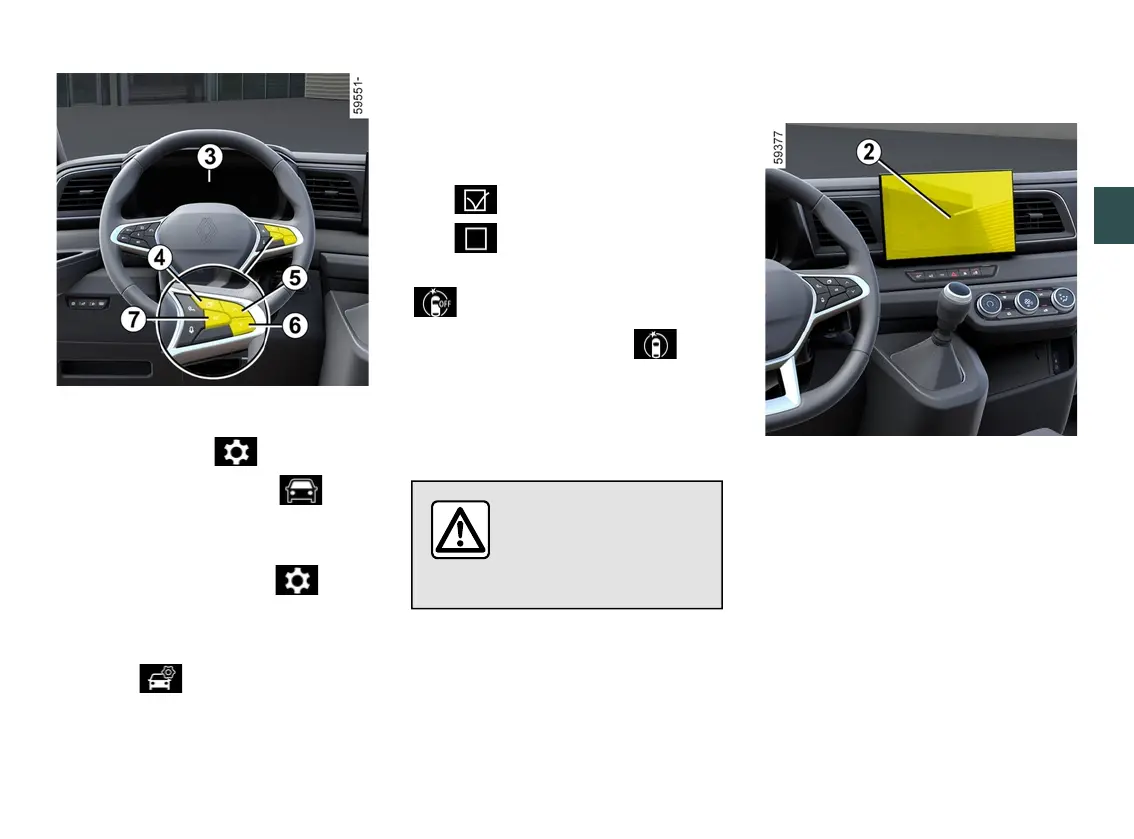
– With the vehicle stationary, press
theswitch
4
asmanytimesasre
quiredtoreachthe tabor,de
pending on the vehicle, the tab;
or
– press switch
4
and repeatedly press
control
5
or
6
to reach the tab;
– depending on the vehicle, press
switch
7
OK;
– repeatedly press control
5
or
6
to
reach the menu, then press
switch
7
OK;
– repeatedly press control
5
or
6
to
reach the "DRIVING ASSIST" menu,
then press switch
7
OK;
– repeatedly press control
5
or
6
to
reach the "Active braking" menu, then
press switch
7
OK;
– press the
7
OKswitchagaintoacti
vate or deactivate the function:
– function activated
– function deactivated
Upon deactivation of the system, the
warninglightilluminatesor,de
pending on the vehicle, the
warninglightilluminatesontheinstru
mentpanel.Whenthesystemisacti
vated, the warning light disappears.
Settings
For safety reasons, carry
out any adjustments
whilethevehicleissta
tionary.
Adjustingsettingsfromthemulti
media screen
2
With the vehicle stationary, to access
thefunctionsettingsfromthemultime
dia screen
2
, refer to the multimedia
instructions:
– "Warning":adjustthesensitivitylev
el. To do this select:
– "Late";
– "Standard";
– "Early".
Pleaserefertothemultimediainstruc
tions for more information.
Adjusting settings from the trip
computer
3
(depending on the vehicle)











 To Next Page