ADDITIONAL DRIVING AID FUNCTIONS
3
244 - Driving
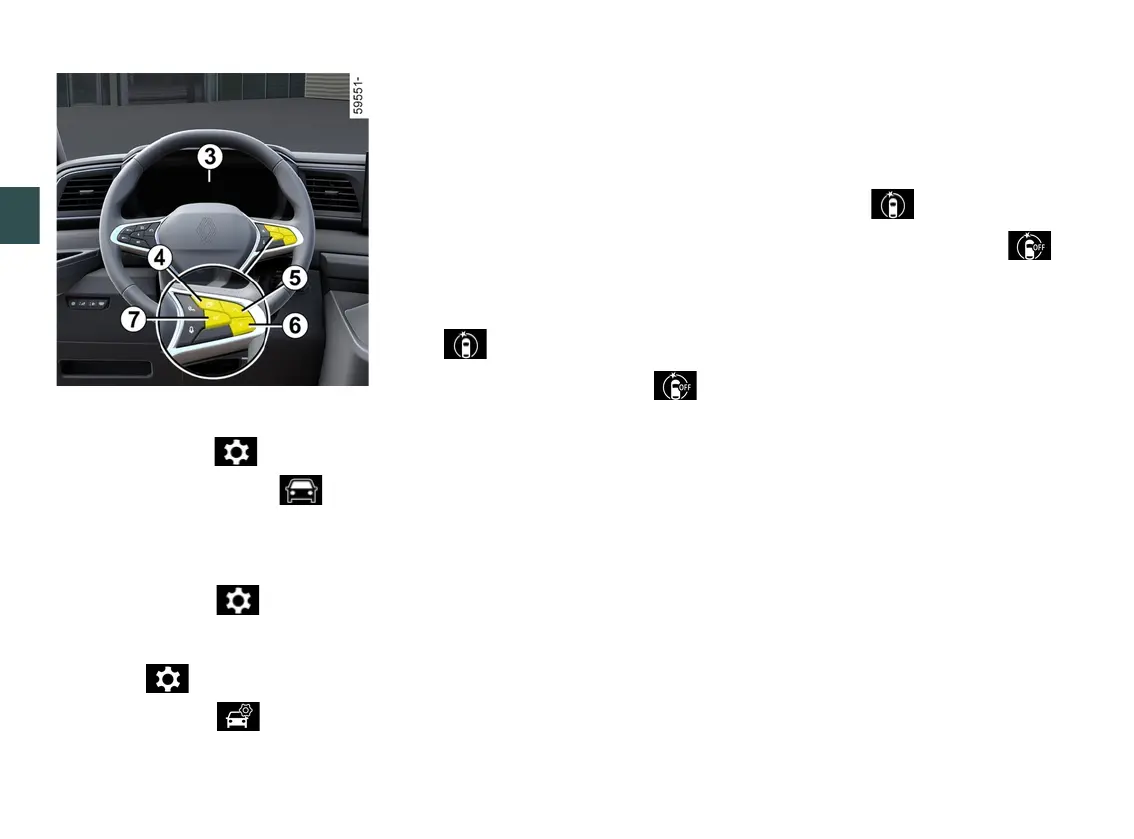
– With the vehicle stationary, press
theswitch
4
asmanytimesasre
quiredtoreachthe tabor,de
pending on the vehicle, the tab;
or
– depending on the vehicle, press
switch
4
and repeatedly press control
5
or
6
to reach the menu. Press
the
7
OKswitch;
– repeatedly press control
5
or
6
to
reach the " " menu or, depending
on the vehicle, the " " menu.
Press the
7
OKswitch;
– repeatedly press control
5
or
6
to
reach the "DRIVING ASSIST" menu.
Press the
7
OKswitch.
– repeatedlypresscontrol
5
or
6
to
reach the "Active braking sensitivity"
menu
7
OK;
– presscontrol
5
or
6
repeatedly to
adjust the setting. Press the
7
OK
switch.
Temporary unavailability
If the system detects a temporary fault
the warning light illuminates, or
depending on the vehicle, the
warninglightilluminatesontheinstru
ment panel.
The possible causes are:
– the system is temporarily blinded
(glare from the sun, dipped beam
headlights, bad weather conditions
etc.). The system will be operational
again when visibility conditions are
better;
– the system is temporarily disrupted
(forexample:thewindscreenisob
scured by dirt, snow, condensation,
etc.). In this case, park the vehicle and
switchofftheengine.Cleanthewind
screen. The next time the engine is
started,afteraroundfiveortenmin
utes of driving, the warning light and
the message disappear. If this is not
the case, this may arise from another
cause; contact an approved dealer.
Operating faults
Whenthefunctiondetectsanoperat
ing fault, the warning light or,
depending on the vehicle, the
warninglightappearsontheinstru
mentpanel.Consultanapproveddeal
er.











 To Next Page