PARKING AIDS
3
270 - Driving
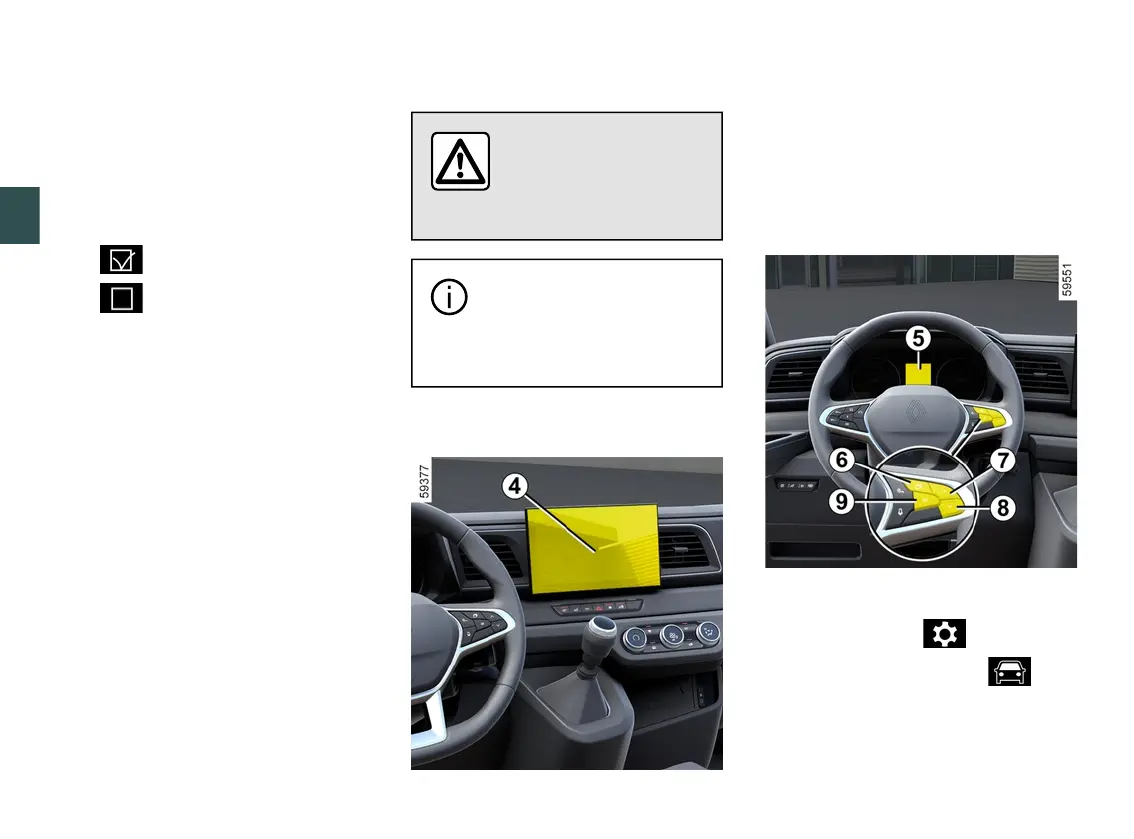
– repeatedly press control
7
or
8
to
reach the "DRIVING ASSIST" menu,
then press switch
9
OK;
– repeatedly press control
7
or
8
to
reach the "Parking" menu, then press
the switch
9
OK;
– press switch
9
OKagaintoactivate
or deactivate the function:
– function activated
– function deactivated
Note: depending on the vehicle, the
reardetectionzonecannotbedeacti
vated.
Parking distance control automatic
deactivation
The system is deactivated:
– whenthevehiclespeedisaboveap
proximately 6 mph (10 km/h);
– depending on the vehicle, when the
vehicleisstationaryformorethanap
proximatelyfivesecondsandanob
stacle is detected (such as when in a
traffic jam, etc.);
– when you are in NorPposition;
– when an operating fault is detected.
Note: depending on the vehicle, if the
vehicleisfittedwithatowbarrecog
nised by the system, only the rear Park
Assist function is deactivated.
Adjustment
For safety reasons, carry
out any adjustments
whilethevehicleissta
tionary.
Each time the vehicle is
started,thefunctioncontin
ues the mode saved the
last time the engine was stopped.
Settings from the multimedia
screen
4
Vehicle stationary, from the "Vehicle"
world on your multimedia screen
4
,
press the "Parking aids" menu.
Pleaserefertothemultimediainstruc
tions for further information.
Settings from the trip computer
5
(depending on the vehicle)
– With the vehicle stationary, press
theswitch
6
asmanytimesasre
quiredtoreachthe tabor,de
pending on the vehicle, the tab;
or
– depending on the vehicle, press
switch
6
and repeatedly press control










 To Next Page