20
EXTERNAL CONNECTIONS
(optional)
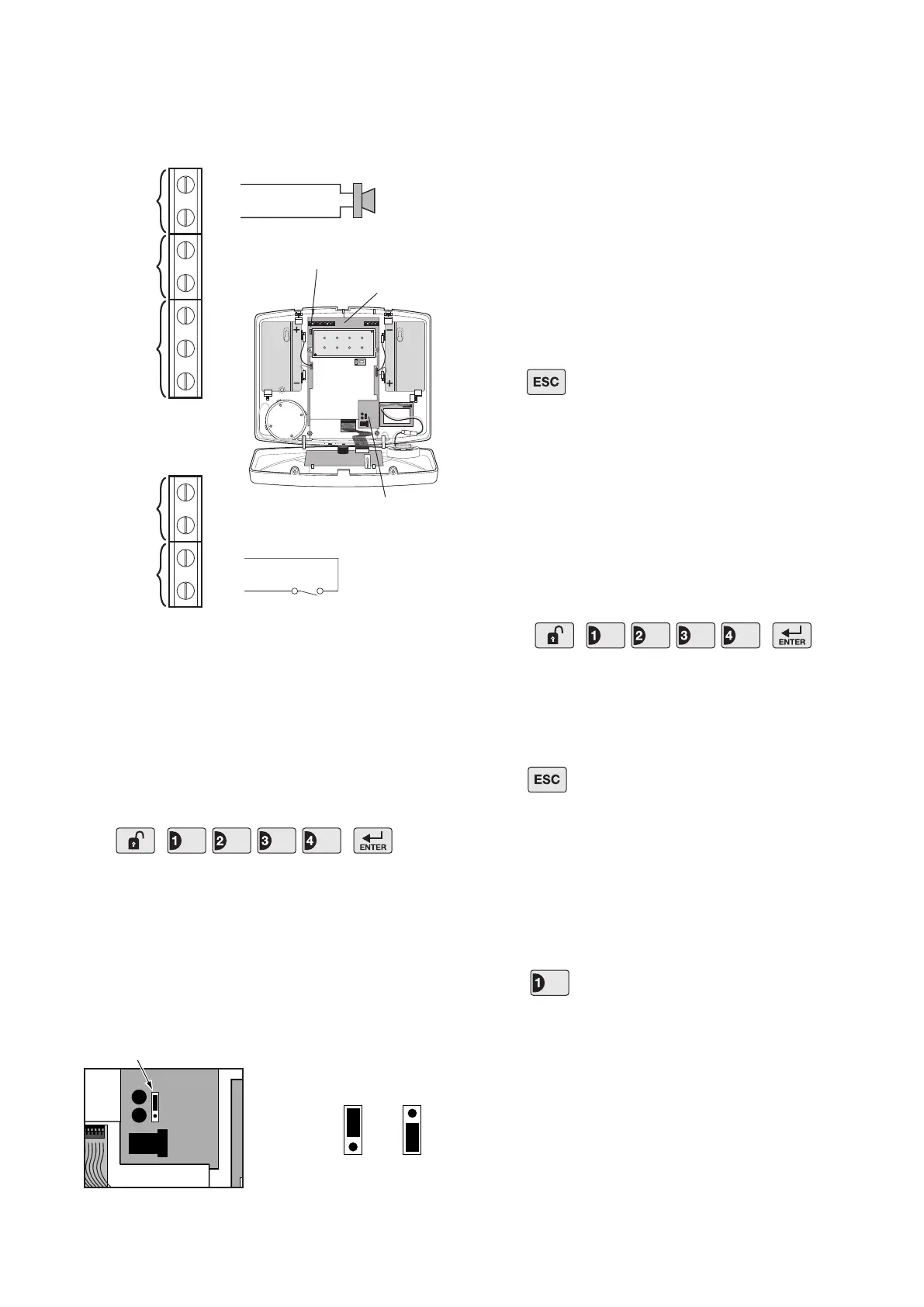
The Control Panel incorporates a terminal block for
connection of a Hard-wired Siren. The connection
terminal block is located inside the Control Panel
behind the front cover. To access the terminal block
you must rst put the system into Test Mode to prevent
an alarm occurring.
To do this:
Press
Undo the two xing screws on the top edge of the
Control Panel and open the front cover.
Before making any connections, ensure that the Reset
Jumper Link P1 is in the ’OFF’ position and then
remove the DC power jack and disconnect 1 of the
back-up batteries.
The hardwired zone and tamper switches should be
volt free and normally closed, with the contacts opening
in order to trigger an alarm.
Note: The External Tamper Switch jumper link
P51 should be tted into the ON position only if the
hardwired tamper circuit is used, otherwise it must be
in the OFF position.
After making your external connections reconnect the
power supply and back-up Battery. Then close the
Control Panel cover and tighten the xing screws on
the top edge.
Press to leave Test Mode and return to Standby.
TESTING THE SYSTEM
The Control Panel has a built in test facility to enable
you to test the system at any time. However it is
recommended that the system is tested at regular
intervals not exceeding 3 months.
With the system in Standby press
The Arm and Part-Arm LEDs will ash.
The system is now in Test Mode
Note: After completing all required test functions
press to leave Test mode and return to Standby.
DETECTOR TEST
Before commencing testing please ensure that there
is no movement in any PIR protected area, all doors/
windows protected by Magnetic Contact Detectors are
closed and that all battery covers are correctly tted.
Press
Zone 1 LED will illuminate.
If your system includes Remote Controls:
For each Remote Control:
1. Activate the Panic/PA switch on the side of the
Remote Control
The Control Panel will beep. (There will be no change
to the ashing LEDs).
User Access Code
OFF ON
Jumper
Link
Reset Jumper
Link P1
Jumper
Link
User Access Code


 To Next Page