EasyManua.ls Logo

Response Alarms SA3 - User Manual

Response Alarms SA3
36 pages
Print Icon
To Next Page IconTo Next Page
Loading...
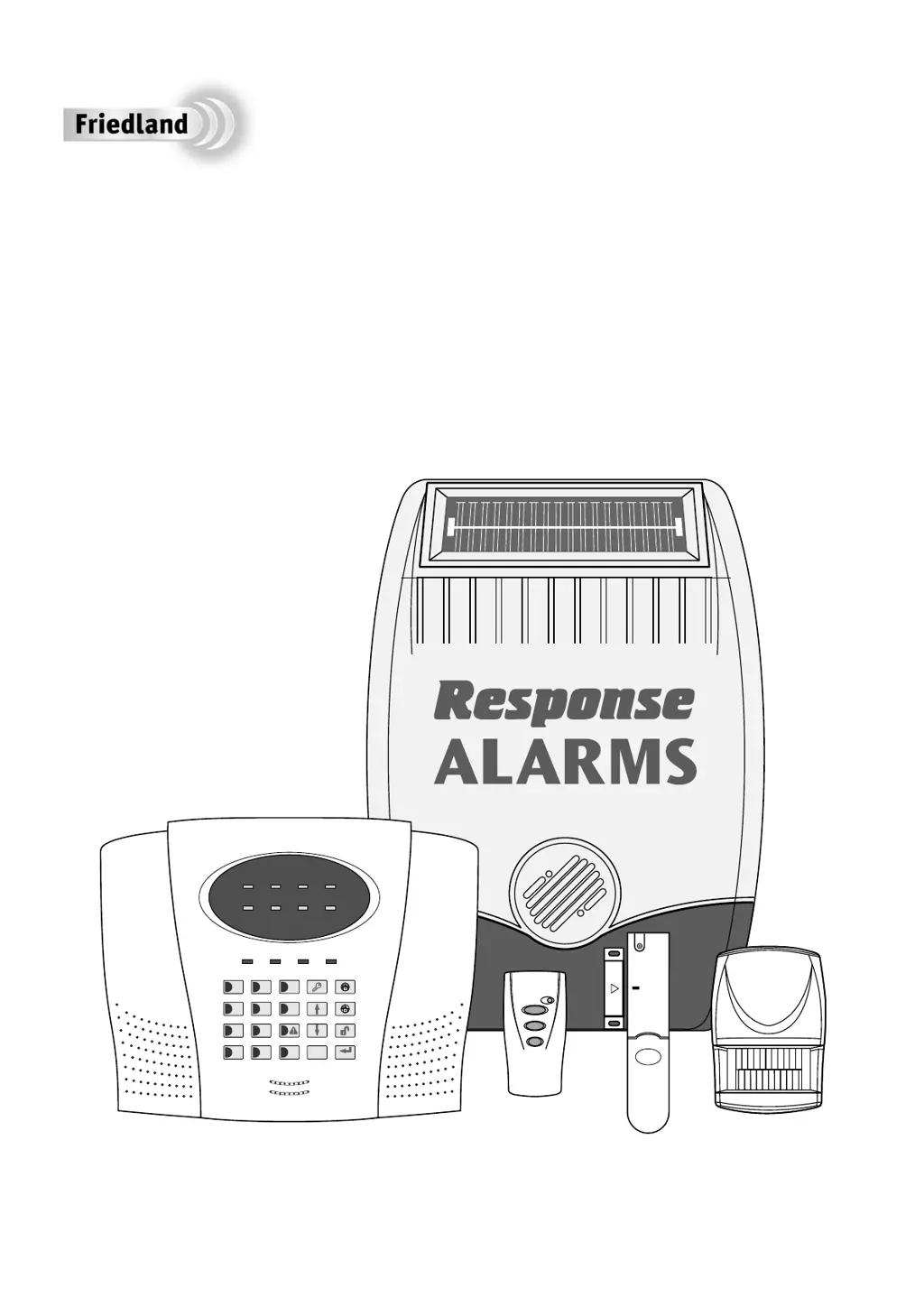
Installation & Operating Manual
SA3
6 Zone Wirefree
Alarm System


   
   

Table of Contents

Questions and Answers

  • C
    Carolyn GriffinAug 19, 2025
    How to fix Response Alarms Security System control unit with power LED off?
    • T
      Tracy Barry PhDAug 19, 2025
      If the Response Alarms Security System control unit isn't working and the power LED is off or flashing, check if other electrical circuits are working. Also, verify that the mains adapter is correctly plugged into the socket and the socket is switched on. Ensure the DC jack plug from the mains adapter is properly connected to the control panel. Finally, inspect the fuse or MCB in the consumer unit on the circuit serving the control panel.
  • J
    Jason ArmstrongAug 21, 2025
    What to do if Response Alarms Security System control unit not accepting user access code?
    • T
      Taylor MccoyAug 21, 2025
      If the Response Alarms Security System control unit isn't accepting the user access code, avoid pausing for more than 5 seconds between pressing keys. If an incorrect code was entered, wait 5 seconds before re-entering the correct code. If issues persist, reset the system to factory defaults and reprogram it.
  • R
    Ryan GarciaAug 23, 2025
    Why is my Response Alarms SA3 siren not responding to the control panel?
    • K
      Kevin RobersonAug 25, 2025
      If the Response Alarms Security System siren is not responding to the control panel, ensure the 'House Code' is correctly set to match all other system devices. Confirm the main siren configuration switch is set to SIREN. Also, make sure the correct user access code is being entered at the control panel. Ensure the siren is within the effective radio range of the control panel and not mounted near metal objects. If the siren has a rechargeable battery, clean the solar panel. Check the age of the rechargeable battery and replace if necessary. Try fitting a new initial power-up battery and re-power the siren. Finally, ensure the Siren Disable link is fitted to enable the siren.
  • J
    Jesse MendezAug 26, 2025
    How to stop Response Alarms SA3 PIR motion detector false alarms?
    • C
      Courtney NewmanAug 26, 2025
      To stop false alarms with your Response Alarms Security System PIR movement detector: * Ensure it's not pointing at heat sources or moving objects. * Make sure it's not above a radiator or heater. * Confirm it's not facing a window or in direct sunlight. * Check it is not in a draughty area. * If the sensitivity is too high, reset it to low sensitivity.
  • C
    Christopher SimpsonAug 28, 2025
    Why does Response Alarms Security System have full alarm when disarmed?
    • T
      Tonya VillaAug 28, 2025
      If a full alarm occurs on your Response Alarms Security System when it hasn't been triggered or is disarmed, check all detector battery covers to ensure they are correctly fitted. Also, check that the control panel and siren are securely mounted to the wall, ensuring the tamper switch is closed. Consider whether a personal attack alarm was activated from a remote control or the control panel, or if the jamming detection circuit was triggered.
  • D
    David PetersonAug 30, 2025
    Why is Response Alarms SA3 Security System PIR motion detector not detecting movement?
    • E
      Erica BrownAug 30, 2025
      If the Response Alarms Security System PIR movement detector isn't detecting movement, ensure the battery clip is securely connected. Also, make sure the 'House Code' is correctly set to match all other system devices. If the sensitivity is too low, reset it to high sensitivity. Ensure DIP switches 1, 2, and 3 of SW2 are correctly set (1=ON, 2=ON, and 3=OFF). Verify the detector is mounted correctly with the detection window at the bottom and at the correct height (2-2.5m). Allow 2-3 minutes for the detector to stabilize.
  • J
    James DeckerSep 1, 2025
    Why Response Alarms Security System siren and strobe operating but no alarm at control panel?
    • S
      Stephen BenderSep 1, 2025
      If the Response Alarms Security System siren and strobe are operating, but there's no alarm at the control panel, the siren tamper switch might be activated. Check the siren's fixing to the wall and adjust the anti-tamper switch to ensure it is fully depressed. Alternatively, the siren jamming detection circuit may have operated (jamming detection at the control panel disabled).
  • E
    Emily SnyderSep 4, 2025
    What to do if Response Alarms SA3 siren not responding to detector?
    • J
      judyrodriguezSep 4, 2025
      If your Response Alarms Security System siren isn't responding to the detector, replace the detector battery. Ensure the siren is not in Service Mode; switch it back to operating mode using the remote control or keypad. Also, verify that the 'House Code' is correctly set to the same code as all other system devices. Finally, ensure the detector is within the effective radio range of the siren and that equipment is not mounted close to metal objects.
  • E
    Elizabeth McculloughSep 6, 2025
    How to fix Response Alarms SA3 magnetic contact detector false alarming?
    • K
      Kirk OchoaSep 6, 2025
      If your Response Alarms Security System magnetic contact detector is false alarming, ensure the magnet is correctly positioned in relation to the detector. Also, make sure the gap between the magnet and detector is less than 10mm. Check that the tamper switch below the battery cover is depressed by ensuring the battery cover is fitted correctly and the fixing lugs are not broken.
  • C
    Crystal ThomasSep 8, 2025
    What does it mean when Response Alarms SA3 control unit low battery LED is flashing?
    • R
      Rita LambertSep 9, 2025
      If the Response Alarms Security System control unit's 'Low Battery' LED is flashing, check all PIR movement detectors for low battery indication (LED behind the detection lens flashes when movement is detected). Replace batteries as needed and press ESC to clear the 'Low Batt' LED on the panel.

Summary

Foreword and Safety Information

System Security Overview

Discusses system design for intruder detection and deterrence, emphasizing the importance of physical protection.

General Safety Precautions

Provides essential safety advice for using tools, ladders, and working near the siren.

Declaration of Conformity

States compliance with the Radio and Telecommunications Terminal Equipment (R&TTE) directive.

Kit Contents

Introduction and System Overview

System Arming Modes

Explains the Full Arm and Part-Arm modes of operation for the alarm system.

Entry and Exit Delay Configuration

Details how entry and exit delays are programmed and function within the system.

Alarm Zones and Operating Modes

Describes the system's 6 wirefree alarm zones and their configurable operating modes.

Zone Lockout Feature

Explains the feature that temporarily disables zones after multiple false alarms.

Tamper Protection

Covers tamper features on devices to protect against unauthorized interference.

Jamming Detection

Describes the system's feature to detect and alarm on radio jamming attempts.

Battery Monitoring System

Explains how the system monitors battery levels and provides low battery warnings.

System House Code Configuration

Details setting a unique House Code for system security and device communication.

Planning and Extending Your Alarm System

Typical Installation Layout

Provides a visual guide and explanation of typical device placement in a property.

Remote Control Unit Operation

Control Panel Placement

Installing the Control Panel

Configuring Control Panel House Code

Details the process of setting the system's unique House Code via the control panel.

Testing Control Panel and Remote

Instructions to test the interaction between the control panel and remote control.

Passive Infra-Red (PIR) Movement Detectors

PIR Detector Positioning

Provides recommendations for optimal PIR detector placement for effective coverage.

PIR Detector Installation and Configuration

Guides through the physical installation and setup of PIR detectors.

Testing the PIR Detector

Instructions for testing the PIR detector's functionality and sensitivity.

Magnetic Contact Detectors

Magnetic Contact Detector Positioning

Provides recommendations for optimal placement of magnetic contact detectors.

Magnetic Contact Detector Installation and Configuration

Guides through the physical installation and setup of magnetic contact detectors.

External Solar Siren

Solar Siren Positioning

Provides recommendations for optimal siren placement for visibility and audibility.

Solar Siren Installation and Configuration

Guides through the physical installation and setup of the solar siren.

Powering Up and Testing the Siren

Instructions for connecting batteries and testing the siren's operation.

External Connections

System Testing Procedures

Detector Testing

General instructions for testing all types of detectors within the system.

Remote Control Tests

Specific test procedures for the remote control unit.

Detector Function Tests

Tests for PIR and Magnetic Contact detectors to verify operation.

System Component Tests

Tests for relays, siren, and control panel LEDs to verify system functionality.

Siren Service Mode

Explains how to put the siren into service mode for maintenance.

Factory Settings Management

Factory Settings Overview

Lists the default factory settings for the alarm system.

Resetting to Factory Defaults

Step-by-step guide to reset the system to its original factory settings.

Programming Instructions

User Access Code Programming

Instructions on how to change the system's user access code.

System House Code Configuration

How to configure the system's unique house code for device communication.

Instant and Delay Zones

Defines zones that trigger instantly or with an entry/exit delay.

Entry;Exit Delay Settings

Configuration for the entry and exit delay periods.

Alarm Duration Settings

Setting the length of time the alarm will sound.

Part-Arm Configuration

Controls which zones are active when the Part-Arm feature is enabled.

Zone Lockout Configuration

Configures the zone lockout feature which limits zone alarms after multiple triggers.

Entry;Exit Warning Tone

Controls whether entry/exit delay beeps are enabled or disabled.

Jamming Detection Configuration

Enables or disables the Control Panel's anti-jamming detection feature.

Signalling Relay Contacts

Controls the operation period of the switching relay contacts following an alarm.

Zone Operating Modes

Defines modes for alarm zones (PA, Intruder, Fire, Test).

Operating Instructions

Arming and Disarming Modes

Covers procedures for setting the system to Full Arm, Part-Arm, and Disarming.

Special Alarms and Modes

Covers Personal Attack alarms, Device Tamper, and Siren Service Mode.

Siren Operating Mode

Instructions on how to switch the siren back to operating mode after service.

Battery Monitoring Indicators

Details how low battery status is indicated for different system devices.

Maintenance Procedures

Solar Siren Maintenance

Maintenance advice specific to cleaning the solar panel and battery care.

Control Panel and Battery Maintenance

Maintenance for the control panel, detectors, remote control, and batteries.

Product Disposal Guidelines

Guidance on the proper disposal of the product and its batteries.

Alarm Record Log

Troubleshooting Common Issues

Control Unit Power and Battery Issues

Troubleshooting power failures and low battery warnings on the control unit.

Access Code and System Communication Problems

Solutions for incorrect access codes and communication failures between components.

Alarm Activation and Sounding Issues

Diagnosing problems with alarms triggering or not sounding correctly.

Detector Specific Issues

Troubleshooting problems specific to the remote control and PIR detectors.

PIR Detector Operation and False Alarms

Diagnosing PIR detector movement detection and false alarm issues.

Magnetic Contact Detector Operation and False Alarms

Troubleshooting magnetic contact detector functionality and false alarms.

Extending Your Alarm System

Available Accessories

Details various accessory kits and components to enhance the system.

Product Guarantee Information

Outlines the product guarantee terms, conditions, and claim procedures.

Component Specifications

Siren and Control Panel Specifications

Technical details for the external solar siren and control panel.

Detector and Remote Specifications

Technical details for detectors, remote controls, and keypad.

Support Information

Includes Helpline contact details and R&D policy.

Response Alarms SA3 Specifications

Power IconPower
sealed lead acid battery6V/1.2Ahr
solar panel charge rate60mA
battery life> 1 year
RF and Range IconRF and Range
rf operating frequency433MHz
control panel range75 metre max.
remote control range50 metre max.
Weight and Dimensions IconWeight and Dimensions
control panel width185 mm
control panel depth52 mm
control panel height125 mm
magnetic contact detector width52 mm
magnetic contact detector height125 mm
magnetic contact detector depth12 mm
keypad width110 mm
keypad height30 mm

Related product manuals