POP 3D Scanner User Manual
COPYRIGHT ©2021 REVOPOINT 3D ALL RIGHTS RESERVED 18
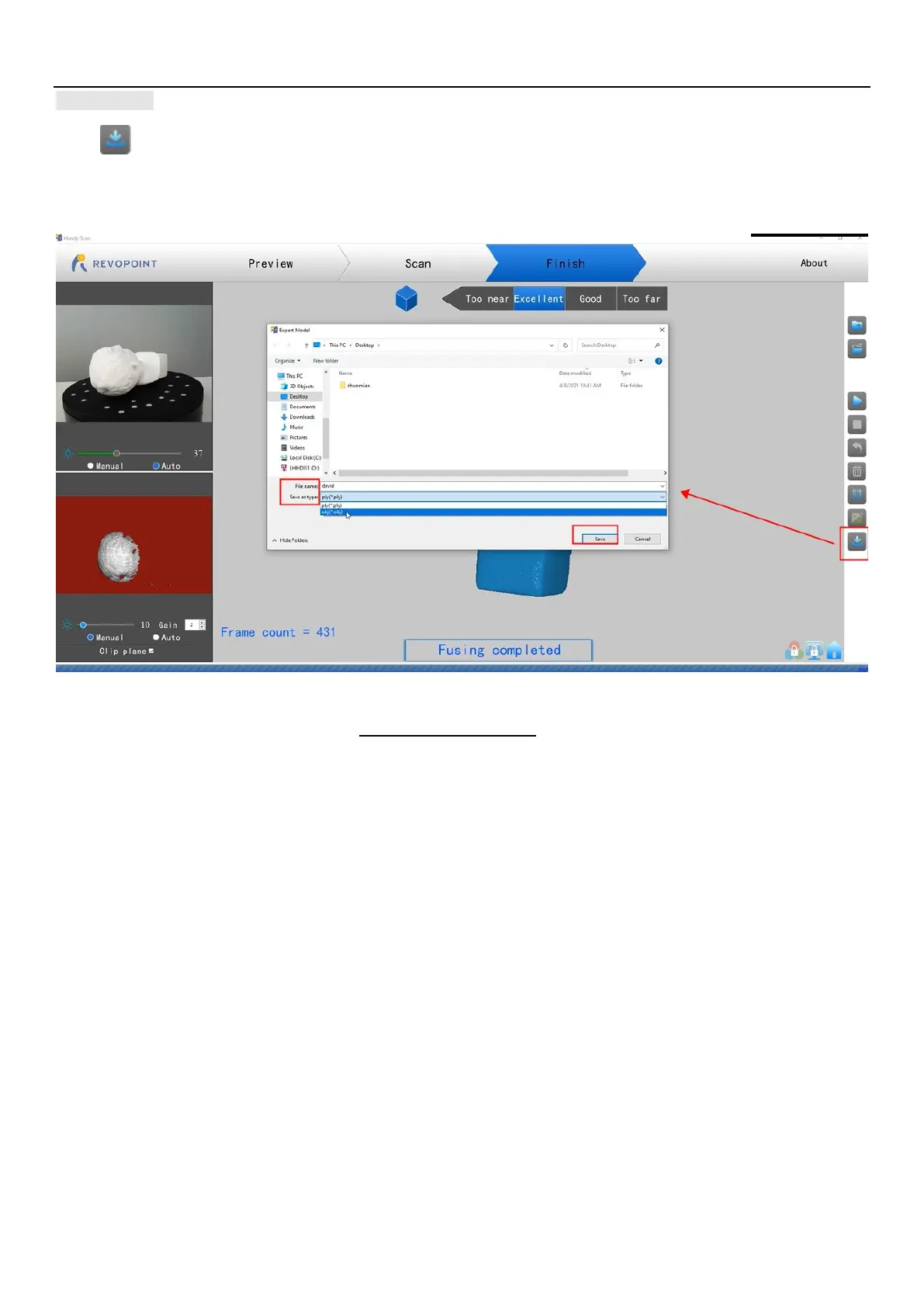
Export
Click to export the 3D model.
Select a file format (obj., stl., & ply. are supported) and a file name.
HINT: It would be convenient to select the file folder named “handylookdata” because that is the default directory for Handy Studio.
File Naming Conventions
If you save the scanned 3
D model as a .PLY file
(Mesh no color)
(Mesh with color)
sh_tex.jpg (Texture color image)
the 3D model as an .STL file:
stl (Point Cloud)
(Mesh no color)
s are not saved in the STL file format
If you save the 3D model as an .OBJ file:
NAME.obj (Point Cloud)
NAME_mesh.obj (Mesh no color)
NAME_mesh_tex.obj (Mesh with color)
NAME_mesh_tex.mtl
NAME_mesh_tex.jpg (Texture color image)
NOTE:
NAME_mesh_tex.obj,
NAME_mesh_tex.mtl &
NAME_mesh_tex.jpg are the three components of a color 3D model in the
OBJ file format.



 To Next Page