Thick Paper
This section gives you various details about and recommendations concerning thick paper.
When loading thick paper of 170 - 256 g/m
2
(45 - 68) in paper trays 1 - 3 or in the bypass tray, follow
the recommendations below to prevent misfeeds and loss of image quality.
• Store all paper together in the same place - a room where the temperature is 20 - 25°C (68 - 77°
F) and humidity is 30 - 65%.
• When loading thick sheets, be sure to load at least 20 sheets. Also, be sure to position the side fences
flush against the paper stack.
• Smooth out any curls in the paper before loading it.
• Jams and misfeeds can occur when printing on thick glossy sheets. To prevent such problems, be sure
to fan glossy sheets thoroughly before loading them. If sheets continue to become jammed or feed in
together even after they are fanned, load them one by one from the bypass tray.
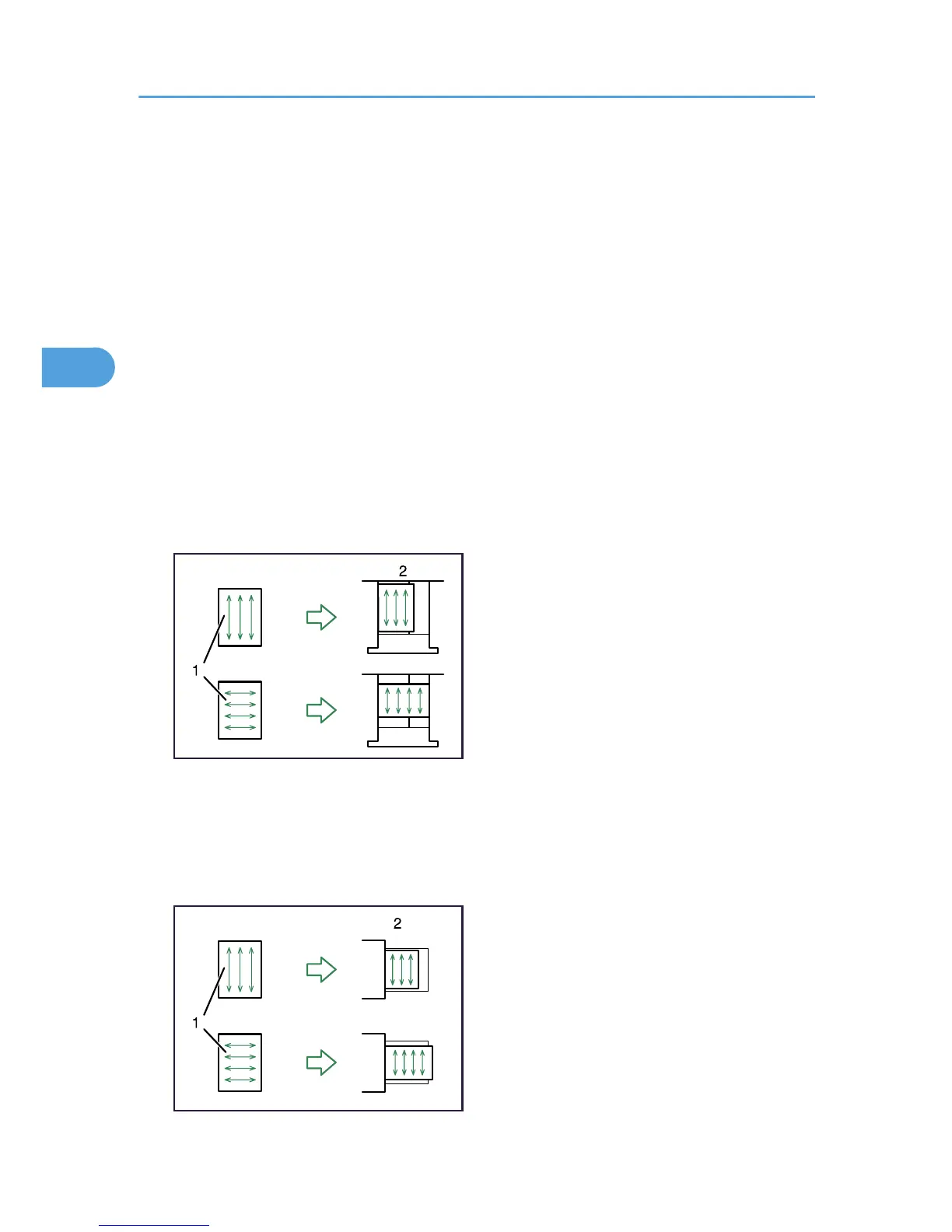
• When loading thick paper in paper trays 1 - 3, set the paper direction according to its grain, as shown
in the following diagram.
1: Direction of paper grain
2: Direction in which to set thick paper in paper trays 1 - 3
• When loading thick paper in the bypass tray, set the paper direction according to its grain, as shown
in the following diagram.



 To Next Page