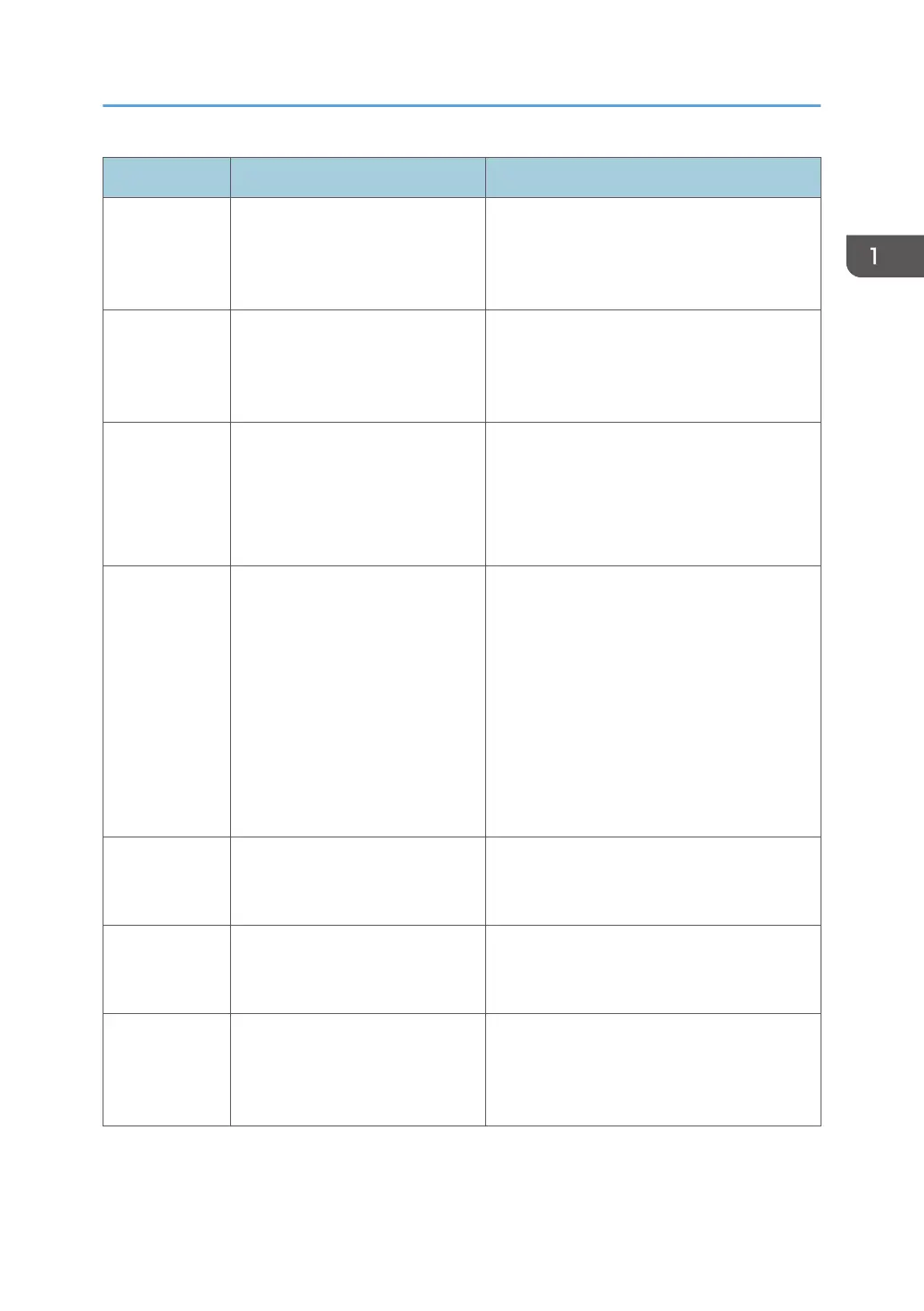
Message ID Error message Action
OFA0030
Internet connection could not be
established.
There is no Internet connection. Check that the
proxy settings are correct and try again. If the
problem persists, contact your network
administrator.
OFA0080
Error <number>
Licensing session expired. Start
licensing session again.
The license activation software was used in a
different browser window more recently than
this one. To continue, close this window and
open a new one.
OFA00105
Error <number>
The license activation software
module is corrupted and Fiery
system software must be
reinstalled.
The license activation software module is
corrupted and Fiery system software must be
reinstalled. Contact technical support and
provide the error code shown in the message.
OFA0070
Error <number>
The license activation software
module is corrupted. Reinstall
Command WorkStation and try
again.
Reinstall Command WorkStation and try
again.
On Windows, go to Control Panel > Add or
Remove Programs and start Fiery User
Software in maintenance mode. Select the
Repair option and then select Command
WorkStation.
On Mac OS, use Fiery Software Uninstaller to
uninstall Command WorkStation, and then
reinstall Command WorkStation.
OFA0050
Sorry we cannot deactivate the
option requested. Please contact
support for more information.
Try to restore Fiery options and deactivate
again. If the error still occurs, contact technical
support.
OFA0040
Sorry we cannot reactivate the
option requested. Contact support
for more information.
Try to restore Fiery options and reactivate
again. If the error still occurs, contact technical
support.
OFA00115
None of the options could be
restored.
No previously activated licenses were found
for this computer. If you had licenses that were
previously activated, contact technical
support.
Installing Optional Features
55



 To Next Page