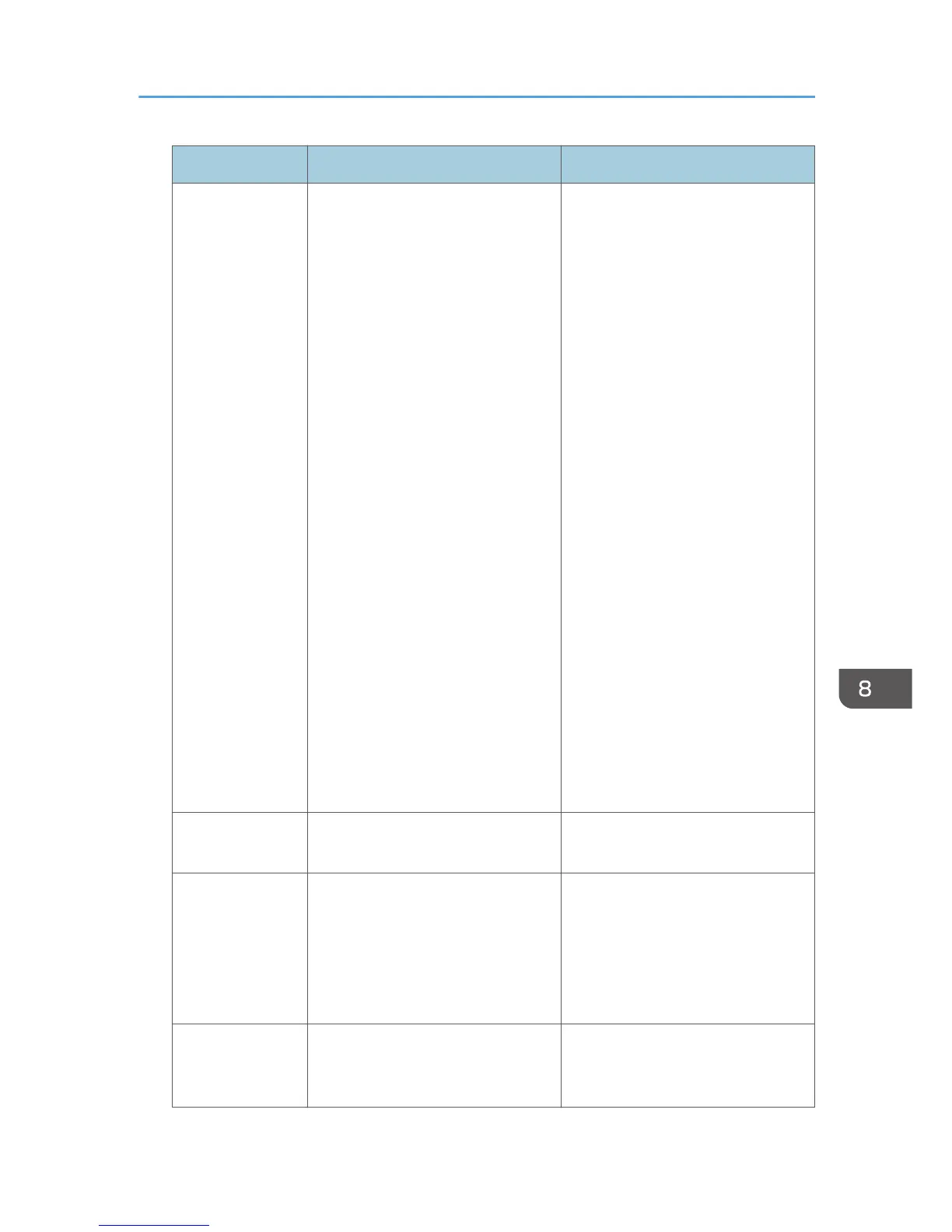
Error Code Cause Solution
W0406-107 5. Kerberos authentication failed. 1. Kerberos authentication settings
are not correctly configured.
Make sure the realm name, KDC
(Key Distribution Center) name and
corresponding domain name are
specified correctly.
2. The KDC and machine timing do
not match.
Authentication will fail if the
difference between the KDC and
machine timing is more than 5
minutes. Make sure the timing
matches.
3. Kerberos authentication will fail if
the realm name is specified in lower-
case letters. Make sure the realm
name is specified in capital letters.
4. Kerberos authentication will fail if
automatic retrieval for KDC fails.
Ask your service representative to
make sure the KDC retrieval settings
are set to "automatic retrieval".
If automatic retrieval is not
functioning properly, switch to
manual retrieval.
W0409-000 Authentication timed out because
the server did not respond.
Check the network configuration, or
settings on the authenticating server.
W0511-000 The authentication server login name
is the same as a user name already
registered on the machine. (Names
are distinguished by the unique
attribute specified in LDAP
authentication settings.)
1. Delete the old, duplicated name
or change the login name.
2. If the authentication server has just
been changed, delete the old name
on the server.
W0607-001 An authentication error occurred
because the Address Book is being
used at another location.
Wait a few minutes and then try
again.
If Authentication Fails
289


 To Next Page