2
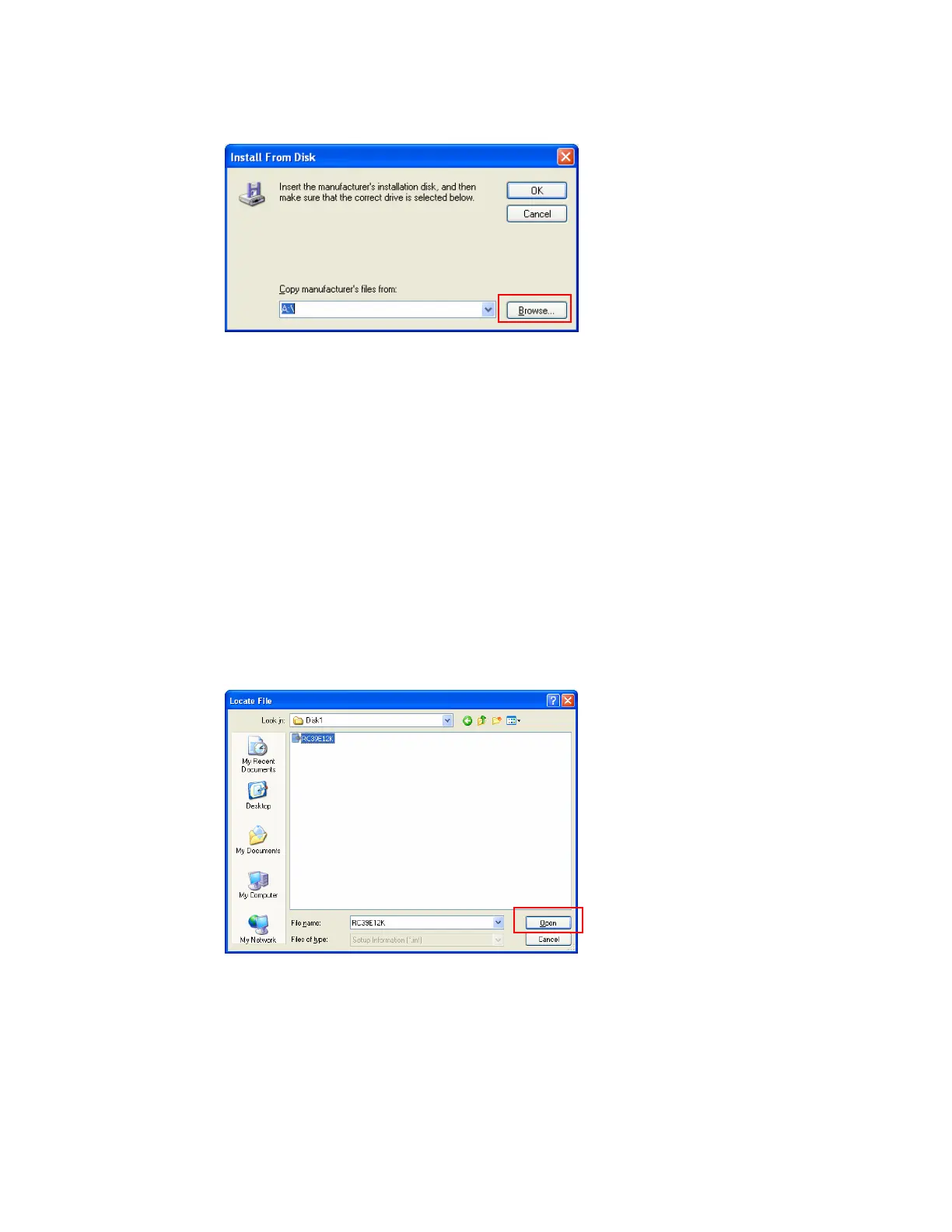
9. Click Browse..., and then specify a location for the printer driver.
If the CD-ROM drive is D, the source files of the printer driver are stored in
the following location:
RPCS printer driver
D:\DRIVERS\RPCS\WIN2K_XP\(Language)\DISK1
D:\DRIVERS\RPCS\WIN9X_ME\(Language)\DISK1
PCL5E printer driver
D:\DRIVERS\PCL5E\WIN2K_XP\(Language)\DISK1
D:\DRIVERS\PCL5E\WIN9X_ME\(Language)\DISK1
PCL6 printer driver
D:\DRIVERS\PCL6\WIN2K_XP\(Language)\DISK1
D:\DRIVERS\PCL6\WIN9X_ME\(Language)\DISK1
PostScript 3 printer driver
D:\DRIVERS\PS3\WIN2K_XP\(Language)\DISK1
D:\DRIVERS\PS3\WIN9X_ME\(Language)\DISK1
10. Select the Setup Information file for the printer driver you want to install, and
then click Open.










 To Next Page