37
Over temperature
protection
Screen brightness setting
2.4 inch color HD display
①
:
Accuracy test method:1 digit is the minimum resolution, so the error under 5V is ±(5*0.5‰+4*0.001)=±0.0065V.
②
:
Ripple measurement method: noise and ripple are measured at X1 range, AC coupling, 20 MHz of
bandwidth on your oscilloscope with a 0.1uF parallel capacitor at the output terminals, pure resistor as load.
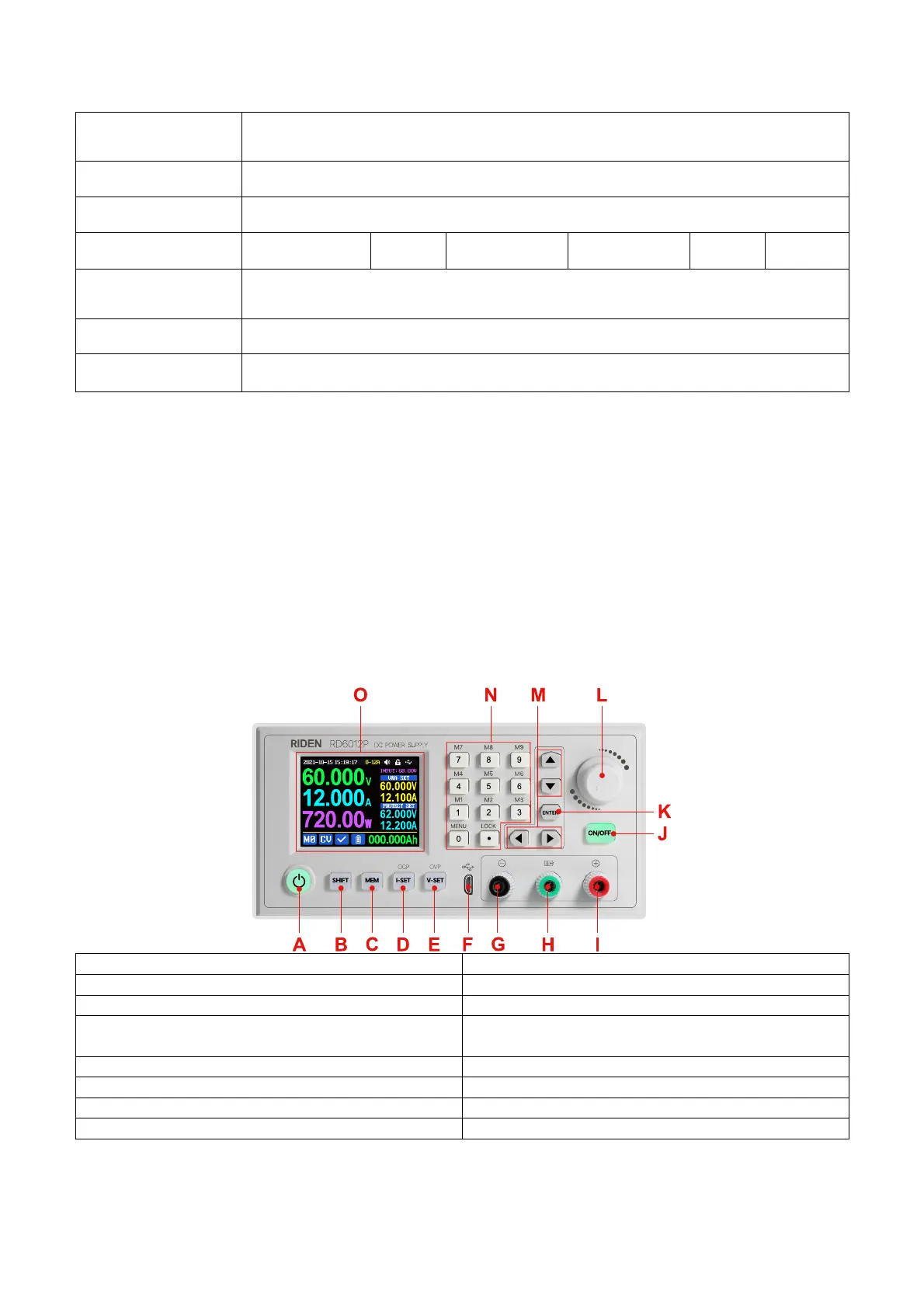
We will use RD6012P to introduce the appearance and operation
1.3 Panel Instruction
1.3.1 Front Panel
B: SHIFT Second function button
D: Current/Over current protection setting
E: Voltage/Over voltage protection setting
G: Power supply output negative terminal/
Battery charging negative terminal
H: Battery charging positive terminal
(Dedicated terminal for battery charging)
I: Power supply output positive terminal
L: encoder potentiometer/Cancel button



 To Next Page