56
we do not provide any guarantee and technical support, and we will decide whether to keep this
function based on customer feedback.
WiFi connection video link:
https://drive.google.com/drive/folders/1BZslMRSntMj9Se6hnsYANsv8XAVhIZZi?usp=sharing
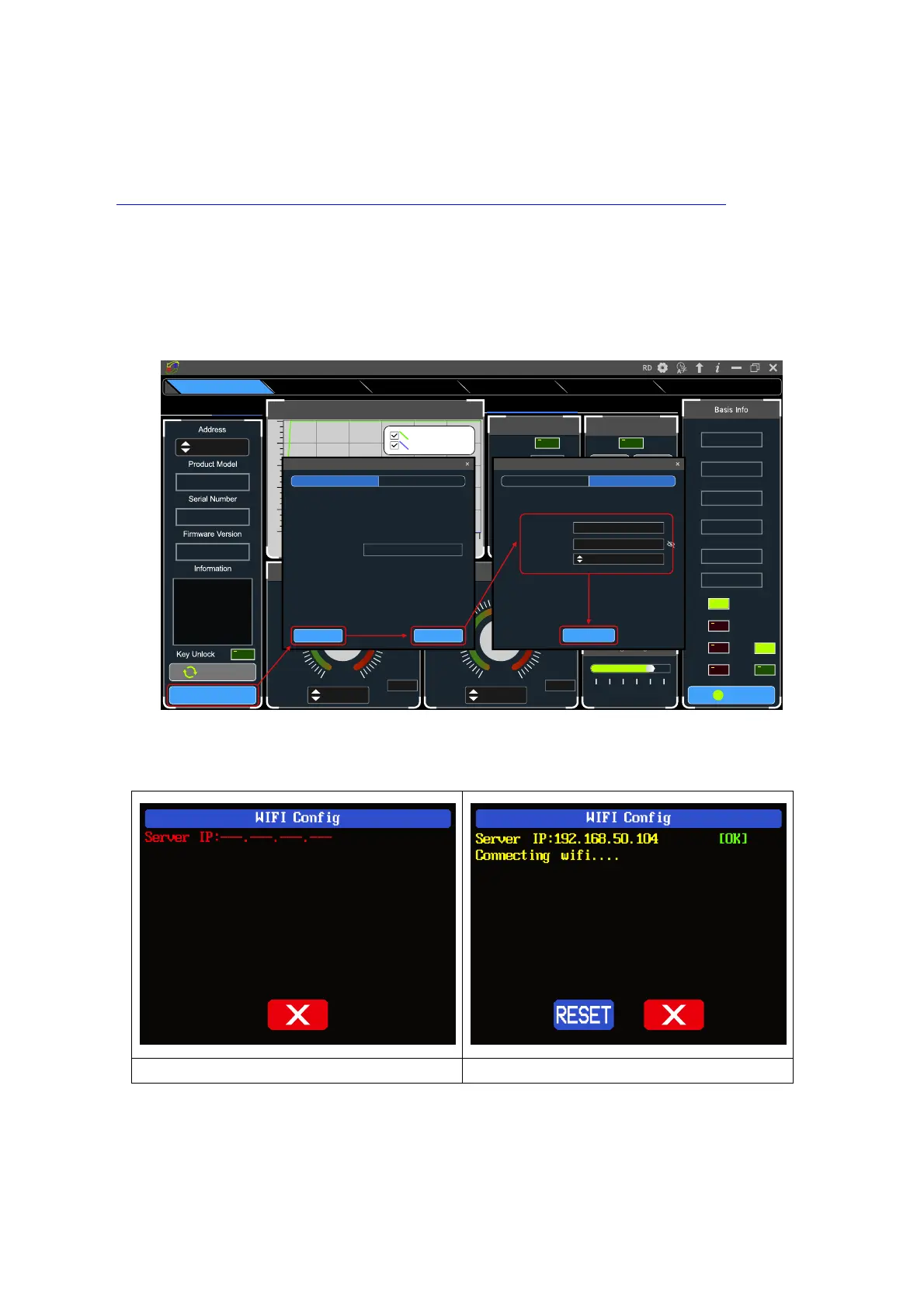
Set the RD6012P-W communication interface to WiFi, and restart, RD6012P-W displays like
figure 27, click "WiFi Network" on the PC software to pop up the WIFI configuration interface (figure
29), click "Initialize" and wait for about 5 -10 seconds, after the RD6012P-W displays the local IP
address (as shown in figure 28), click "Next" and enter the WiFi name and password, then click
"Network distribution", wait for about 20 seconds, the PC software prompts that the connection is
successful, and then Click "Connect".
USB connection: Set RD6012P communication interface to USB and connect RD60012 and PC,
the PC software prompts the serial port has been updated and licks “Connect”.
4.2.2 PC Software Operation Instruction
Choose the right communication port, baud rate, slave address (default 001), click “CONNECT”
On
Norm al
O VP
OCP
O TP
CV
CC
5 4 .9 7 V
Input V o lta g e
4 9 .9 9 8 V
O utp ut V o ltag e
0 .0 0 0 0 A
O utp ut C u rent
0 0 .0 0 0 W
O utp ut P o w e r
25 °C
Syste m T e m p e rture
077
°F
B acklight A djust
0 1 2 3 4 5
T im e S ynchronization
S ynchronize
3 .0 5 0 0
3 .6 6 0 02 .4 4 0 0
4 .2 70 01.8 3 0 0
4 .8 8 0 01.2 2 0 0
5.4 9 0 00 .6 10 0
6 .10 0 00 .0 0 0 0
5.0 0 0 0
A
6.10 0 0
M ax
V - S et
3 0 .5 0 0
3 6 .6 0 02 4 .4 0 0
4 2 .70 018 .3 0 0
4 8 .8 0 012 .2 0 0
5 4 .9 0 06 .10 0
6 1.0 0 0
V
0 .0 0 0
5 0 .0 0 0
V
61.0 0 0
M ax
C all O ut
D ata 9
D ata 8D ata 7
D ata 6D ata 5
D ata 4D ata 3
D ata 2D ata 1
Battery C harging
Wh000.000
O utp ut W h
Ah000.000O utp ut A h
°F---
°C--
Tem peratu re
V00.00Volta ge
U nconne c ted
B attery C harging/Q uick C all O ut C a lib ra tio n
Read N um be r(N u m )
0 5 10 15 20 25 3 0
50
40
30
20
10
0
O utput V oltage A nd C urrent G raph
D o u b le d ick to in itia liz e
O utp ut V o ltag e (V )
O utp ut C u rrent(A)
W iF i N e tw ork
C o n n e ct
W iFi fu n c tio n is
curre n tly tria l v e rsion,
please read th e
m anual carefu lly
before u s e !
----
----
----
001
WiFiUSB
Sta rtup L o g o U p d a teFirm w a re U p d a teRS485 M u lti C o rresp o n dAdvanced FunctionsBasic Fun c tions
Riden Pow er Supply Softw are
N extInitialization
46s
T o b e in itia liz e d ... (c lic k th e [in itia liz e ] b u tto n to in itia liz e )
192.168.50.104Local lp:
If th e lo c a l IP is b lan k , plea s e reo p e n this pa g e to re fres h . An y o f th e re fre s h tim e s is
e m p ty . P le a s e c h e c k th e c o m p u te r c o n fig u ra tio n .
Step 2Step 1
W iFi Netw o rk
D istrib ution
W a itin g fo r d is trib u tio n n e tw o rk ... (a fter c o n firm in g tha t th e p rod u c t disp la y s th e IP
a d d re s s o f th e m a c h in e , c lick th e [d istrib u tio n n e tw o rk ] b u tton fo r d is trib u tio n
n e tw o rk )
1Equipm ent C ount:
·················
Passw ord:
A SU S_2.4GW iFi N am e:
F ill in th e c o rre s p o n d ing W iF i na m e , W iF i pa s s w o rd a n d th e n u m b e r of d e v ic e s to be
c o n n e c te d , a n d clic k th e [d is tribu tion ne two rk ] b u tto n fo r W iF i d is trib u tion ne two rk
Step 2Step 1
W iFi Netw o rk



 To Next Page