12
Only eects assigned to the jog-wheels will
appear on this screen.
Eects assigned to the faders will not be
shown.
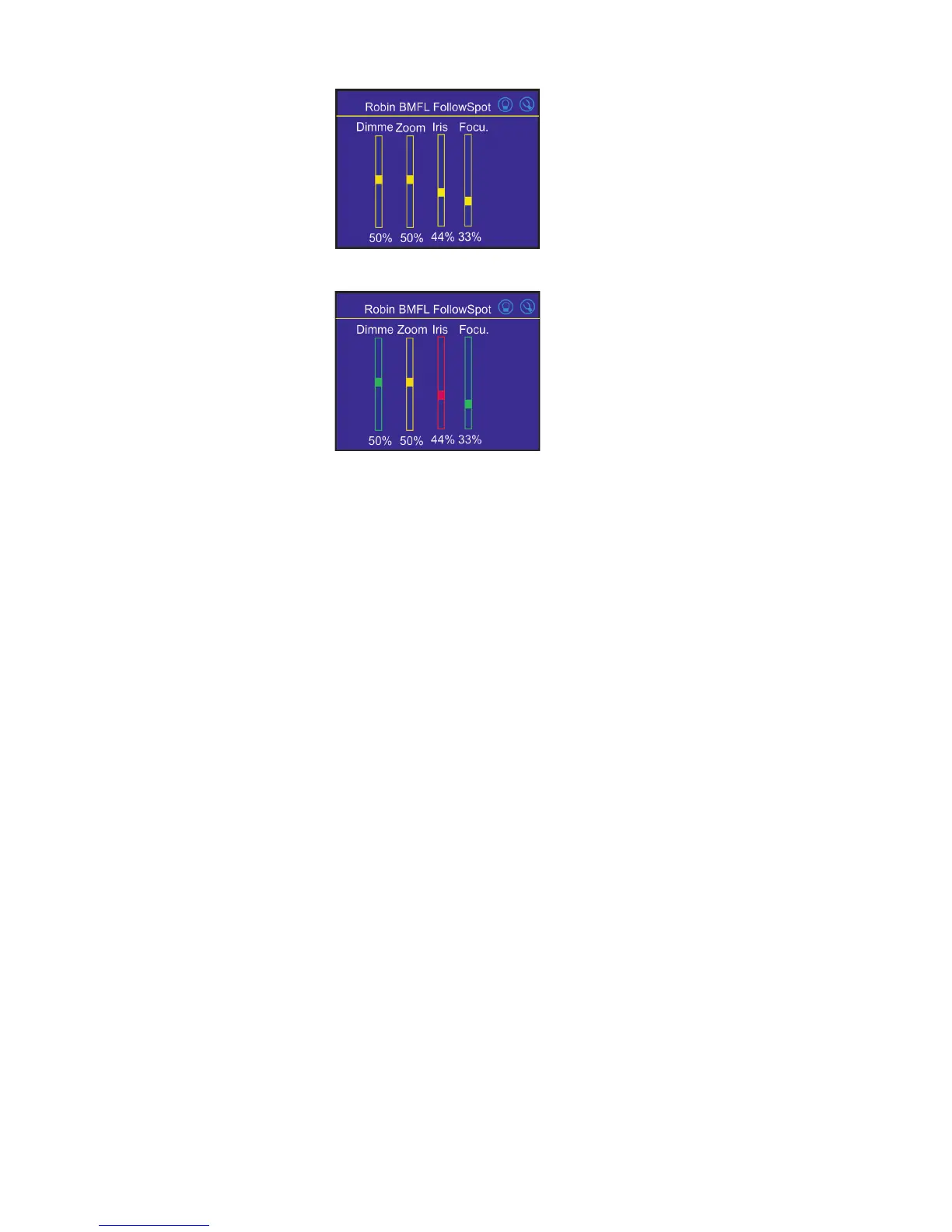
4.Touch the [cancel] icon and than [back arrow] icon. The screen with eect faders will appear.
E.g.
Sensitivity of the jog-wheels assigned to the eects can be set at three levels: low, medium and high.
The levels of the sensitivity are marked in colour on the screen:
low level - red slider
medium level - yellow slider
high level (most accurate)-
green slider
In order to switch an jog-wheel to desired level of sensitivity, press and hold its activating button (8/10/16/18)
until the colour of fader is changed.
Eects assigned to the four jog-wheels and two faders on the handlebars have a priority over DMX values
coming from a DMX controller.
Functionality of the RoboSpot can by restricted by means of commands on the channel Power/Special Functions
(240-255 DMX) of connected xture.
To control desired eect
1.Use its slider on the screen or press the activating button for its jog-wheel and use this jog-wheel or use a
corresponding fader.
To release an eect from the jog-wheel (fader)
1.Touch desired eect from the list of eects in the menu "Functions Mapping".
2.Touch the option "Unlink".
3.The eect will be displayed in a white colour.
The item "All" allows you to release all assigned eects at one go.


 To Next Page