39
Setting alarm times
Your sound system has two alarms which can be set to wake you to DAB,
FM radio, CD, USB or beep type alarm. Each alarm can be set to sound
once, daily, on weekdays or at weekends.
The alarms may be set while the unit is in standby mode or while playing.
Note: If no buttons are pressed for 12 seconds, your radio will exit the
alarm setup.
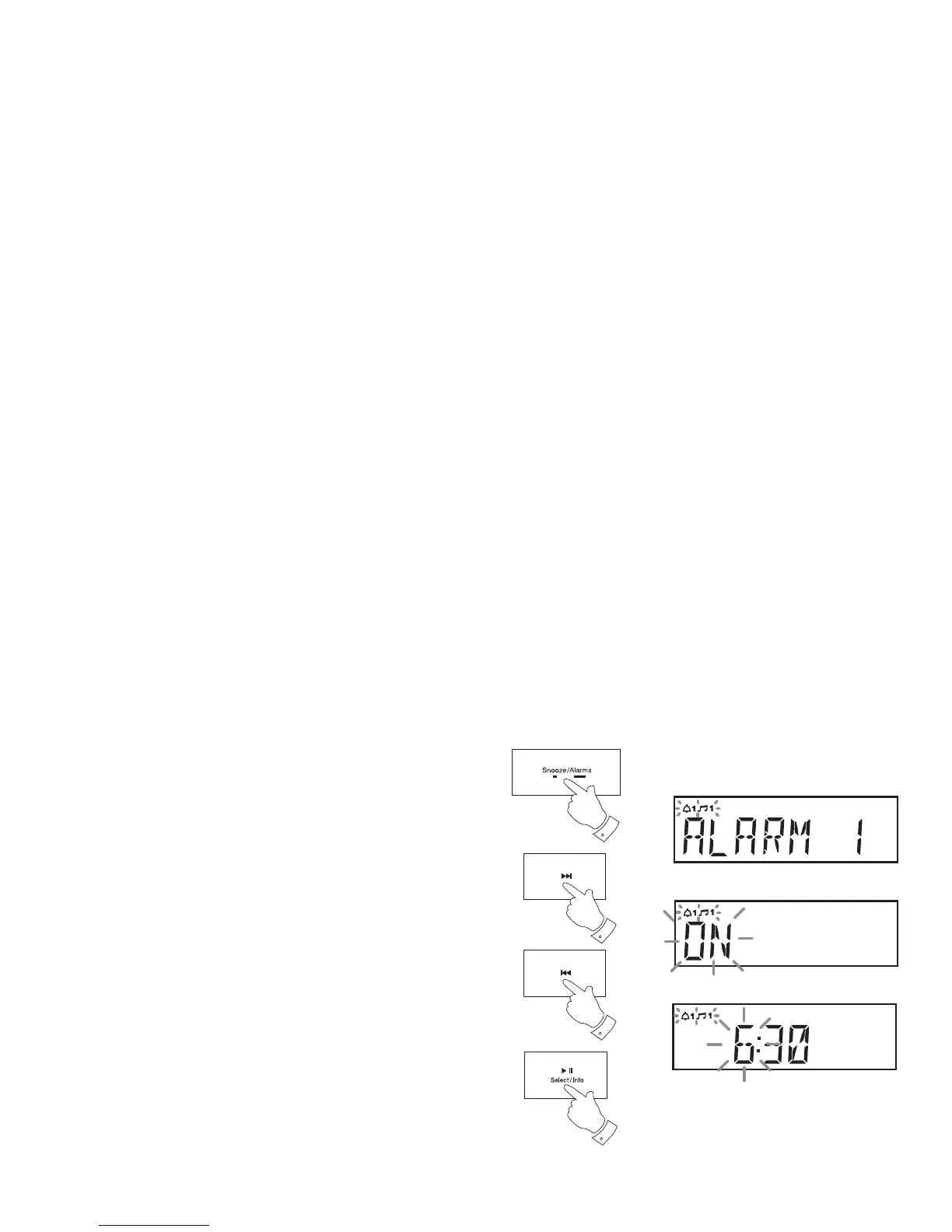
1. Press and hold the Alarm button. 'Alarm 1' will be displayed.
2. Press and release the Tuning Up or Down buttons to choose either
alarm 1 or alarm 2.
3. Press and release the Select button to enter the alarm setting menu.
4. Press and release the Tuning Up or Down buttons to select ON
or OFF. If OFF is selected any current setting for that alarm will be
cancelled.
5. With 'ON' selected press and release the Select button to cause the
alarm hour digits to fl ash on the display.
6. Press and release the Tuning Up or Down buttons to choose the
desired alarm hour.
7. Press and release the Select button to enter the hour setting. The
alarm minute digits will fl ash on the display.
2-6
2-6
3-7
1


 To Next Page