Robotiq Hand-E C10 Gripper Instruction Manual
Measure the Diameter with Custom Fingertips
Method 1
1. On one of the fingertips, locate the middle of the side that would touch the object when gripping.
2. Measure the distance between that point and the same point on a second fingertip.
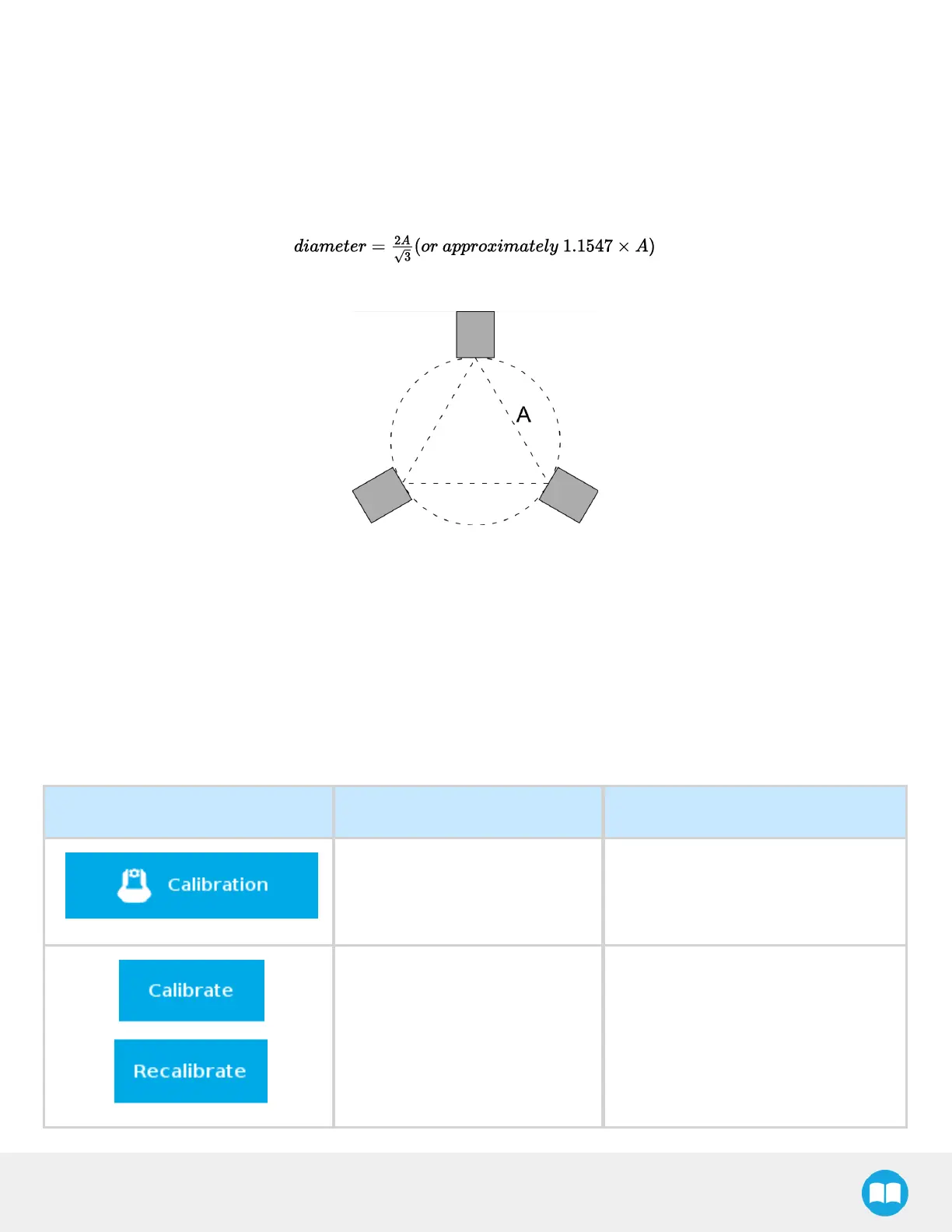
3. Use the following formula, where “A” is the measured distance:
Fig. 4-21: Distance Between Two (2) Fingertips
Method 2
1. Locate the center of the gripper.
2. On one of the fingertips, locate the middle of the side that would touch the object when gripping.
3. Measure the distance between those two points to obtain the radius.
4. Double that distance to obtain the diameter.
Features
Icon Functionality Name Description
Calibration
After selecting the gripper in the left
pane of the Installation tab, tap this
button to access the Gripper
Calibration menu.
Calibrate/Recalibrate
The Calibrate and Recalibrate buttons
launch the Gripper Calibration wizard.
78



 To Next Page