Programming and Parameters 3-55
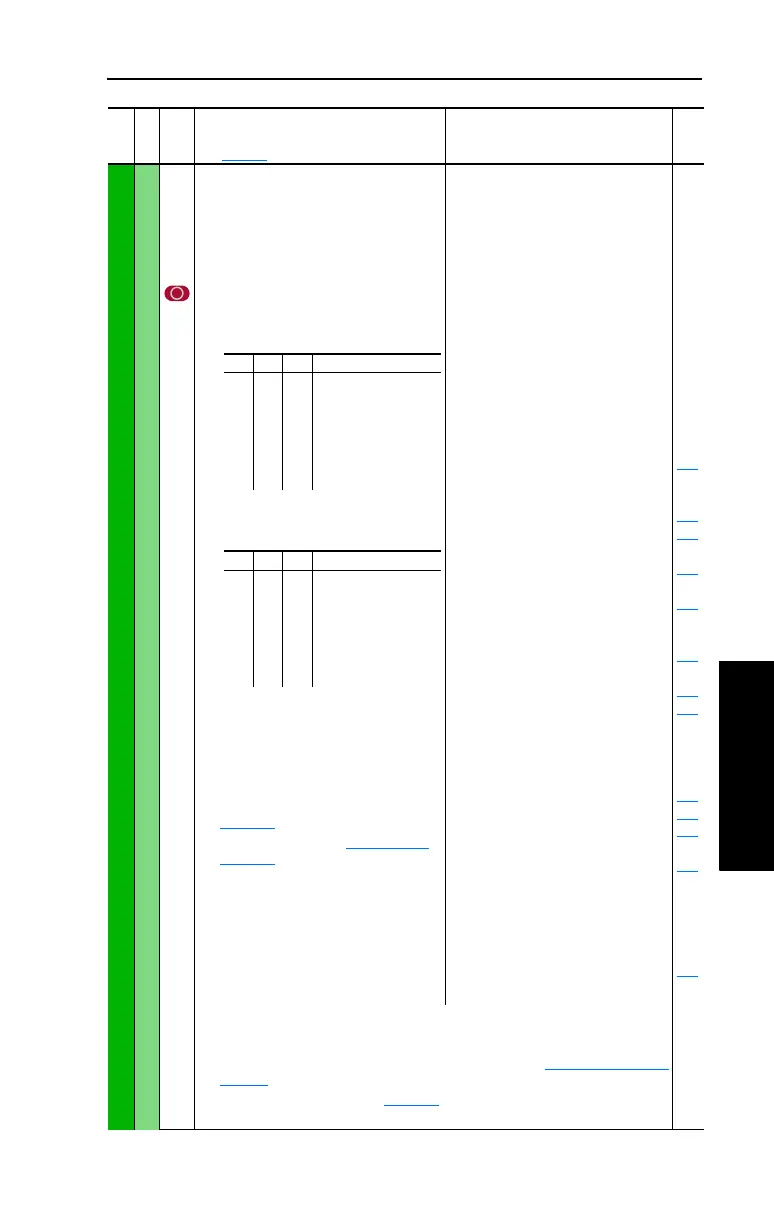
INPUTS & OUTPUTS (File J)
Digital Inputs
361
362
363
364
365
366
[Digital In1 Sel]
[Digital In2 Sel]
[Digital In3 Sel]
[Digital In4 Sel]
[Digital In5 Sel]
[Digital In6 Sel]
(7)
Selects the function for the digital inputs.
(1)
When [Digital Inx Sel] is set to option 2
“Clear Faults” the Stop button cannot
be used to clear a fault condition.
To access Preset Speed 1, set [Speed
Ref A Sel] or [Speed Ref B Sel] to
“Preset Speed 1”.
(4)
Enhanced Control Drives Only.
(5)
Enhanced Firmware V2.001 and later.
(6)
Opening an “Enable” input will cause the
motor to coast-to-stop, ignoring any
programmed Stop modes.
(7)
A dedicated hardware enable input is
available via a jumper selection. Refer to
page 1-15 for further information.
(8)
Auto/Manual - Refer to Figure 1.13 on
page 1-19 for details.
(9)
Typical 3-Wire Inputs - Requires that only
3-wire functions are chosen. Including
2-wire selections will cause a type 2
alarm.
(10)
Typical 2-Wire Inputs - Requires that only
2-wire functions are chosen. Including
3-wire selections will cause a type 2
alarm.
Default:
Default:
Default:
Default:
Default:
Default:
Options:
4
5
18
15
16
17
0
1
2
3
4
5
6
7
8
9
10
11
12
13
14
15-17
18
19
20
21
22
23
24
25
26
27
28
29
30
31-33
34
35
36-40
41-42
43
44
45
46
47-57
58
59
“Stop – CF”
(1)
“Start”
“Auto/ Manual”
“Speed Sel 1”
“Speed Sel 2”
“Speed Sel 3”
“Not Used”
“Enable”
(6)
“Clear Faults”
(1)
“Aux Fault”
“Stop – CF”
(1)
“Start”
(9)(11)
“Fwd/ Reverse”
(9)
“Run”
(10)
“Run Forward”
(10)
“Run Reverse”
(10)
“Jog”
(9)
“Jog1”
(4)
“Jog Forward”
“Jog Reverse”
“Stop Mode B”
“Bus Reg Md B”
“Speed Sel 1-3”
(2)
“Auto/ Manual”
(8)
“Local”
“Acc2 & Dec2”
“Accel 2”
“Decel 2”
“MOP Inc”
(12)
“MOP Dec”
(12)
“Excl Link”
(12)
“PI Enable”
“PI Hold”
“PI Reset”
“Reserved”
“Precharge En”
(4)(12)
“Spd/Trq Sel1-3”
(3)(13)
“Jog 2”
(4)
“PI Invert”
(4)
“Reserved”
“UserSet Sel1-2”
(5)
“Run Level”
(5)(12)
“RunFwd Level”
(5)(12)
“RunRev Level”
(5)(12)
“Run w/Comm”
(5)(12)
“Reserved”
“Sync Enable”
(13)
“Traverse Ena”
(13)
100
156
162
096
140
194
380
125
088
108
124
205
620
(11)
A “Dig In ConflictB” alarm will occur if a “Start” input is programmed without a
“Stop” input. Type 2 Alarms - Some digital input programming may cause conflicts
that will result in a Type 2 alarm. Example: [Digital In1 Sel] set to 5 “Start” in 3-wire
control and [Digital In2 Sel] set to 7 “Run” in 2-wire. Refer to Alarm Descriptions on
page 4-7 for information on resolving this type of conflict.
(12)
Refer to Option Definitions on page 3-58.
(13)
Enhanced Firmware V3.002 and later.
File J
Group
No.
Parameter Name and Description
See page 3-2 for symbol descriptions
Values
Related
(2)
321“Speed Sel 1-3”
0
0
0
0
1
1
1
1
0
0
1
1
0
0
1
1
0
1
0
1
0
1
0
1
Reference A
Reference B
Preset Speed 2
Preset Speed 3
Preset Speed 4
Preset Speed 5
Preset Speed 6
Preset Speed 7
(3)
321“Spd/Trq Sel1-3”
0
0
0
0
1
1
1
1
0
0
1
1
0
0
1
1
0
1
0
1
0
1
0
1
Zero Torque
Spd Reg
Torque Reg
Min Spd/Trq
Max Spd/Trq
Sum Spd/Trq
Absolute
Zero Trq



 To Next Page