EasyManua.ls Logo

Roland E-66 - Page 45

Roland E-66
118 pages
Print Icon
To Next Page IconTo Next Page
To Previous Page IconTo Previous Page
Loading...
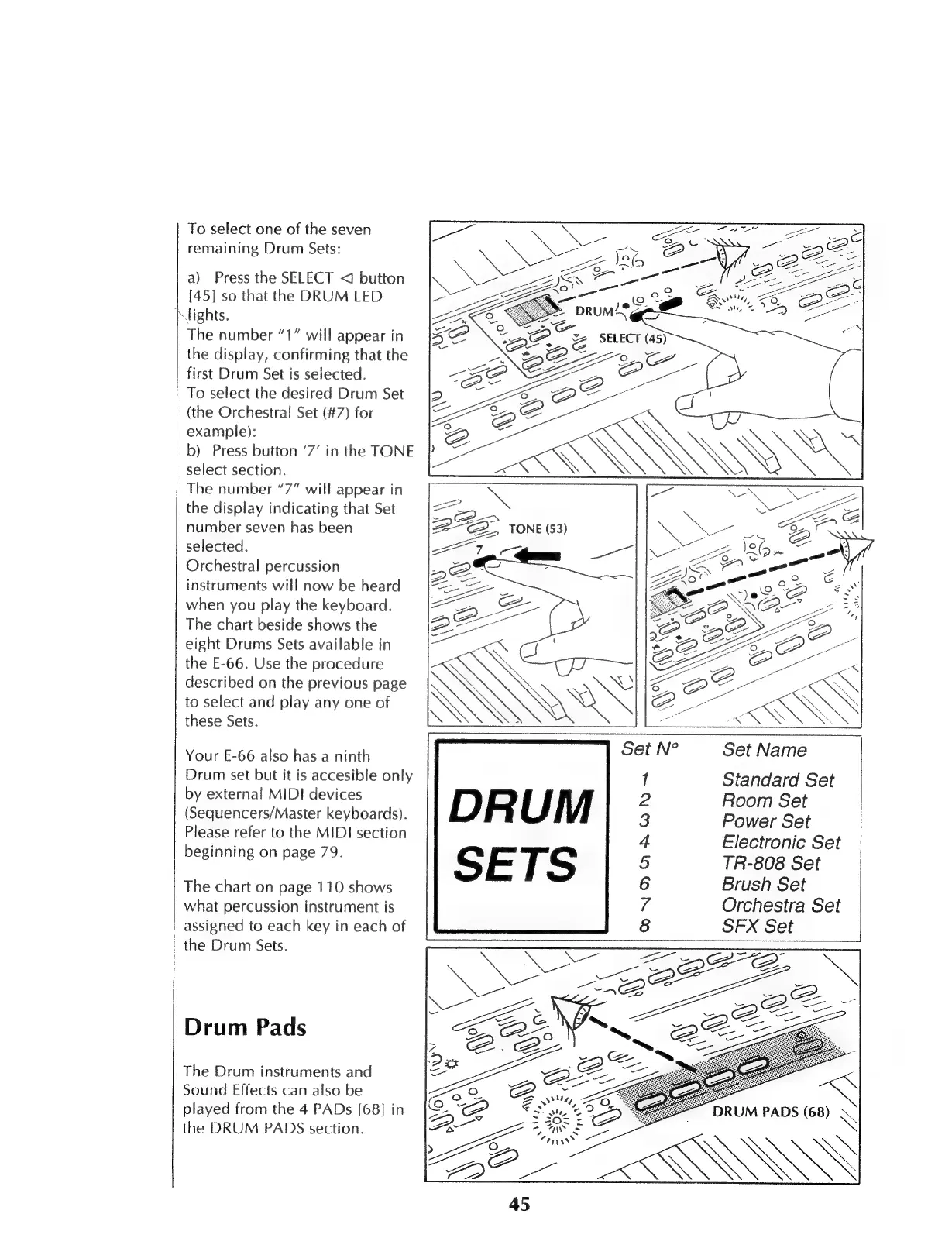
To
select
one
of
the
seven
remaining
Drum
Sets:
a)
Press
the
SELECT
<
button
[45]
so
that
the
DRUM
LED
Nights.
The
number
“1”
will
appear
in
the
display,
confirming
that
the
first
Drum
Set
is
selected.
To
select
the
desired
Drum
Set
(the
Orchestral
Set
(#7)
for
example):
b)
Press
button
‘7’
in
the
TONE
select
section.
The
number
“7”
will
appear
in
the
display
indicating
that
Set
number
seven
has
been
selected.
Orchestral
percussion
instruments
will
now
be
heard
when
you
play
the
keyboard.
The
chart
beside
shows
the
eight
Drums
Sets
available
in
the
E-66.
Use
the
procedure
described
on
the
previous
page
to
select
and
play
any
one
of
these
Sets.
Your
E-66
also
has
a
ninth
Drum
set
but
it
is
accesible
only
by
external
MIDI
devices
(Sequencers/Master
keyboards).
DRUM
Please
refer
to
the
MIDI
section
beginning
on
page
79.
SETS
The
chart
on
page
110
shows
what
percussion
instrument
is
assigned
to
each
key
in
each
of
Set
Name
Standard
Set
Room
Set
Power
Set
Electronic
Set
TR-808
Set
Brush
Set
Orchestra
Set
SFX
Set
1
2
3
4
5
6
7
8
Pes
the
Drum
Sets.
d
~
D
Drum
Pads
The
Drum
instruments
and
Sound
Effects
can
also
be
played
from
the
4
PADs
[68]
in
>
the
DRUM
PADS
section.
S

Table of Contents

Related product manuals