EasyManua.ls Logo

Roland E-66 - Page 46

Roland E-66
118 pages
Print Icon
To Next Page IconTo Next Page
To Previous Page IconTo Previous Page
Loading...
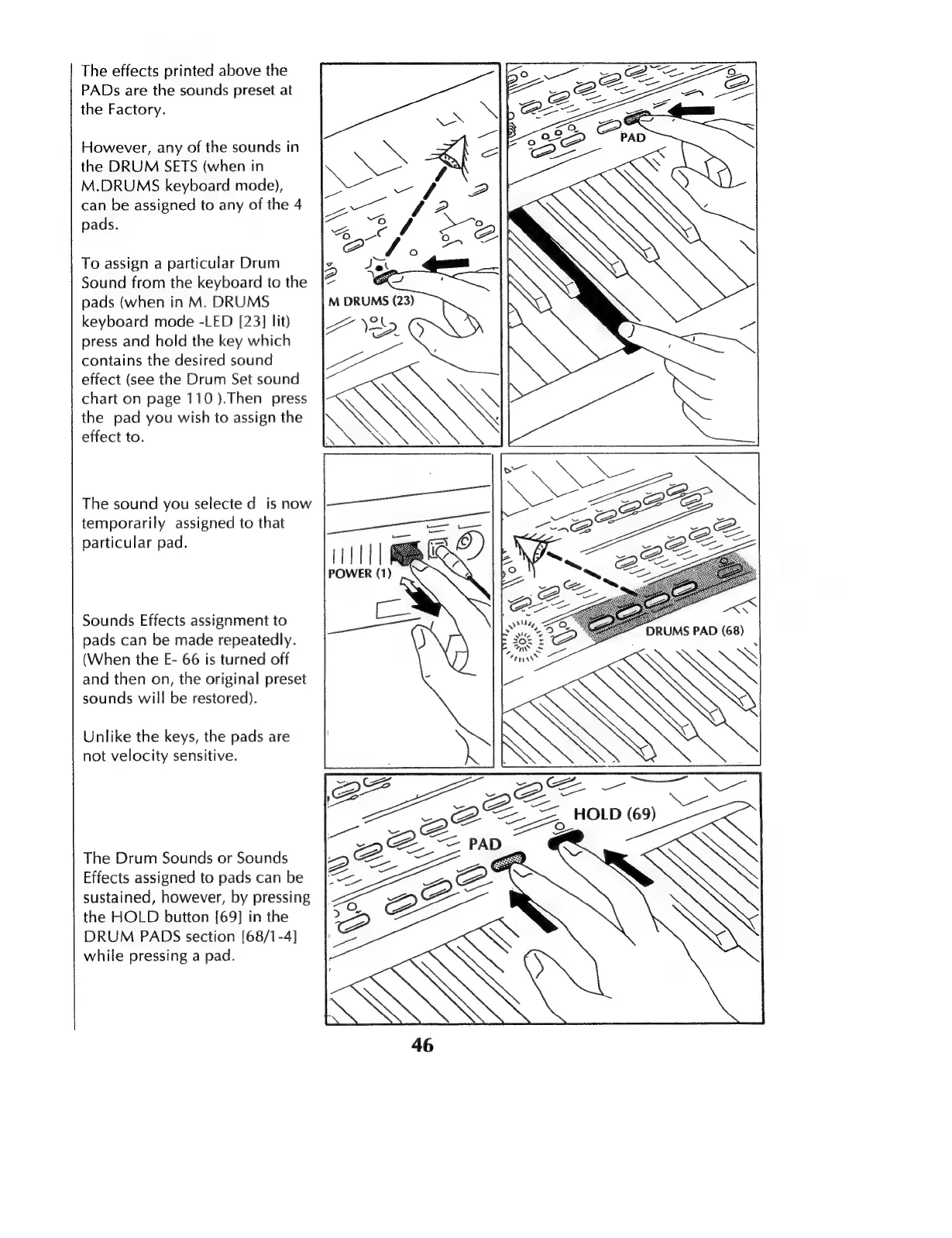
The
effects
printed
above
the
PADs
аге
the
sounds
preset
at
the
Factory.
However,
any
of
the
sounds
in
the
DRUM
SETS
(when
in
M.DRUMS
keyboard
mode),
can
be
assigned
to
any
of
the
4
pads.
To
assign
a
particular
Drum
Sound
from
the
keyboard
to
the
pads
(when
in
M.
DRUMS
keyboard
mode
-LED
[23]
lit)
press
and
hold
the
key
which
contains
the
desired
sound
effect
(see
the
Drum
Set
sound
chart
on
page
110
).Then
press
the
pad
you
wish
to
assign
the
effect
to.
The
sound
you
selecte
d
is
now
temporarily
assigned
to
that
particular
pad.
DRUMS
PAD
(68)
Sounds
Effects
assignment
to
pads
can
be
made
repeatedly.
(When
the
E-
66
is
turned
off
and
then
on,
the
original
preset
sounds
will
be
restored).
Unlike
the
keys,
the
pads
are
not
velocity
sensitive.
The
Drum
Sounds
or
Sounds
Effects
assigned
to
pads
can
be
sustained,
however,
by
pressing
the
HOLD
button
[69]
in
the
DRUM
PADS
section
[68/1-4]
while
pressing
a
pad.
——
NN
Net
69)
S

Table of Contents

Related product manuals