Reference Manual
00809-0100-4841, Rev. AA
May 2007
Rosemount 3490 Series
4-26
The X and Y values may be 'normalised' (range 0 to 1). In this case, the
volume is derived from automatic linearisation of the profile using the live level
measurements that are pre-'normalised' (0 to 1) by P114. A Post Scale NLP
(P116) must then be applied to the result of linearisation to obtain the volume
for the PV.
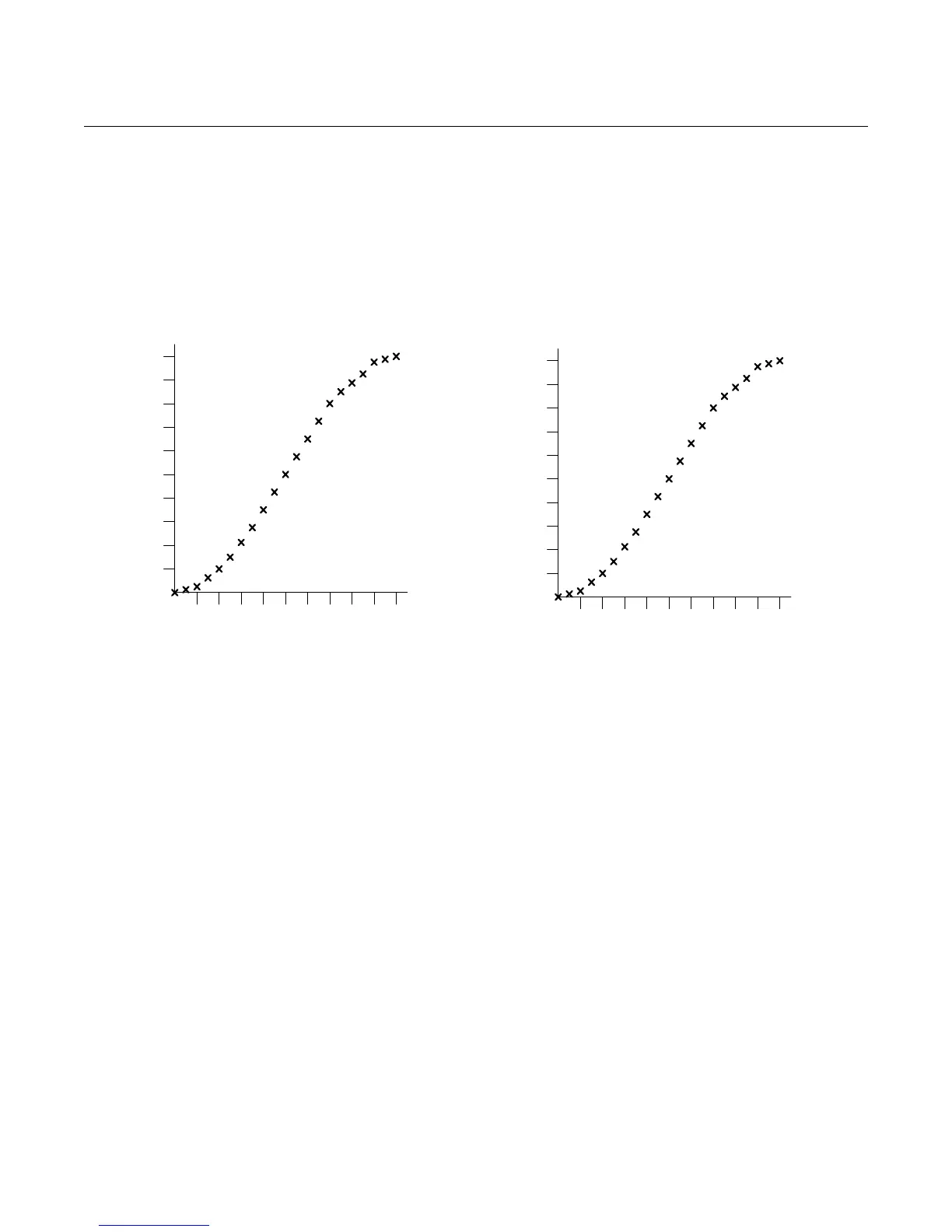
Figure 4-20. P115 = 3490
Plotted Profile for "Spherical"
How to edit the 'look-up' table (P115):
(Note: Parameter P113 must be set to be "Special".)
1. Navigate to the P115 parameter screen (see Figure 4-21 on page 4-28).
2. Press the red (ENTER) button once to select point 0. (Before editing, you
can use the DOWN-ARROW button to page down to another point or use
the ESC button to return to the menu.)
3. With the "X0:" text highlighted, use the RIGHT-ARROW button to move
across to the X0 value.
4. Use the arrow buttons to edit the X0 value.
5. Press the red (ENTER) button once to confirm the new X0 value.
6. With the "Y0:" text highlighted, use the RIGHT-ARROW button once to
move across to the Y0 value.
7. Use the arrow keys to edit the Y0 value.
8. Press the red (ENTER) button once to confirm the new Y0 value.
9. To re-edit X0 and Y0, press the red (ENTER) button and repeat as before.
Otherwise, use the DOWN-ARROW button to display the page with X1
and Y1. (The parameter number P115 does not change until beyond X20,
Y20.)
10. Repeat for all points in the profile. To return to the menu at any time, use
the ESC button.
0.1
0.2
0.3
0.4
0.5
0.6
0.7
0.8
0.9
1.0
0.1 0.2 0.3 0.4 0.5 0.6 0.7 0.8 0.9 1.0
0.0
Y
X
200.0
400.0
600.0
800.0
1000.0
1200.0
1400.0
1600.0
1800.0
2000.0
0.40.81.21.62.02.42.83.23.64.0
0.0
Y
X
P115 = Plotted Profile for “Spherical” option
Normalised units (range 0 to 1) Actual level (X) and Volume (Y) units



 To Next Page