Switcher Basics
Before using your switcher, it is important to become
familiar with how audio and video is handled by the
switcher. Some important concepts includes video
sources, video layering and re-entry, and preview.
Audio and Video Processing
Video and audio signals are processed and passed through
the switcher in different ways, depending on how the
switcher is being used or is set up. A better understanding
of how the switcher is processing these signals help you
to achieve the production you want.
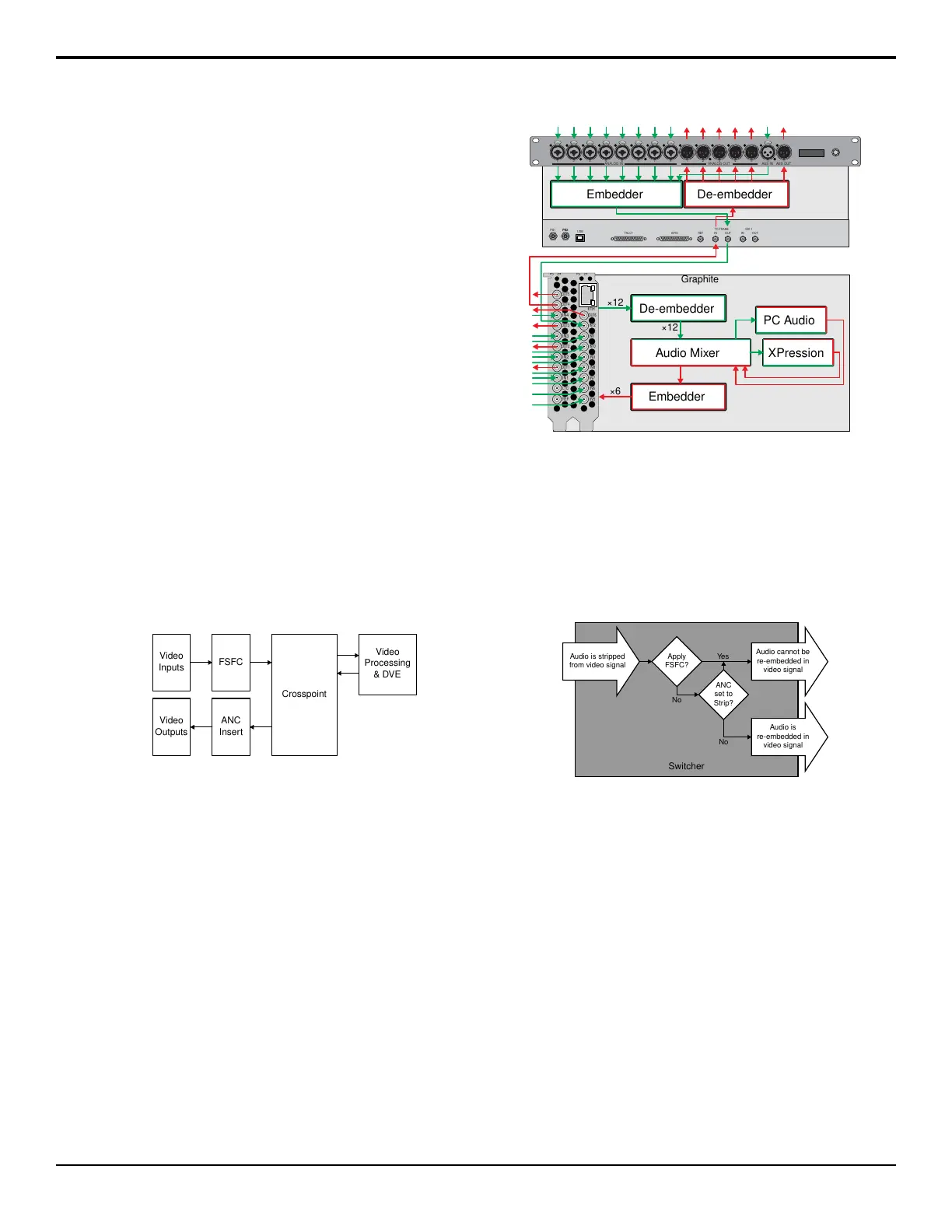
Video Processing and Flow
Video is processed in a number of blocks in the switcher.
After video comes into the switcher, the frame
synchronizers / format converters are applied (depending
on the frame you have). At this point any required color
correction is also applied. After input the video signal is
routed through the crosspoint. The crosspoint can route
any input to any output for straight switching, or to the
video processor and DVE and back for video
manipulation. Just before the video signal is sent to the
output, the processing of the ancillary data is performed.
Video
Processing
& DVE
Crosspoint
FSFC
Video
Inputs
ANC
Insert
Video
Outputs
Figure 5: Video Flow Through the Switcher
Audio Processing and Flow
An audio signal is embedded into the ancillary data of a
video signal before is comes into the switcher. This
includes both standard embedded audio that comes from
external sources and the audio sources from the 1RU
Audio Breakout Module. These audio sources are then
brought into the audio mixer where they can be mixed
and re-embedded on an output video signal.
PC Audio
De-embedder
Audio Mixer
Embedder De-embedder
PS1 PS2
USB
TALLY GPIO
REF
IN
OUT
TO FRAME
IN
OUT
SDI 1
PS2
OUT5
ETH
OUT4
IN4
OUT3
IN3
OUT2
IN2
OUT1
IN1
LTC
REF
OUT6
IN12
IN11
IN10
IN9
IN8
IN7
IN6
IN5
PUSH PUSH PUSH PUSH PUSH PUSH PUSH PUSH
1
2
3
1
2
3
PUSH
ANALOG IN ANALOG OUT AES OUTAES IN
1 2 3 4 5 6 7 8 1 2 3 4 5 1 1
1
2
3
1
2
3
1
2
3
1
2
3
1
2
3
1
2
3
1
2
3
1
2
3
1
2
3
1
2
3
1
2
3
1
2
3
1
2
3
XPression
Graphite
×12
×12
Embedder
×6
Figure 6: Audio Flow Through the Audio Mixer
As the embedded audio signal comes into the switcher
and is manipulated, you must ensure not to perform an
operation that will force the ancillary data to be stripped.
Once an audio signal is in the switcher sub-system the
audio mixer is able to manipulate and re-embed it in the
video signal. Pass-thought embedded audio can be
stripped from the ancillary data if the video source is
manipulated.
No
Apply
FSFC?
Yes
No
ANC
set to
Strip?
Audio is stripped
from video signal
Audio cannot be
re-embedded in
video signal
Audio is
re-embedded in
video signal
Switcher
Figure 7: Audio Flow Through the Switcher Subsystem
The following restrictions apply to ancillary data being
included in the output:
• All ME program buses pass ancillary data.
• MultiViewer outputs do not include any ancillary
data.
• MiniME
™
and MultiScreen outputs do not include
any ancillary data unless an ME with ancillary data
is re-entered onto the background bus.
• ME Preview does not include ancillary data unless
the background is not selected as part of the next
transition.
• A MiniME
™
or MultiScreen can include ancillary
data if an ME is re-entered onto the background.
• Any format conversion on the input video signal.
• Setting ancillary data to be stripped.
Graphite Operation Manual (v1.1) — Switcher Basics • 13



 To Next Page