1RU Audio Breakout Module
The 1RU Audio Breakout Module (ABM) provides the
audio inputs and outputs, as well as the tally and GPI
ports for the switcher. A video loop between the switcher
subsystem and the 1RU Audio Breakout Module passes
all audio signals, as well as the tally and GPI states.
Figure 14: 1RU Audio Breakout Module
Important: Ensure that Phantom Power is turned off
for the Analog Input unless you are connecting a
microphone that requires phantom power. Connecting
the line out from an audio device to the analog input
with phantom power on could damage the audio
device and/or the 1RU Audio Breakout Module. For
added safety, a TRS phone connecter should be used
for line in audio sources.
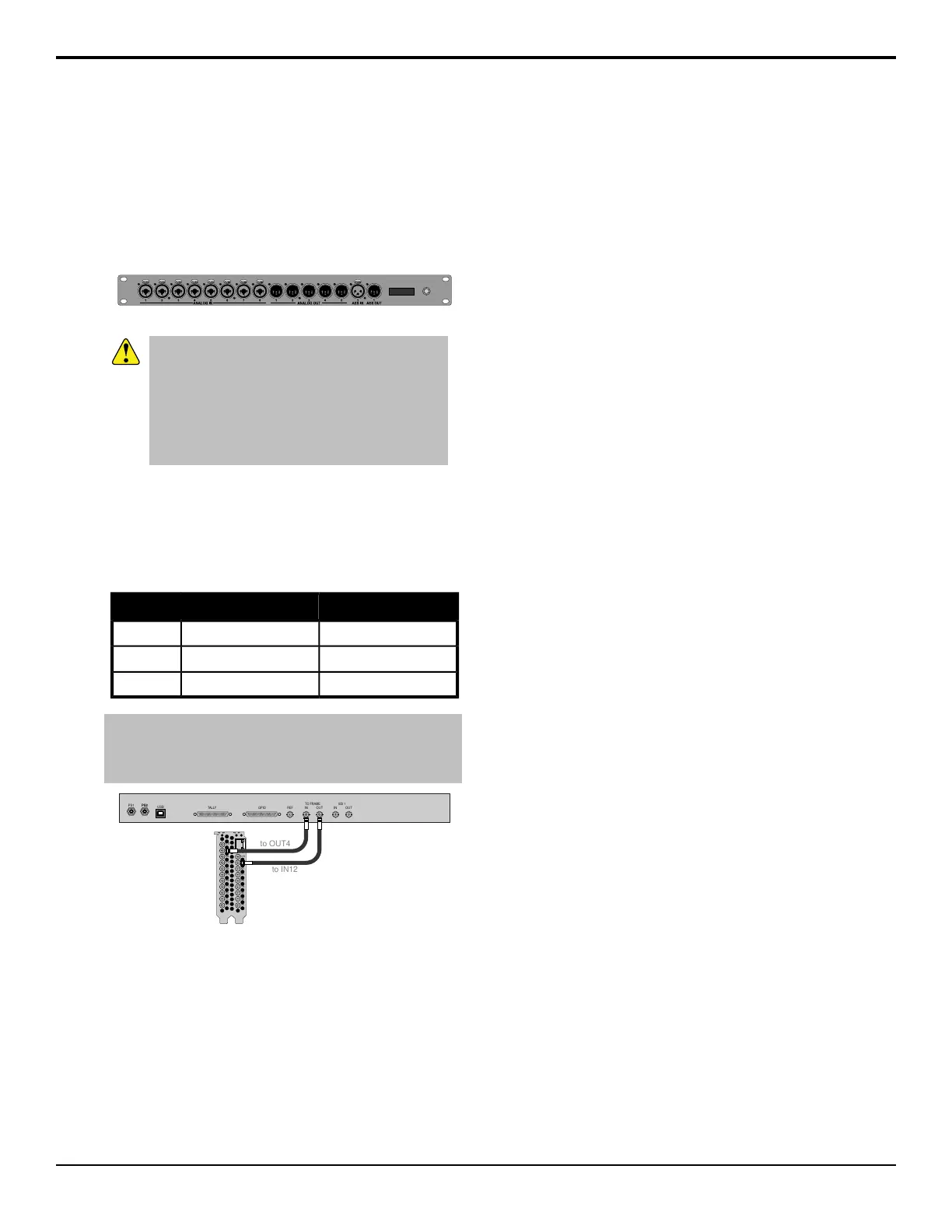
The system must be set up for the number of 1RU Audio
Breakout Modules you want to connect (up to three).
Each ABM connects to different IN and OUT BNCs on
the 4RU Integrated Production System.
Table 1: ABM Cable Connections
FRAME OUTFRAME IN
IN 12OUT 4ABM 1*
IN 11OUT 3ABM 2
IN 10OUT 2ABM 3
Note: * Only the Tally and GPI ports on the first 1RU Audio
Breakout Module (ABM 1) are available. The Tally and GPI ports
on the remaining 1RU Audio Breakout Modules are not available
for use.
PS1 PS2
USB
TALLY GPIO
REF
IN
OUT
TO FRAME
IN
OUT
SDI 1
PS2
OUT5
ETH
OUT4
IN4
OUT3
IN3
OUT2
IN2
OUT1
IN1
LTC
REF
OUT6
IN12
IN11
IN10
IN9
IN8
IN7
IN6
IN5
to OUT4
to IN12
Figure 15: First 1RU Audio Breakout Module Cabling
To Set Up Multiple 1RU Audio
Breakout Modules
The system can support up to 3 1RU Audio Breakout
Modules.
1.
Click Navigation Menu > Configuration >
System.
2.
Click the Num RAVE ABMs button for the number
of 1RU Audio Breakout Modules connected to the
system.
18 • 1RU Audio Breakout Module — Graphite Operation Manual (v1.1)



 To Next Page