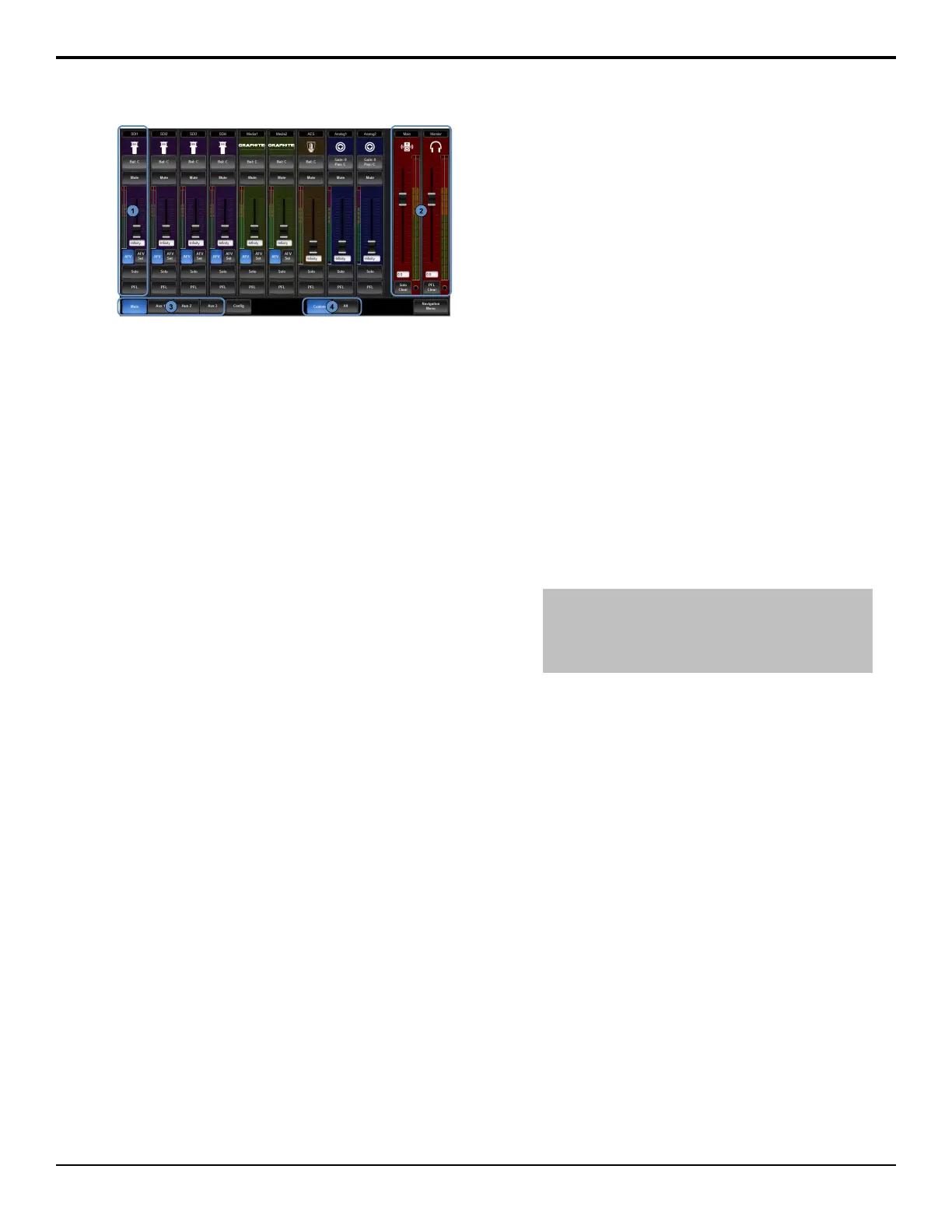
Figure 25: Audio Mixer Tab
1.
Audio Channel Strips — Each strip controls the
input from that audio channel. Strips are color coded
for where the audio comes from. The controls
available on each strip depend on the source of the
audio.
•
Bal: — adjust the volume of the left and right
stereo channel. For example, as you move the
slider to the right the volume of the right channel
is increased and the volume of the left channel
is decreased.
•
Gain — adjust the amount gain (loudness) that
is applied to the input audio channel before the
mixer.
•
Pan — adjust the amount of the left or right
input channel that is part of each channel before
the mixer. For example, as you move the slider
to the right you get more of the left channel in
the right channel and the volume of the left
channel decreases.
•
Phantom (48V)(Gain/Pan) — apply 48V to
the analog input XLR jack (On) to power a
microphone (condenser microphone).
•
PAD (-20dB)(Gain/Pan) — apply -20dB of
attenuation to the input signal (On) to prevent
clipping of very loud signals.
•
Mute — turn off the audio from this source. This
does not change the level.
•
Pre/Post — select whether the audio source on
an Aux layer is taken before the fader (Pre) or
after (Post) the source fader. If an audio source
is taken before the fader, the source fader has no
impact on the level of the audio going out the
aux layer.
•
Slider — adjust the level of the audio from the
source. You can either move the slider manually
or enter a value in the text eld at the bottom of
the slider.
•
AFV — turn Audio Follow Video (AFV) on or
off for this audio source. AFV is only available
for audio that is associated with a video source,
such as embedded audio on input BNCs and from
the Media-Store. When AFV is on, the audio
level is taken to the AFV Set level when the
associated video source is taken on-air. The audio
level is taken to -infinity when the video source
is taken off-air.
•
AFV Set — the maximum level that you want
the audio to rise to when the associated video
source is taken on-air. To set the AFV level,
move the slider to the level you want the audio
to be at and click AFV Set. The AFV Set button
turns on when the slider is at the AFV set level.
•
Solo — mute all other audio sources but the
one(s) you turn solo on for. This allows you to
quickly isolate a source without having to mute
all the other sources. When Solo is turned on
for a source a warning light ashes red on the
main (master) strip.
•
PFL — turn Pre Fader Listen (PFL) on or off
for this audio source. This is similar to solo in
that it mutes all other sources, but only affects
the Monitor (headphone) output. The Main
output is not affected by PFL. When PFL is
turned on for a source a warning light ashes red
on the monitor strip.
Tip: You can move a slider at any time to bring up an audio
source even if the associated audio source is not on-air.
This audio source will remain at the selected level until it
is brought down again manually or is included in a transition
with AFV turned on.
2.
Main Level Controls — The Main and Monitor
strips control the levels of the output audio for the
mixer. If you select an Aux output this strip changes
to control the level for that output.
• •
Slider — adjust the level of the audio output.
You can either move the slider manually or
enter a value in the text eld at the bottom
of the slider.
•
Solo Clear — turn solo off for all sources
on this audio layer.
3.
Layer Controls — select the audio layer that you
want to control. Each layer is assigned to an audio
output.
4.
Included Channels — select whether only the audio
sources that have been assigned to each layer are
shown (Custom), or whether all audio sources are
shown (All).
Windows
®
Audio
Windows
®
identies and interacts with the audio going
to and coming from the switcher subsystem in specic
44 • Audio Mixer — Graphite Operation Manual (v1.1)



 To Next Page