Re-Entry Timing
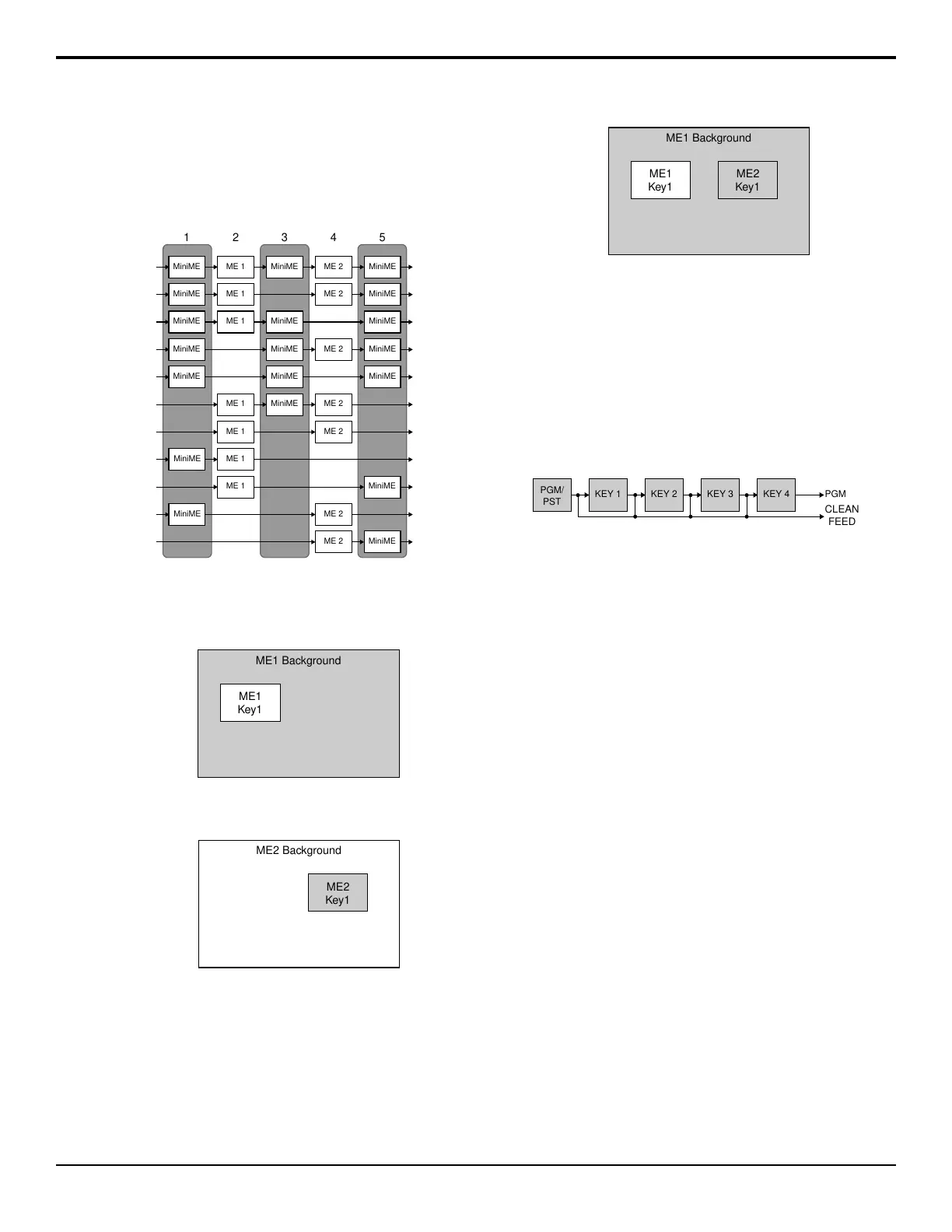
To maintain proper video timing through the switcher,
each MiniME
™
exists in a specic timing window relative
to the ME. These windows restrict what can be re-entered
into what.
ME 1 ME 2
1 2 3 4 5
MiniME ME 1 MiniME MiniMEME 2
ME 1 MiniME ME 2
MiniME MiniME MiniME
MiniME ME 1 MiniMEME 2
MiniME ME 1 MiniME MiniME
MiniME MiniME MiniMEME 2
MiniME ME 1
ME 1 MiniME
MiniME ME 2
MiniMEME 2
Figure 9: MiniME
™
Timing Windows
To Re-Enter an ME
1.
Set up ME 1 with a background and a key.
Figure 10: ME 1
2.
Set up ME 2 with a key.
Figure 11: ME 2
3.
Select ME 1 as a source on the Background Bus of
ME 2. Notice that the output of ME 1 is now being
used as the background of ME 2.
ME1 Background
ME1
Key1
ME2
Key1
Figure 12: ME 1 Re-entered onto ME 2
FlexiClean Clean Feed
FlexiClean provides a second program output that is
derived from a different location than the standard
program output. A frequent application is the recording
of shows for later airing without call-in phone numbers
inserted.
The clean feed output can come from before or between
the keyers.
KEY 1 KEY 2
PGM/
PST
KEY 3 PGM
CLEAN
FEED
KEY 4
Figure 13: Clean Feed Modes
Video Preview
Video preview allows you to use an additional monitor
to preview what the next shot is going to be. The preview
for an ME shows what is selected for the next transition
on that ME. This includes the keys and background video
sources that will be on-air after the next transition.
MultiViewer
Each MultiViewer allows you to view up to 16 video
sources, in 45 different layouts, from a single output.
Any video source on the switcher, including ME
Program, Preview, and Media-Store channels, can be
routed to any box on the MultiViewer. All boxes on the
MultiViewer output include mnemonic source names
and red and green tallies.
ME Copy
You can copy the entire contents of an ME, MiniME
™
,
or MultiScreen to another ME, MiniME
™
, or
MultiScreen. The entire contents of the destination is
replaced with the contents of the source.
When you copy an ME, the switcher tries to assign
resources to the destination ME to match the source ME.
If these resources are not available, the switcher may
need to steal resources. If you are performing the copy
from the control panel you will be asked to conrm the
stealing of any required resources. From DashBoard you
will not be asked and the required resources will be
stolen.
Graphite Operation Manual (v1.1) — Switcher Basics • 15



 To Next Page